66
Advanced Settings
Procedure
[r] (REC) * [SET] * MENU * REC Tab * CS
Your camera has three continuous shutter modes.
• To turn off a continuous shutter mode, select “Off”.
* fps (frames per second) is a unit of measurement indicating the number of images
recorded or played back per second.
1. Use [8] and [2] to select the continuous shutter mode you want, and
then press [SET].
2. Press the shutter button to shoot.
Images continue to be shot as long as you keep the shutter button depressed.
Releasing the shutter button stops shooting.
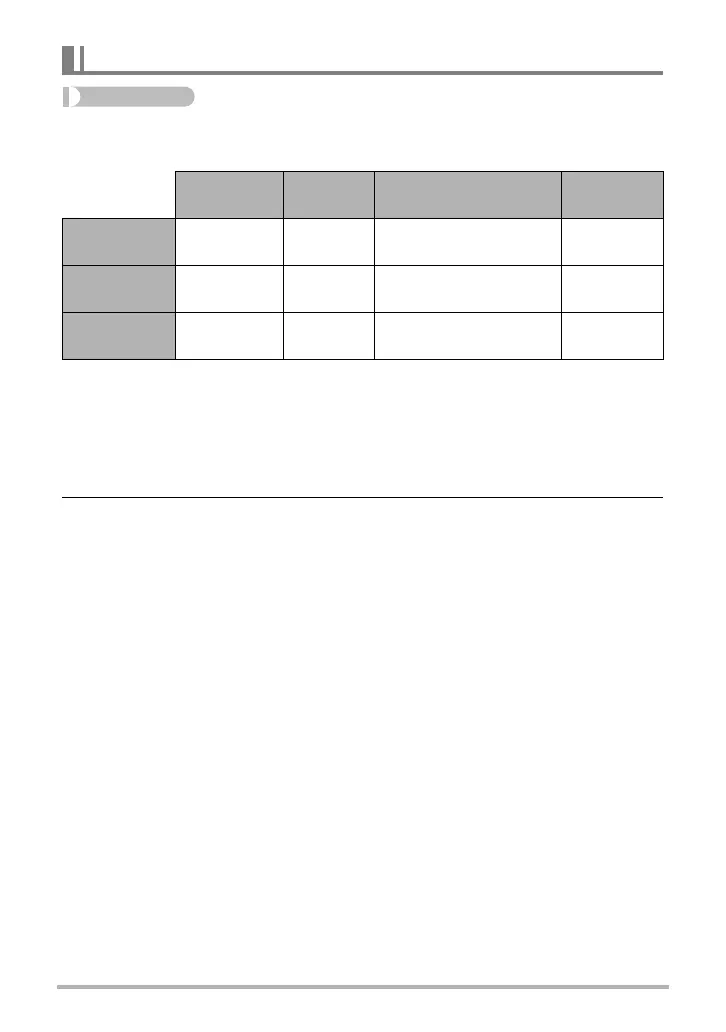
Using Continuous Shutter (CS)
CS speed
Maximum
CS Shots
Recorded Image Size Flash Mode
4 fps
4 images per
second
8 shots
2M (1600
x
1200 pixels)
fixed
Flash Off
10 fps
10 images
per second
20 shots
1M (1280
x
960 pixels)
fixed
Flash Off
Flash CS
3 images per
second
3 shots
2M (1600
x
1200 pixels)
fixed
Flash On


 To Next Page
 Loading...