19
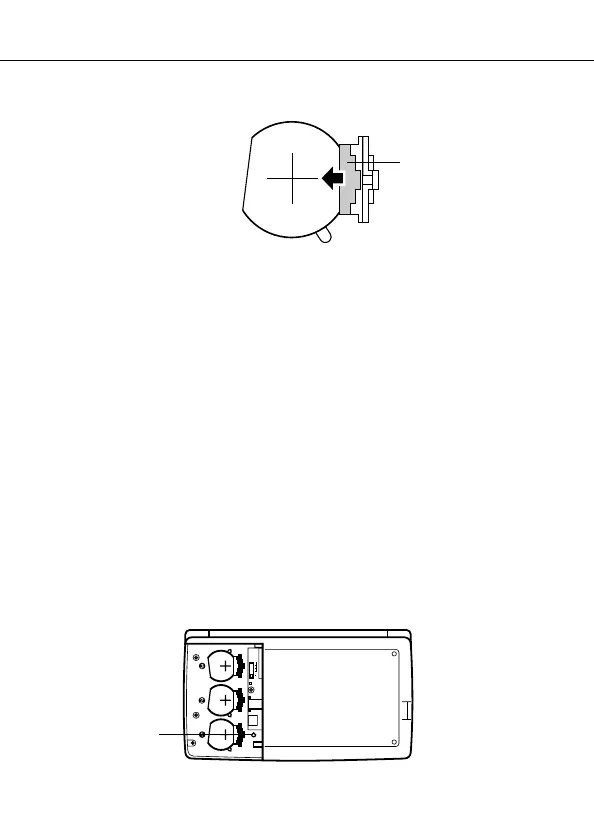
6. Slide the battery holder back to its original position as indicated by the arrow
in the illustration.
7. Slide the battery switch to the “REPLACE 2, 3” setting and repeat steps 4
through 6 for the other batteries.
• Be sure to replace all three batteries, using CR2032 lithium batteries only.
Never mix old batteries with new ones.
8. Slide the battery switch to the “NORMAL” setting.
• You will not be able to turn the unit on if the battery switch is not in the
“NORMAL” setting.
9. Replace the battery compartment cover.
Resetting the SF Unit’s Memory
Warning!
The following procedure erases all data stored in the memory of the SF Unit.
Perform the following operation only when you want to delete all data and
initialize the settings of the SF Unit.
Remember
−
you should always keep copies of important data by writing it down,
by transferring it to a personal computer or other SF Unit, CSF Unit or NX Unit.
To reset the SF Unit’s memory
1. Press ON to switch power on.
2. Open the battery compartment and press the RESET button.
RESET
Resetting the SF Unit’s Memory
RESET button
Battery holder


 To Next Page