8
Error and protection conditions
D
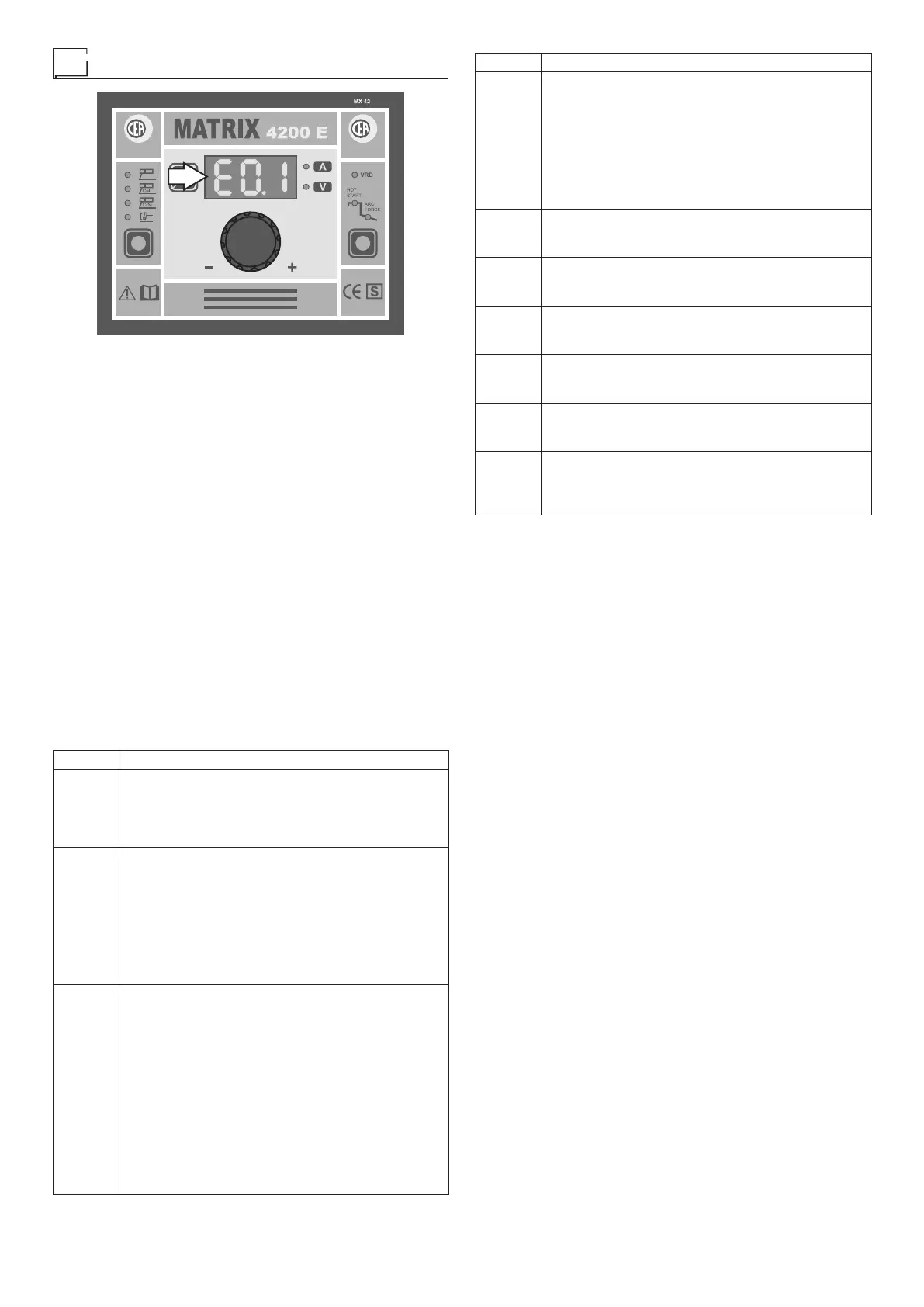
The equipment is protected against problems and if any arise
the DISPLAY shows fixed or flashing (error code) messages
(depending on the type of error) that serve to inform the oper-
ator that a fault has occurred in the equipment (see table 1).
The table provides a summary of all the error conditions that
may arise on the equipment and, if possible, what the opera-
tor must do to attempt to resolve the problem.
The table contains 2 types of errors:
•
Errors reset automatically: once the alarm condition has
been resolved the equipment starts working again and the
operator can weld again!
•
Errors NOT reset automatically: To eliminate the alarm
states and reinstate correct functioning of the machine, the
equipment must be switched off.
When it is switched on again, the machine will be working
again and the operator can weld again!
PLEASE NOTE: If when it switches on the error condition
recurs, contact the technical assistance immediately.
All of this is necessary to allow our technical assistance de-
partment (which must be contacted each time error mes-
sages appear on the equipment’s operator interface) to
resolve problems more easily, as quickly as possible and
thanks to the user’s reports, also because, in the meantime
the machine will not allow the operator to do their work.
Table 1
Display Diagnosis
E0.1
UNDER & OVER VOLTAGE
Automatic reset error.
If the fault persists look for the cause of the fault
and contact our technical assistance department if
necessary.
E0.2
OVER VOLTAGE
This is activated when the power supply voltage to
the equipment exceeds 480 V.
Automatic reset error.
The welding machine stops automatically and
resets itself automatically when the voltage returns
within the limits again. If the fault persists look for
the cause of the fault and contact our technical
assistance department if necessary.
E0.3
UNDER VOLTAGE
This is activated when the power supply voltage to
the equipment is less than:
• 320 V (MATRIX 2700 E - MATRIX 2800 E -
MATRIX 2800 E-MG - MATRIX 420 E - MATRIX
420 E-MG - MATRIX 4200 E - MATRIX 4200
E-MG)
• 180 V (MATRIX 2700 E SV)
Automatic reset error.
The welding machine stops automatically and
resets itself automatically when the voltage returns
within the limits again. If the fault persists look for
the cause of the fault and contact our technical
assistance department if necessary.
Display Diagnosis
E0.4
PRIMARY OVER CURRENT
This is activated when the primary current goes
beyond dangerous values.
Automatic reset error.
The welding machine stops automatically and
resets itself automatically when the current returns
within the limits again. If the fault persists look for
the cause of the fault and contact our technical
assistance department if necessary.
E0.5
POWER FAIL
NON automatic reset error.
Immediately contact technical assistance dept.
E1.0
CONFIGURATION FILE MISSING
NON automatic reset error.
Immediately contact technical assistance dept.
E1.1
USER FILE MISSING
NON automatic reset error.
Immediately contact technical assistance dept.
E2.0
FILE SYSTEM ERROR
NON automatic reset error.
Immediately contact technical assistance dept.
E4.0
USER SETTINGS MISSING
NON automatic reset error.
Immediately contact technical assistance dept.
t°C
THERMAL PROTECTION
The welding stops due to an excessively high
temperature (thermostat activated).
Automatic reset error.
WARNING: Errors E0.1 – E0.2 - E0.3 cannot be picked up on
the MX22 control panel!
WARNING: The MATRIX 2200E welding machine has a
built-in electronic protective device to deal with fluctua-
tions in mains voltage that switches the machine off auto-
matically (voltage exceeding 300 V), without indicating any
type of error or warning message for the operator. Subse-
quently it starts functioning again automatically when the
voltage has dropped to below the value indicated above.














 To Next Page