DA5 User's Manual
11
Press the FILTER button on the front panel or D.FILTER button on the remote control unit to
select a digital fi lter type FLAT or PULSE.
Click noise may happen from speakers or headphones when changing the
digital fi lter. It is recommended to change the fi lter after volume down.
Note: Digital filter type is always FLAT when DSD signal is played, and PULSE is not
available.
Note: When the display is "off" by dimmer setting pressing once the FILTER button will return
the display brightness to the default "brighter" and show the current digital fi lter type.
Press the button again to change the digital fi lter type.
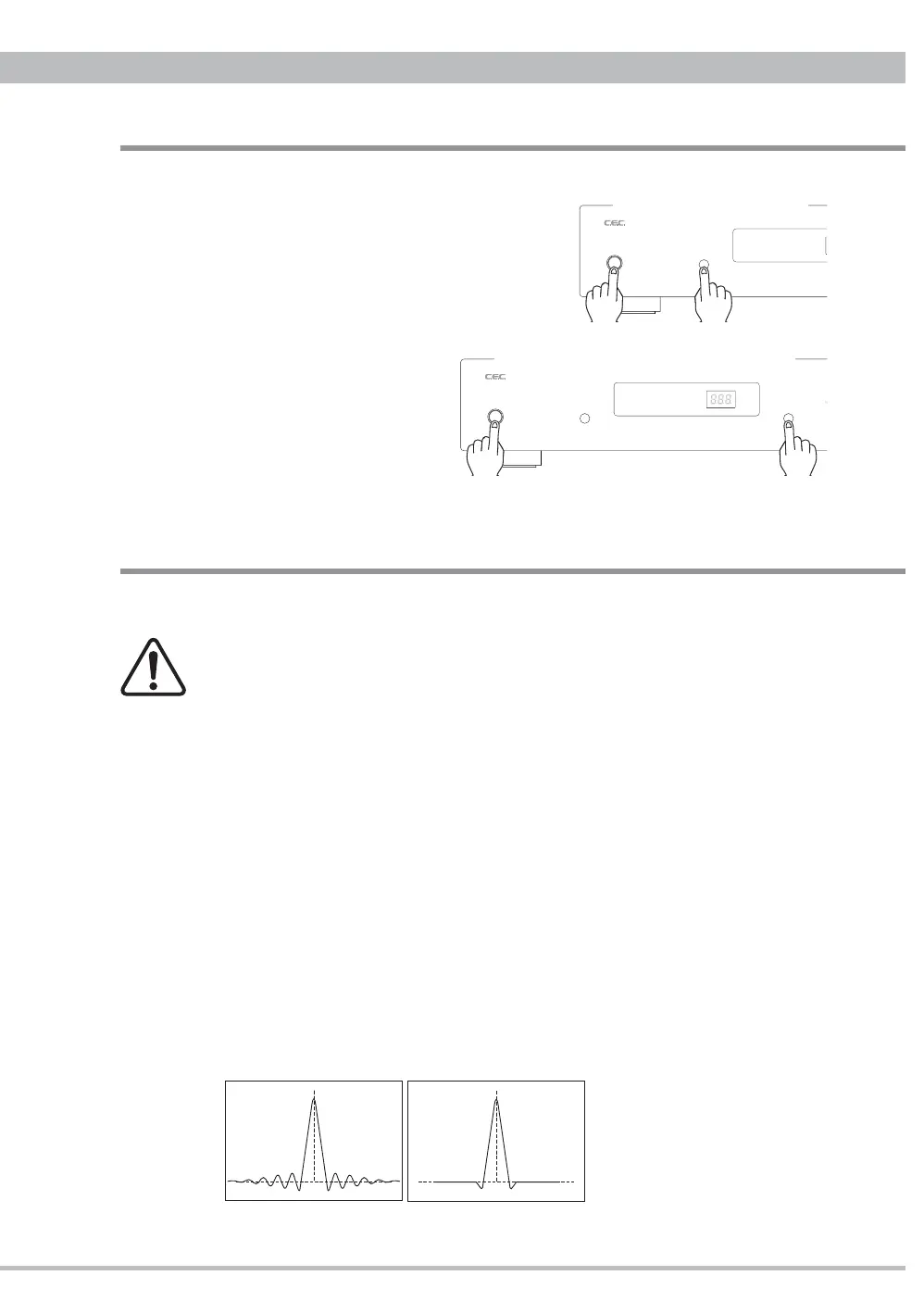
FLAT digital Filter is very common in digital audio items. The frequency response is almost
perfect, but such fi lter cause "ringing" in the time domain. Some energy of a pulse signal is
distributed in the time domain, before and after the pulse centre. Any ringing before the signal
does not exist in nature.
PULSE digital filter avoids the problems in the time domain and thus has a very good
response in the time domain. The frequency response of the PULSE digital filter shows a
soft roll-off at high frequencies. This results in about -2dB at 20kHz with an input sampling
frequency of 44.1kHz. For higher sampling frequencies the roll-off is irrelevant and the
"PULSE" fi lter is the best choice. For 44.1kHz and 48kHz the better result may depend on the
whole system as well as personal preferences.
Differences in ringing of FLAT and PULSE
Wavy form of the digital signal passing through the circuit
Digital Filter
FLAT
PULSE
Digital Volume
Change not to memorize the last volume
You can change the starting up volume to the
minimum -99(dB) regardless of the last volume
setting. Turn on DA5 pressing and holding the
FILTER button on the front panel, and keep the
FILTER button pressed for approx. 5 seconds until
the blinking of the volume level ends. From the
next time DA5 will be turned on at -99(dB).
To return to memorize the last
volume, turn on DA5 pressing
and holding the INPUT button
on the front panel, and keep the
INPUT button pressed for approx.
5 seconds until the blinking of the
volume level ends. From the next
time DA5 will be turned on at the last volume memorized.
FLAT USB COAX PCM
PULSE AES TOS DSD
P
WER
to start up at min. -99(dB)
FLAT USB COAX PCM
PULSE AES TOS DSD
INPU
ILTERPOWER
to start up at the last volume memorized


 To Next Page