D/A CONVERTER / USB SOUND SYSTEM DA5
12
䆩䆩
䆫
䆮
䆭䆬䆪
to an amplifier
3-pin AC power cord
to a wall outlet
ᵰᶁᶆ ᵪᶁᶆ
ᵪᶁᶆᵰᶁᶆ
from a digital player
from a PC
䆨䆨
RCA
䆩䆫 䆮䆪䆬䆨 䆭
ANALOG OUTPUT
RIGHT LEFT
DIGITAL INPUT
USB TOSLINK COAX AES/EBU
AC LINE
D/A Converter
DA5
XLR RCA XLR
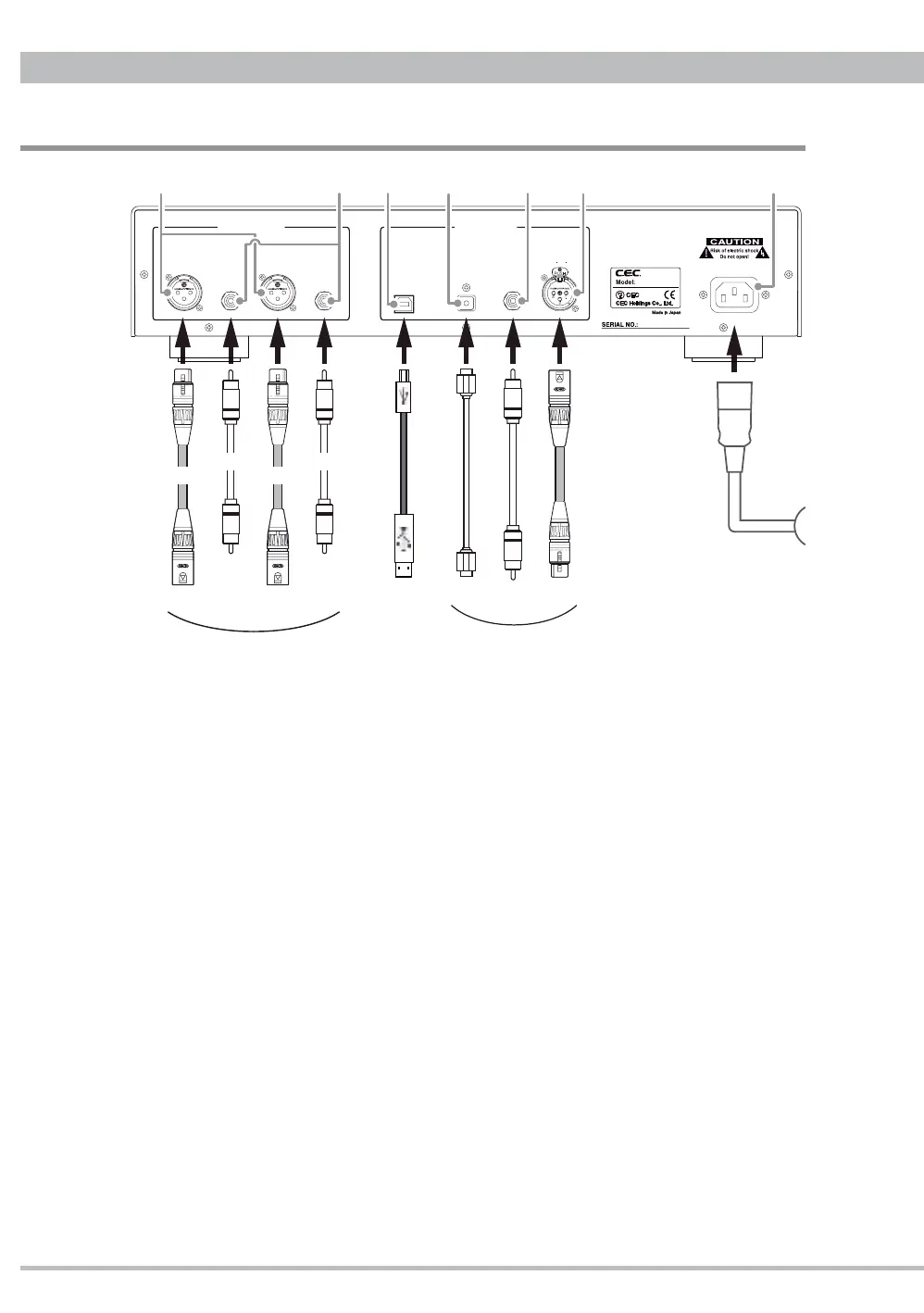
Rear Panel Functions and Connections
Analog output
Pressing D.VOL-UP/DN buttons on the remote control unit the analog outputs level
changes between minimum -99(dB) and maximum 0(dB) in the digital domain. This
volume function allows DA5 to connect to a power amplifi er directly as well as a pre-
amplifi er with a volume control function.
䆨
XLR(Balanced)
Balanced analog output using standard XLR terminals (1=GND, 2=Hot, 3=Cold). This
should be the preferred connection since DA5 has been designed at fully balanced
circuit.
䆩
RCA(Unbalanced)
Standard RCA analog output terminals.
Digital input
䆪
USB
USB input to connect with a PC using a USB cable with a B-type plug. This input
supports sampling frequencies up to PCM 32bit/384kHz and DSD256 11.2896MHz.
Note: Mac PC (X10.6.8 or newer) does not require any additional driver for USB 2.0
audio device but Windows PC (XP or newer) needs to install CEC specialized USB
driver to recognize DA5 as USB audio device and play PCM music fi les. Compatible


 To Next Page