DA5 User's Manual
27
Installing ASIO and DSD drivers to a freeware PC-music player foobar2000 for Windows PC
DSD64(2.8224MHz) to DSD256(11.2896MHz) fi les can be played through DA5.
Before starting these steps install foobar2000 to your Windows PC, which can be
downloaded from http://www.foobar2000.org/.
2. ASIO driver Installation on foobar2000
2.1. Melt (open) the downloaded "da5_dsd-plugin_fb2k.zip" file and save the melted
folder at ex. desktop.
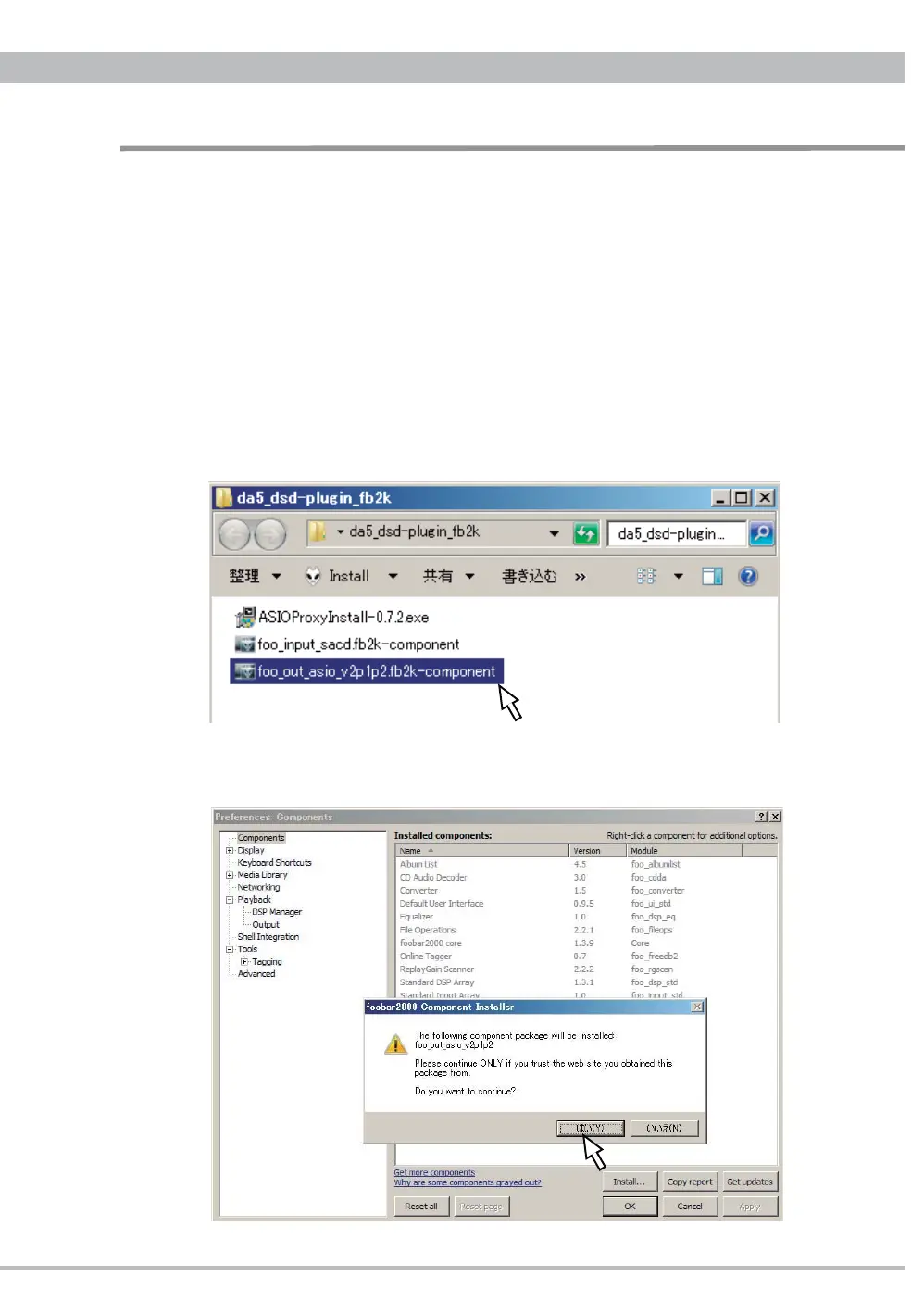
2.2. Double-click and open the saved "da5_dsd-plugin_fb2k" folder.
2.3. Double-click "foo_out_asio_v2p1p2.fb2k-component" in the folder.
2.4.
foobar2000 Components Installer will start. Click "Yes(Y)" to continue.
Installation and Setup for DSD Playback


 To Next Page