D/A CONVERTER / USB SOUND SYSTEM DA5
8
Front Panel Functions
䆨
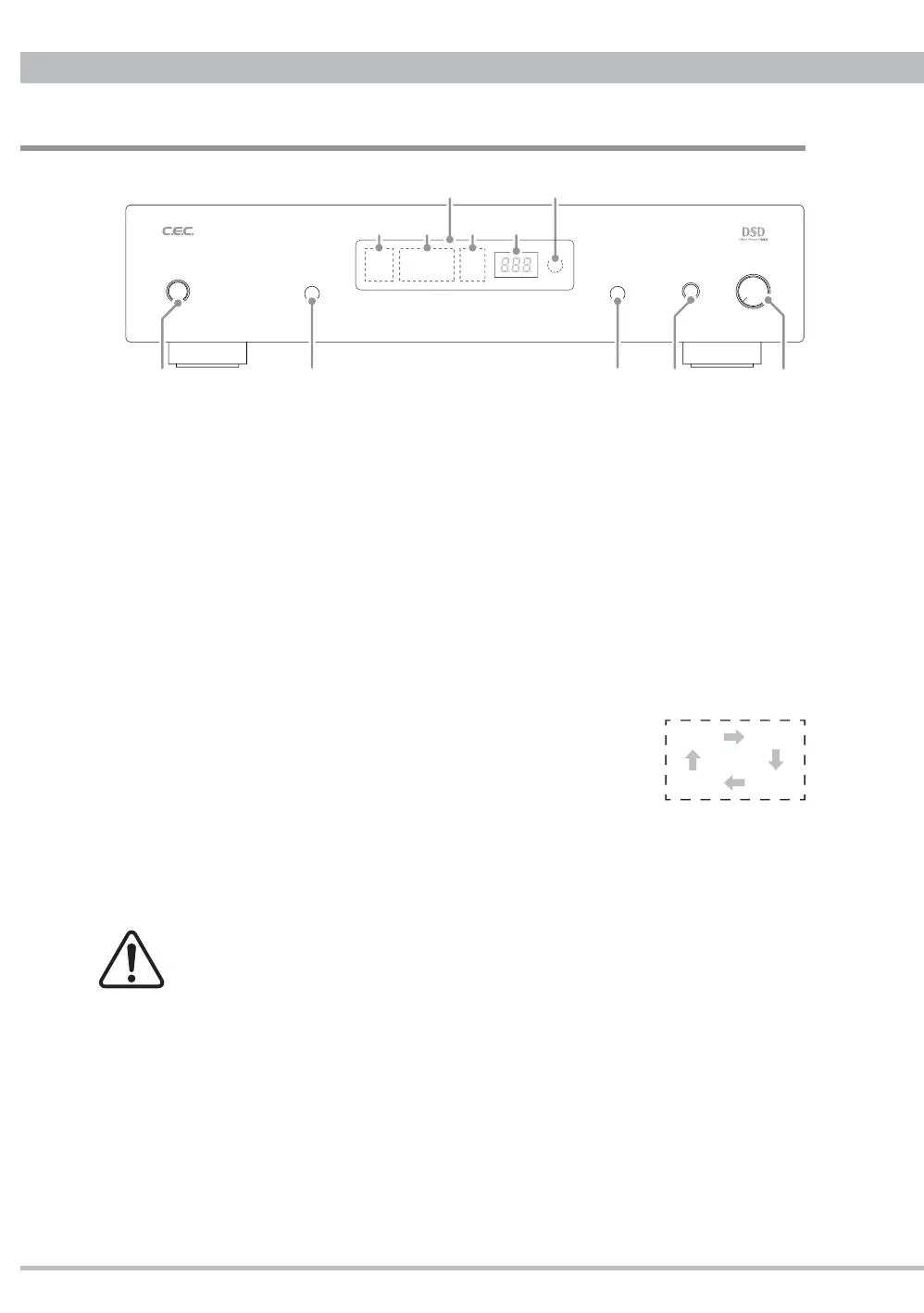
POWER button
Press to turn the power ON or OFF. When DA5 is turned on, digital volume ex. "0"
(initial setting = maximum 0 dB) will blink at
䆮㽵
Sampling frequency indicator in the
display. Approximately 5 seconds later the display will change to indicate the current
function settings and now DA5 is ready for playback.
䆩
FILTER button
Press to select a digital fi lter type "FLAT" or "PULSE". The selected fi lter type will light
up at
䆮㽲
Digital Filter indicator. Refer to "Digital Filter" on page 11 for details.
䆪
INPUT button
Press to select an input from USB being connected with a personal computer, or
COAX, TOS(optical) or AES(balanced AES/EBU) being connected with a digital music
player like CD Transport. Pressing the button will change the input in an order described
in the right fi gure, and the relative input name will light up at
䆮㽳
INPUT indicator.
The selected digital input signal is converted and transferred
to the analog and headphone outputs.
The last input has been memorized after power off.
䆫
HEADPHONE jack
Headphone output jack for a standard 6.3mm plug.
For using a headphone with 3.5mm mini plug, purchase a 6.3mm conversion plug
from a dealer.
Before using your headphones for listening, minimize the volume and then
insert the headphones plug into the jack. Excessive sound pressure from the
headphones may cause hearing loss to your ears.
䆬
VOLUME knob
Turn clockwise to increase or counterclockwise to decrease the headphones volume.
For headphones listening, in addition to this analog volume operated by the knob,
adjust the digital volume through the remote control unit as well. Refer to "Digital
Volume" on page 10 for details.
䆭
Remote sensor
The remote sensor, which receives signals from the remote control unit, is located at
the right side of the display window. Aim for the sensor when using the remote control
unit. The remote control may malfunction if there are any obstacles between the remote
control unit and the remote sensor.
D
A
NVERTER DA
WE
EADPH
N
V
L
ME
䆩䆫
䆮
䆪䆨 䆬
䆭
PCMFLAT
PULSE
USB COAX
AES TOS DSD
㽲㽳㽴㽵
USB COAX
AES TOS


 To Next Page