DA5 User's Manual
35
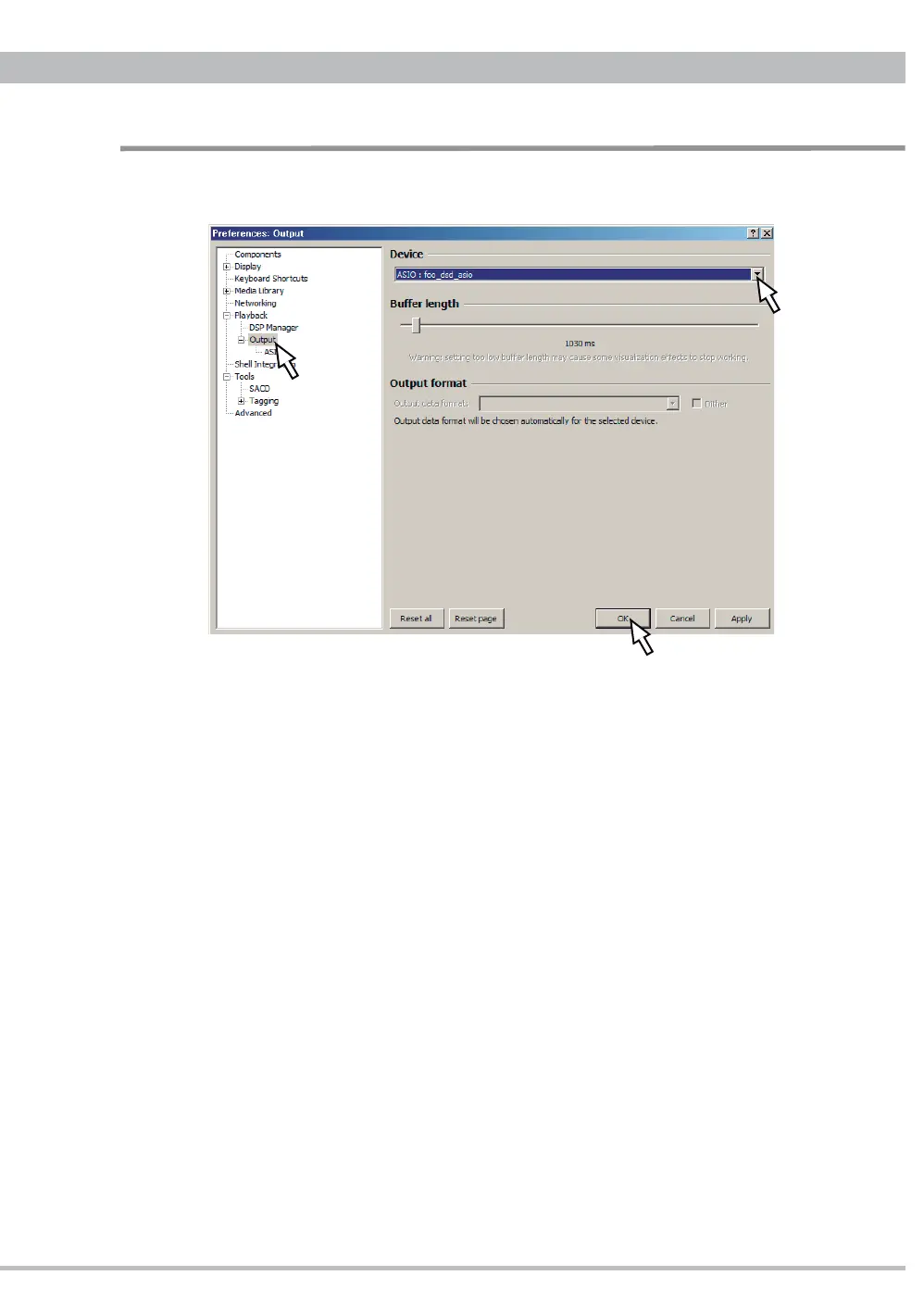
5.5. Click "Playback - Output" at the left side tree and select "ASIO:foo_dsd_asio" at
Device. And click "OK" to fi nish the setup.
All the installation and setup have completed. Now foobar2000 is compatible with DSD
up to 256 (11.2896MHz) and PCM up to 32bit/384kHz through DA5-USB.
NOTE
ṳ
In order to avoid any interruption or affection from PC upon listening to your desired
music through ASIO at foobar2000, set the output of reproduction to the other than CEC
DA5 HS USB Audio at Sound and Audio Device property at your PC (refer to page 26). The
volume control and/or mute function can be operated by foobar 2000, DA5 and/or amplifi er.
ṳ
When you listen to the music through the other sound/playback device than ASIO at
foobar 2000 like Windows Media Player and/or iTunes, set the output of reproduction to
CEC DA5 HS USB Audio at Sound and Audio Device property at your PC.
Installation and Setup for DSD Playback


 To Next Page