8.2. QA PHANTOM ACQUISITION
QA Phantom for Quality Control.
Before carrying out the quality control, fill QA phantom
with water.
Please find below a description of the operations
required to position the QA phantom and perform the
quality control.
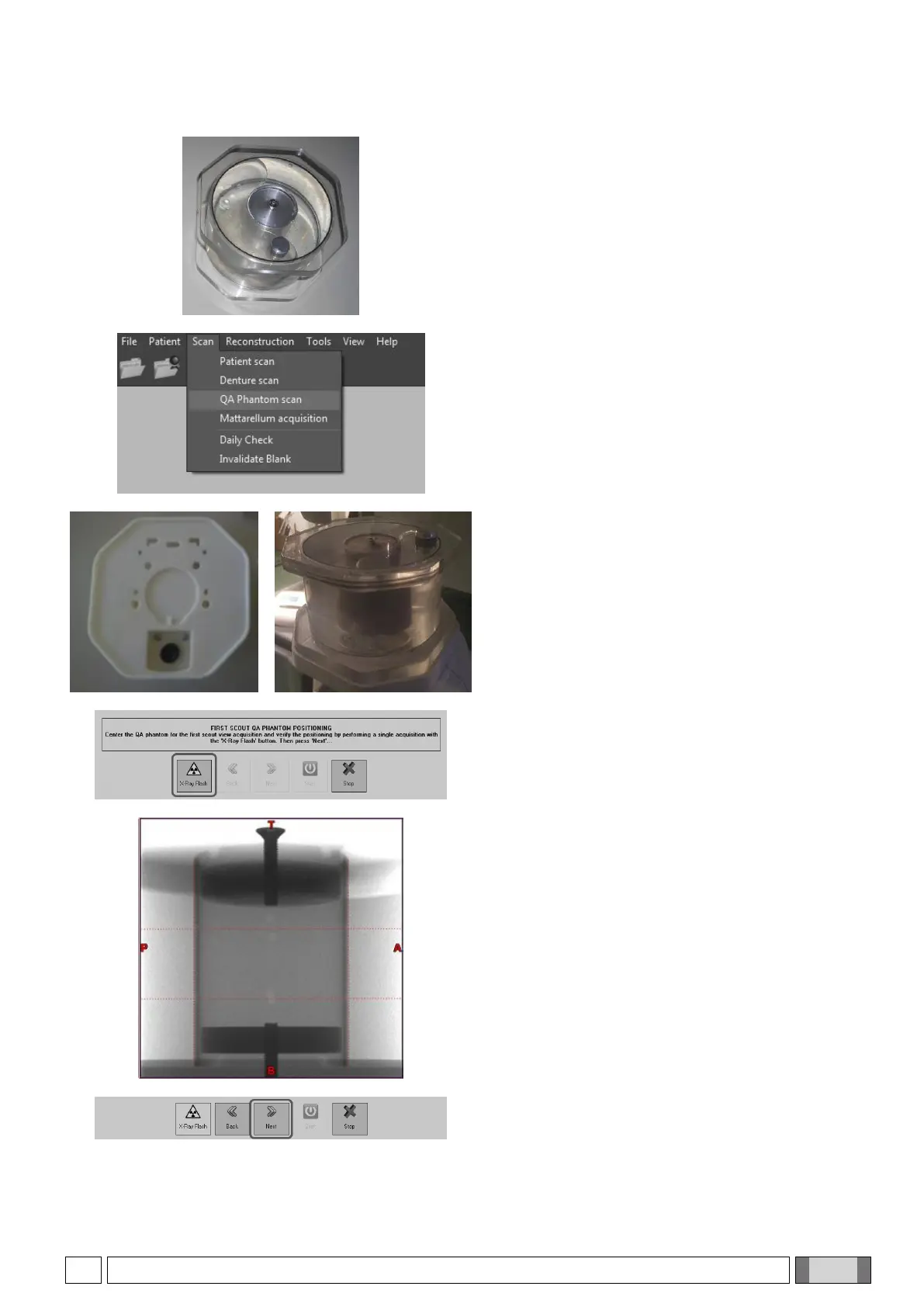
From the software main menu, select “Scan” and “QA
Phantom scan”.
Remove the chinrest and replace it with the octagonal
support.
Place the phantom on the octagonal support, as
shown in the figure.
Click on “X-ray Flash” and press the rays button when
prompted.
A side scout image is acquired to check positioning.
Assess phantom position; if necessary, correct it in
order to reach a position similar to the one shown in
the figure:
the aluminium cylinder should be between the vertical
red broken lines, whereas the internal balls must pass
through by the horizontal red broken lines.
In order to acquire a second scout, click again on “X-
ray Flash” and press the rays button when prompted.



 To Next Page