30
NOTE: This secon describes the install process for Windows PC soware only. Skip to
“6.2 Installing Repeer-Host (Mac)” if you own a Mac!
NOTE: If you have a previous version of HeartWare installed on your PC, perform the
steps found in “6.1.1 Uninstalling HeartWare” before aempng to reinstall or update
HeartWare. Failure to do so may cause slicing issues.
1. There are three ways of nding the HeartWare install le:
• Insert the SD card that came with your machine and copy the le
“setupHeartWare_2_4_1.zip” to your PC.
• Refer to the electronic version of this manual, click the following link,
navigate to “CELLINK HeartWare for PC” and download
“setupHeartWare_2_4_1.zip.
• Go to the CELLINK Support page at hps://cellink.com/support/, click
“Downloads” and select “Download” next to HeartWare.
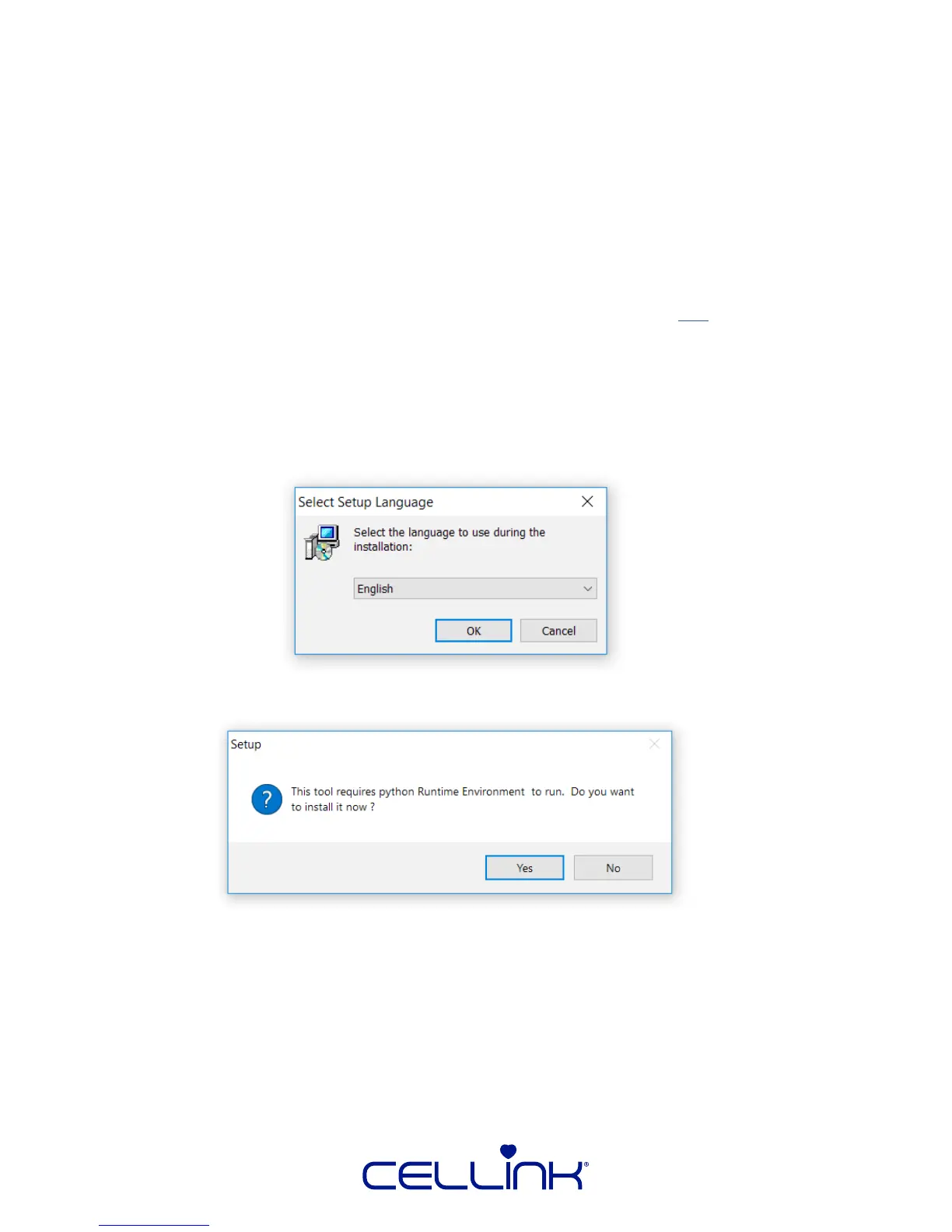
2. Open the ZIP archive and run “setupHeartWare_2_4_1.exe”.
3. Select your desired language.
4. If prompted to setup the Python Runme Environment, select “Yes”.
6.1 Installing HeartWare (PC)



 To Next Page