45
7.2 HeartWare Interface
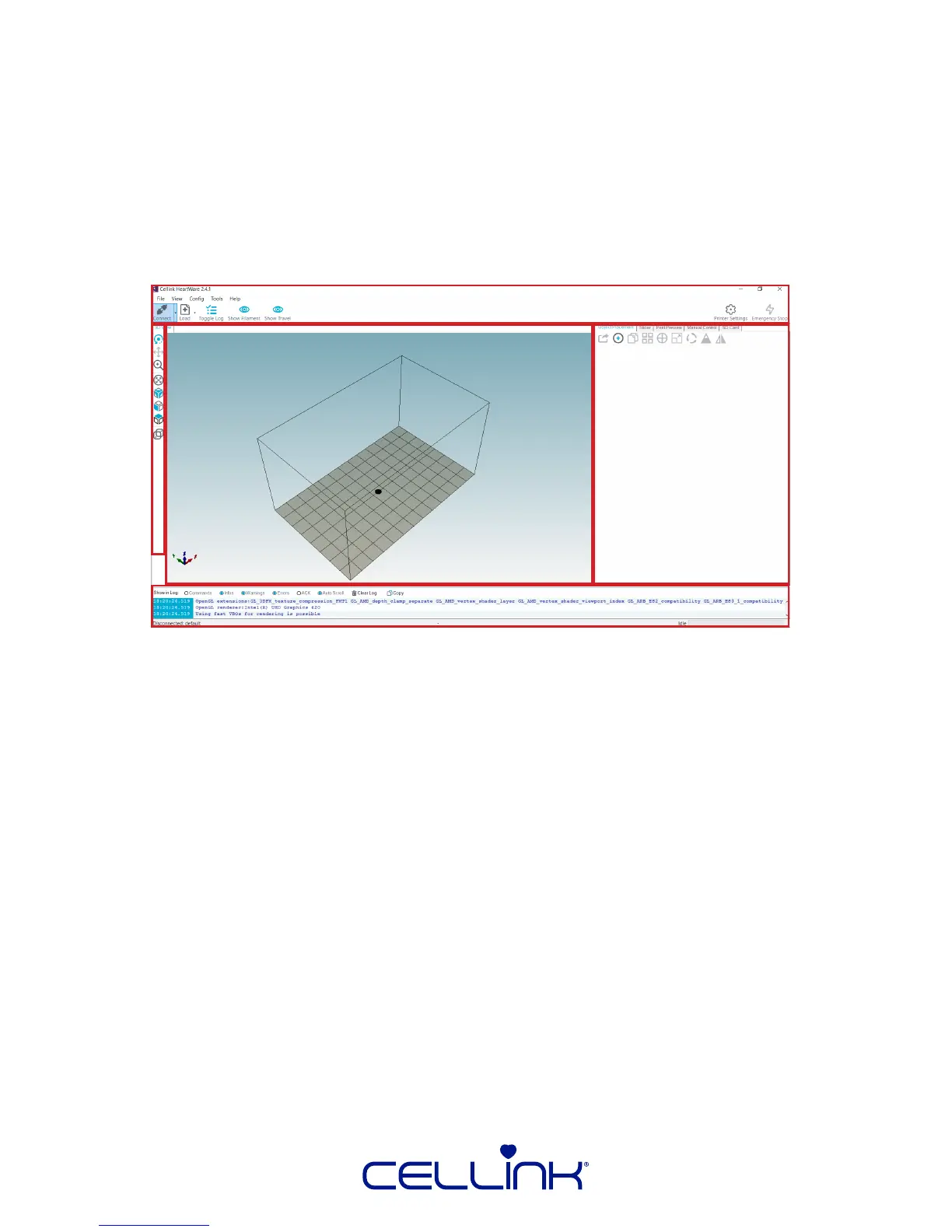
The HeartWare interface can be divided into 5 secons:
1. Top Tool Bar
2. Le Tool Bar
3. View Window
4. Log
5. Right Control Window
7.2.1 Top Tool Bar
The Top Tool Bar contains buons for loading models and G-code, connecng your
machine, HeartWare preferences, and toggling the appearance of visualizaons in the
View Window. Below, you will nd the capabilies of these buons:
File – Load models, take screenshots of the view window, show the directory
where G-codes are generated, load recent models, and exit HeartWare.
View – Snap camera to specic orientaons with respect to the print area and
toggle appearance of visualizaons within the View Window [3].
Cong – Language, printer, and HeartWare sengs and preferences
Tools – Not relevant for CELLINK bioprinters.
Help – Check HeartWare version. The rest of the funcons are not relevant to
CELLINK bioprinters
Connect – Connect your INKREDIBLE to your machine to control movements
or run prints. Note: Your INKREDIBLE must be connected securely via the
provided USB cable for this to work, and “SD Print” should be disabled from
the “Ulies” menu on the INKREDIBLE.
Load – Load G-Code and model les. Click the arrow to the right to view and
load recent les.
1
2
3
4
5



 To Next Page