EAGLE CONTROLLER – INSTALLATION & COMMISSIONING INSTRUCTIONS
EN1Z-0970GE51 R0918 32
Connecting RS485-2 to the Modbus
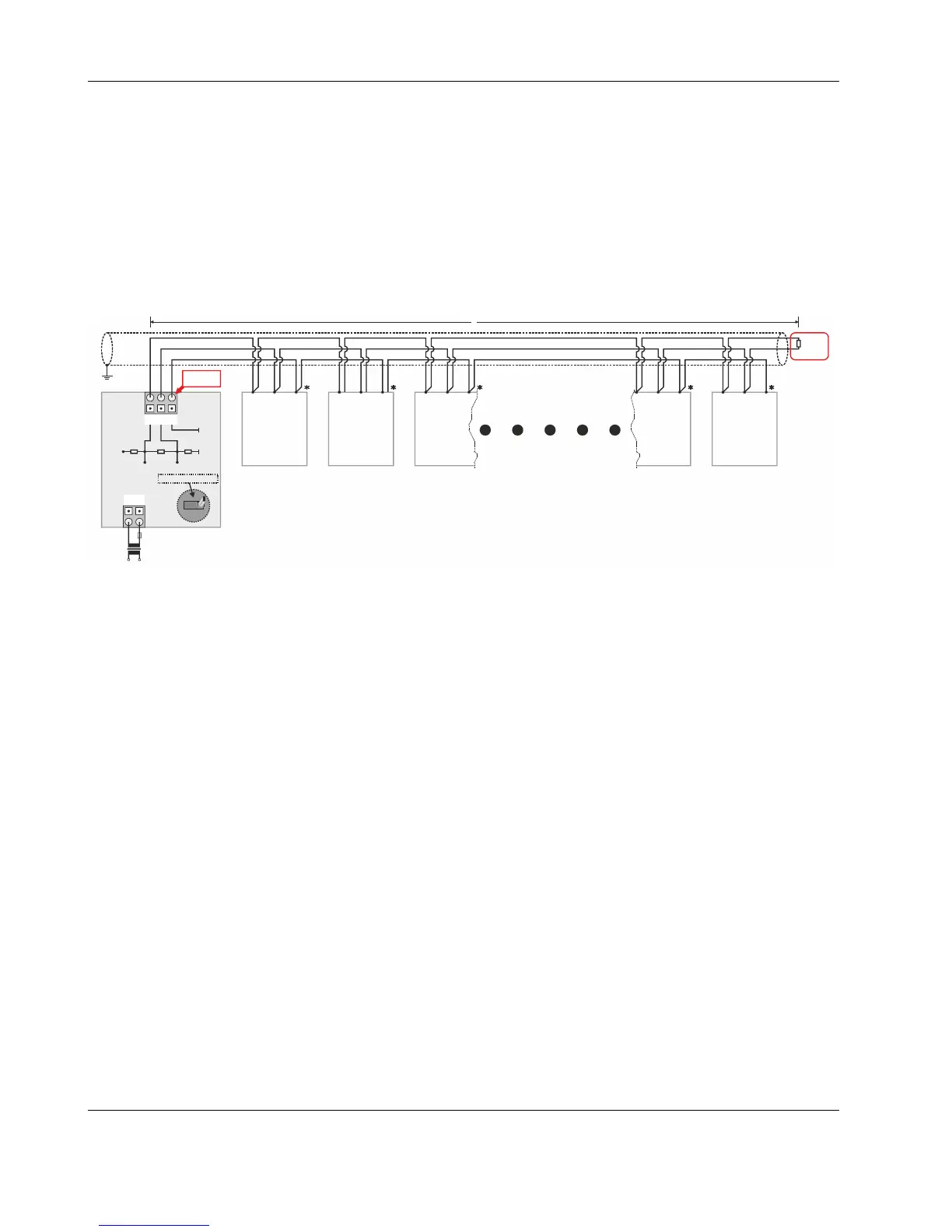
With regards to Fig. 48, please note the following:
NOTE: Always power each EAGLE and the connected Modbus slaves via separate transformers.
NOTE: For "L," see section "RS485 Standard" on pg. 9.
NOTE: If any of the devices are electrically isolated, it is recommended that those devices be connected to signal ground.
See section "RS485 Standard" on pg. 9.
NOTE: Between devices equipped with non-isolated RS485 bus interfaces, potential differences of max. ±7 V are allowed.
Further, this bus should not extend beyond a single building.
Example: EAGLE Modbus Master Controller and Connected Modbus RTU Slaves (with inserted termination
resistor)
1 2
24V~
24~0
2930 31
GND-2
GND-2+5V
RS485-2 (+) RS485-2 (-)
550 OHM 550 OHM130 OHM
F1
230 V
24 V
R
T
RS485 +
RS485 -
GND
RS485 +
RS485 +
RS485 +
RS485 +
RS485 -
RS485 -
RS485 -
RS485 -
GND
GND
GND
GND
L
EAGLE
*CONNECT GND, IF AVAILABLE.
RS485-2
Modbus
Module
Modbus
Slave #1
Modbus
Slave #2
Modbus
Slave #3
Modbus
Slave #N-1
Modbus
Slave #N
120 Ohm
END
BI
S
MID
NO EFFECT ON RS485-2
Fig. 48. Connection of EAGLE Modbus Master Controller to Modbus RTU slaves via RS485-2
The termination resistor must be inserted directly into the terminals of the last Modbus RTU slave.



 To Next Page