EAGLE CONTROLLER – INSTALLATION & COMMISSIONING INSTRUCTIONS
37 EN1Z-0970GE51 R0918
Earth Grounding of EN60204-1 Applicable
Systems
NOTE: We strongly recommend that each CPU be
supplied with electricity from its own dedicated
transformer.
► If system protective earth grounding is planned, use a
cable as short as possible for grounding:
min. 1.5 mm² (16 AWG).
► For connection details, refer to the following examples.
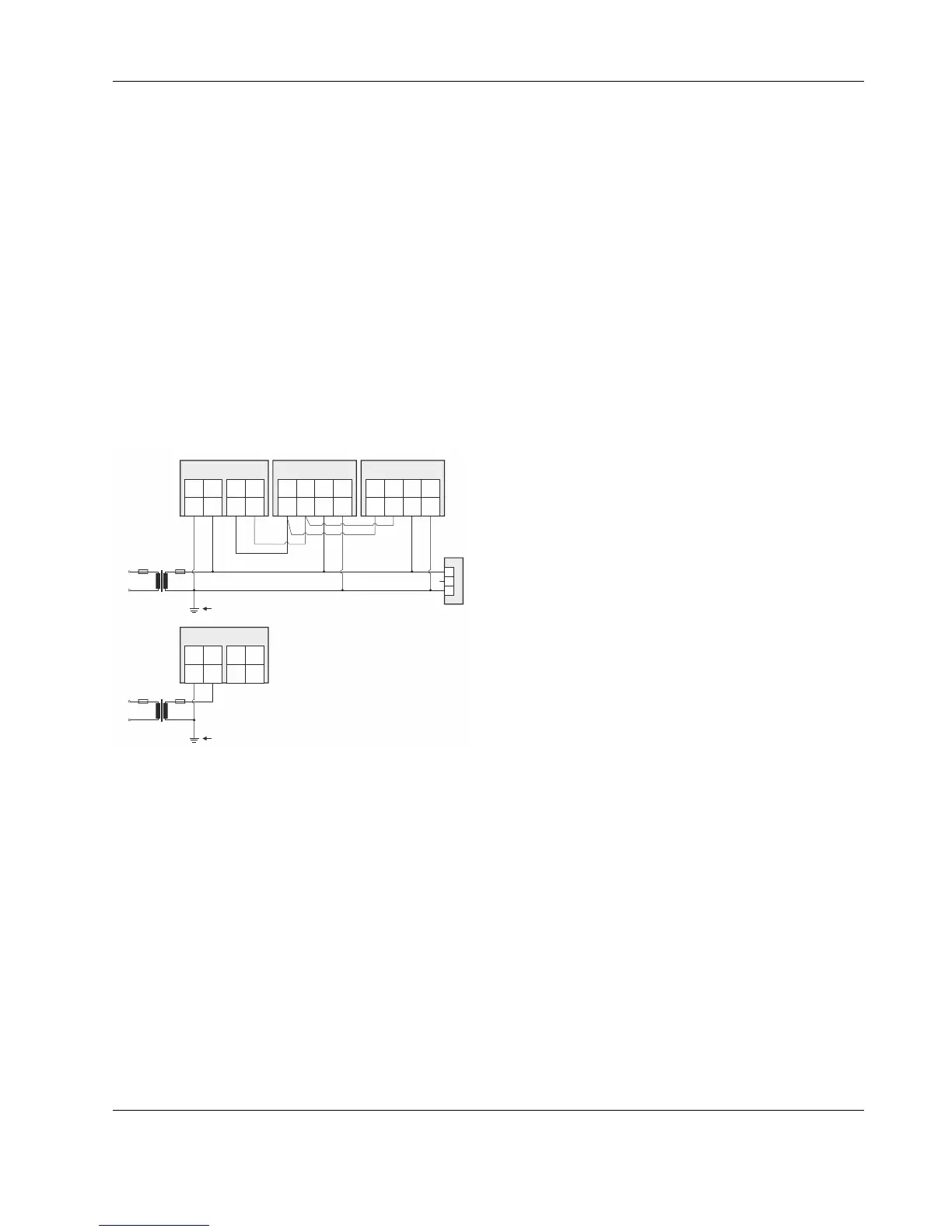
Example 1
The following explains how to connect and earth multiple
CPUs (e.g., multiple EAGLEs, PANTHERs, TIGERs, LIONs,
etc. or any combination thereof) earth-grounded as per
EN60204-1.
NOTE: Use a noise-free earth ground inside the cabinet.
NOTE: If a field device that prohibits earth grounding is
connected to the system ground, an isolation
monitoring device must be used instead of earth
grounding.
► Connect earth ground to the respective terminal of the
CPU, see Fig. 57.
24 V~
24 V~
24 V~0
24 V~0
LINE
LINE
L
L
N
N
CPU 1
29 30
RS485-2 + RS485-2 -
COM
B
COM
B
NOISE-FREE EARTH GROUND
(ONLY ONE PER SYSTEM)
NOISE-FREE EARTH GROUND
(ONLY ONE PER SYSTEM)
COM
A
COM
A
74 7472 7273 7371 71
24V~ 24V~24V~0 24V~0
21
24V~24V~0
CPU 2
29 30
RS485-2 + RS485-2 -
21
24V~24V~0
I/O MODULE I/O MODULE
GND
FIELD DEVICE
24 V~
Y
RECOMMENDED
Fig. 56. Connecting and earthing multiple CPUs
(RECOMMENDED USE OF SEPARATE
TRANSFORMERS)



 To Next Page