EAGLE CONTROLLER – INSTALLATION & COMMISSIONING INSTRUCTIONS
33 EN1Z-0970GE51 R0918
M-BUS CONNECTION
The EAGLE controller supports M-Bus Master functionality
via its onboard RS232 / RJ45 socket.
It uses standard PW3/PW20/PW60 converters to connect to
the M-Bus devices.
M-Bus Considerations
Max. no. of M-Bus devices per EAGLE: 60.
Bus Length
Max. M-Bus length: 350 meters from PW3 / PW20 /
PW60, at baud rates of 9.6 kbaud or slower with shielded,
twisted pair cable: J-Y-(St)-Y 2 x 2 x 0,8.
The M-Bus can be extended to 1,000 meters, depending
upon the baud rate, and provided that the following
electrical limitations are observed:
˗ Bus voltage must at no point fall below 12 VDC
˗ Maximum cable capacitance of 180 nF
For bus length extension, M-Bus repeaters can be used, but
have not been tested by Honeywell. Hence, it is the
responsibility of the installing / commissioning personnel to
ensure proper functioning.
Wiring Topology
M-Bus meters are connected to the bus cable in parallel.
EAGLE
SLAVE 1 SLAVE 2 SLAVE 3
PW
CONVERTER
Fig. 49. Allowed M-Bus wiring topology
Cabling EAGLE to PW3/PW20/PW60
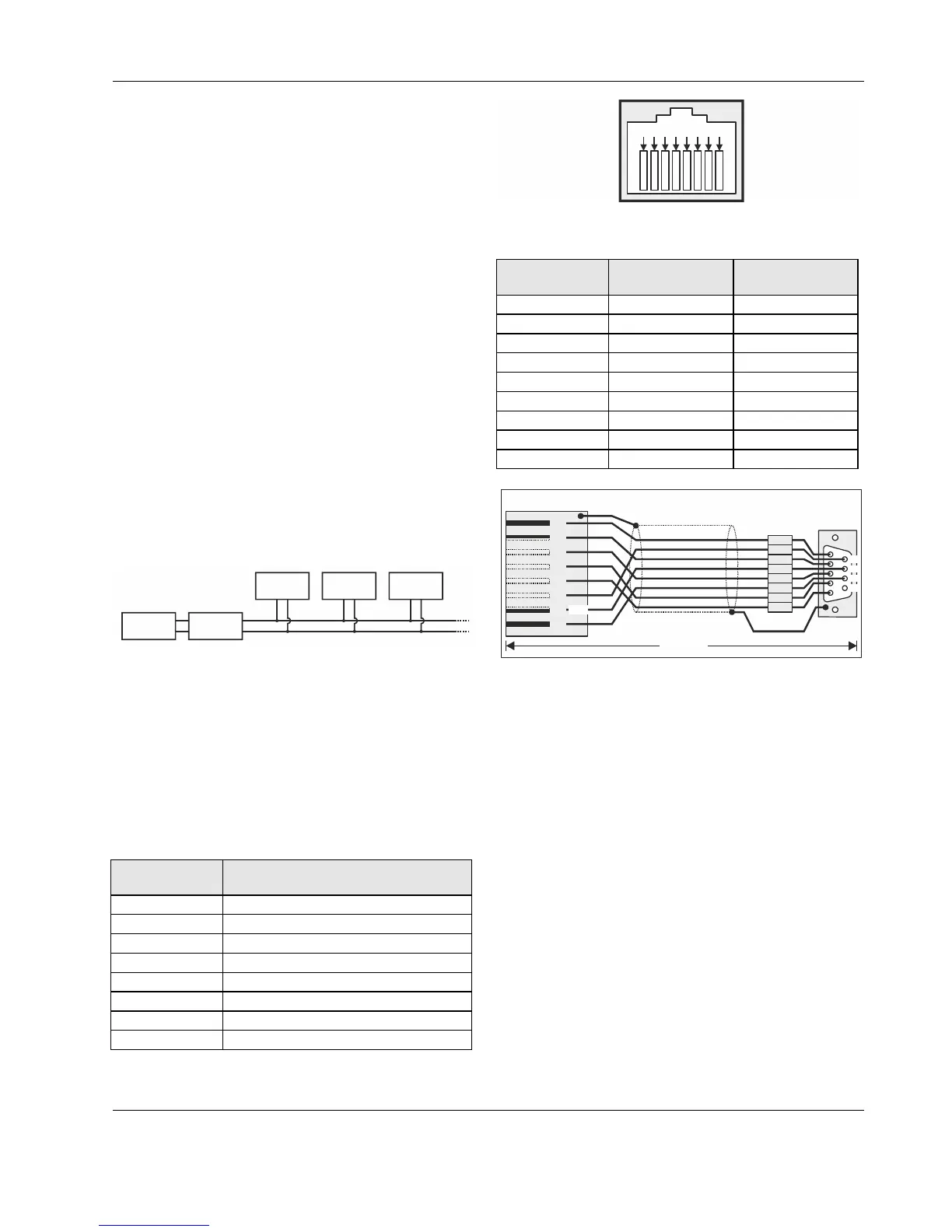
Use the XW586 cable between the RS232 / RJ45 socket
of the EAGLE and the PW adapters.
The XW586 cable has a length of 1.8 m, and the pin-out
listed in Table 26.
In case a third-party cable is used instead of the XW586
cable, the third-party cable must have a max. length of
15 meters and a max. cable capacitance of 2,500 pF.
Table 25. EAGLE RS232 / RJ45 socket specifications
RJ45 plug,
pin no.
RS232 function
1
2 RxD
3 TxD
4
5 GND
6
7
8
876
5
4
3
21
Fig. 50. EAGLE RS232 / RJ45 socket
Table 26. RS232-to-PW cable specifications
RJ45 plug,
pin no.
RS232 function
9-Pin sub-D
connector pin no.
1 DCD 1
2 RxD 2
3 TxD 3
4 DTR 4
5 GND 5
6 DSR 6
7 RTS 7
8 CTS 8
-- Not used 9
1
5
4
3
2
9
8
7
6
12
3678
4
5
RS232 plug
sub-D male
SHIELD
D
C
D
D
S
R
R
x
D
R
T
S
T
x
D
C
T
S
D
T
R
G
N
D
XW586
RJ45 plug with clip at front
+5V
Fig. 51. XW586 power / communication cable details
Cabling PW3/PW20/PW60 to M-Bus
Use shielded, twisted pair cable J-Y-(St)-Y 2 x 2 x 0,8.
Shielding is especially recommended when the M-Bus
cable is installed in areas with expected or actual electro-
magnetic noise. Avoiding such areas is to be preferred.
Connect the shield to a noise-free earth ground – only
once per M-Bus connection.
Power the EAGLE controller and the PW M-Bus Adapter
with separate transformers – see WARNING below.
NOTE: If, alternatively, only a single transformer is avail-
able, when connecting a laptop, PC, web browser,
CL-Touch, or 3
rd
-party touch panel to the USB 2.0
Device Interface on the front of the EAGLE con-
troller, use an optical isolator for the USB con-
nection or substitute an M-Bus Mikro-Master USB
(Relay GmbH, D-33106 Paderborn) for the PW M-
Bus Adapter.



 To Next Page