C-net 2000 MULTI
26
10. Configuration Settings
Press and hold the blue (righthand) button, and you select a
group of configuration settings that, once set, rarely need
changing.
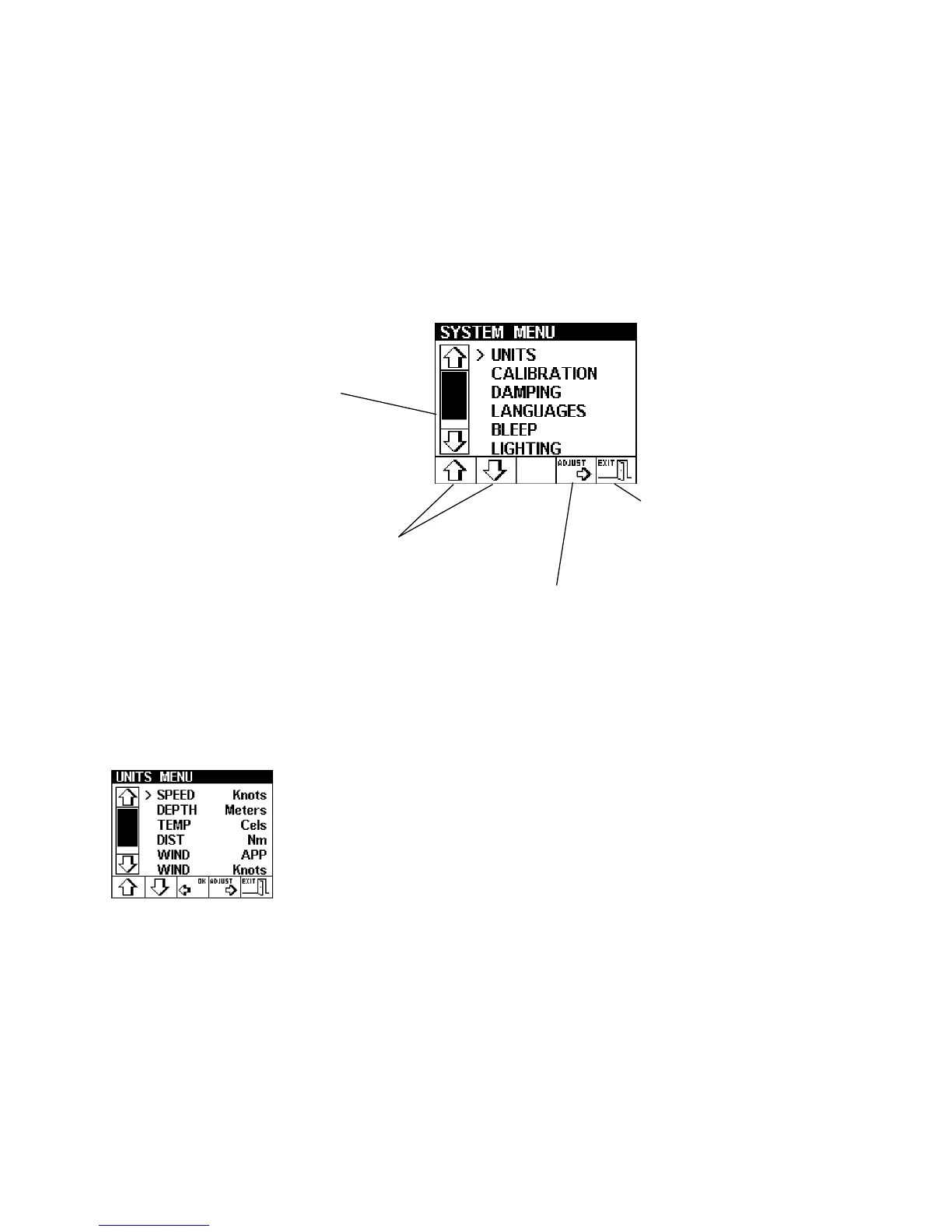
Each system menu option has a similar layout to the example
above.
The bar graph indicates
that there are more
options in the list but
not currently displayed,
CONFIG for instance.
Used to select the option
you wish to change
Use to adjust the selected
option (Units in this example),
a new menu will be displayed
Use to exit the
ADJUST option
UNITS
This option allows the setting of the following:
Speed ............... Knots, MPH or KPH
Depth ............... Meters, Feet or Fathoms
Temperature ...... Celsius or Fahrenheit
Distance Units ... Nm, Miles or Km
extra on Ocean versions:
Wind Angle ....... Apparent, True
Wind Speed....... Knots, m/s, MPH, Beaufort
Bearing ............. Mag, True
Select the units to be displayed, on any C-net 2000 Multi
in a system. This information is Global and will be used
by all other MULTIs in the system.



 To Next Page