Chapter 2
Cylinder and Components
Edition 1 – December 2019 SAFETY FIRST 45
MSA G1 Electronic Breathing Apparatus
Primary screen
The primary screen is automatically shown when the screen is activated and
provides
all critical information to the operator including:
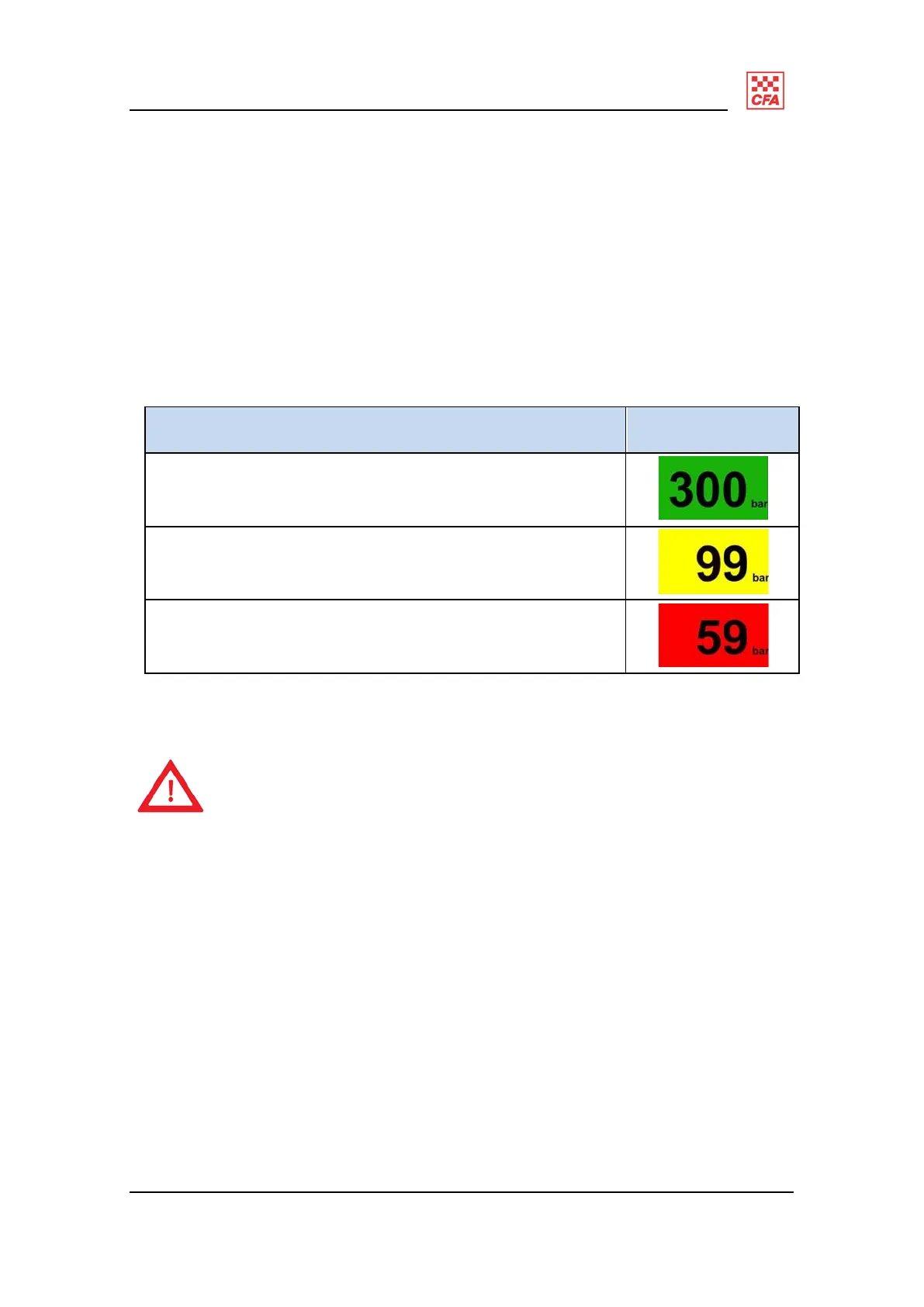
cylinder pressure (in bar) and associated colour backlight;
alarm status indicators.
Figure 23
shows the colour backlighting indicators at different pressures.
Description Illustration
Green indicates pressure of 300 to 100 bar.
Yellow indicates pressure between 99 bar and 60 bar
Red indicates a pressure 59 bar and 0 bar.
Figure 23: backlighting indicators at different pressures
An attention icon (an exclamation mark inside a triangle) displayed
in the
upper corner of the primary screen indicates a secondary
warning or alarm
is active and the operator should press either
of the
green RESET buttons
once to access the secondary screen to
determine the nature of the
warning or alarm.
The attention icon flashes for an active and new warning or is
steady for
old or previously viewed warnings.


 To Next Page