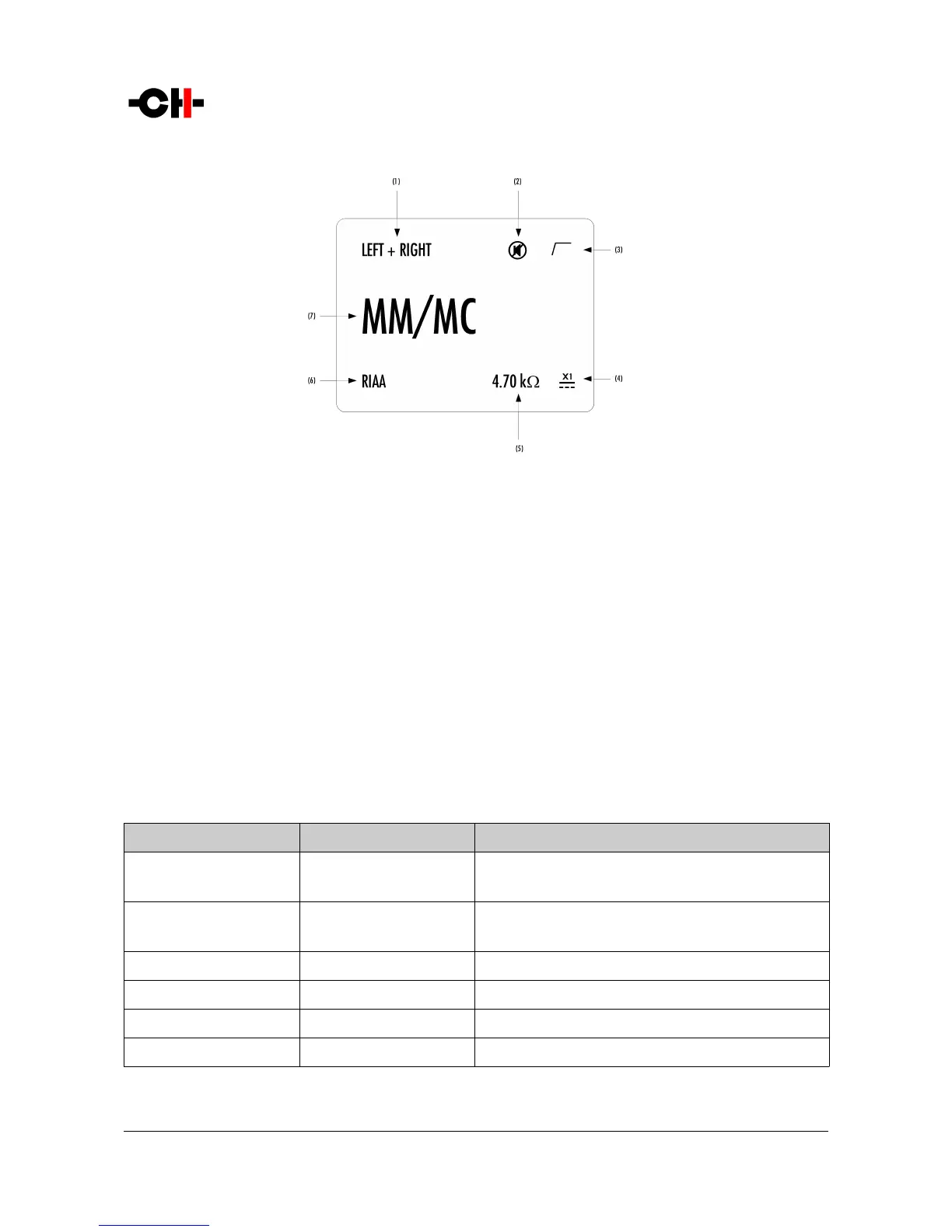
Normal mode display elements
(1) Handled channel (in true monaural) or channel pair (in dual monaural)
(2) Mute indication. If the 7 symbol is present, the output is muted
(3) Subsonic filter indication. If the / symbol is present, the subsonic filter is engaged
(4) External power supply indication. When an external power supply is connected and engaged, < symbol is displayed and internal power supply is
turned off
(5) Cartridge loading indication (only for voltage mode MM/MC input)
(6) Equalization curve engaged
(7) Selected input source. Each input source can be renamed through P1's menu
Displayed elements depend on the user settings. In the example above, an X1-powered P1 is set as a dual-monaural phono stage,
MM/MC voltage mode input is selected. The RIAA equalization curve is selected, the subsonic filter is engaged and a 4.7 kOhm
loading is applied to the cartridge. The P1 is muted.
Following table shows the actions of the front panel push-buttons in Normal mode.
Front face push buttons Unit State Unit Action
S, short push STANDBY
Any other state
Wake from STANDBY
Mute/Unmute
S, long push STANDBY
Any other state
Wake from STANDBY
Go to STANDBY
N
Any state Selects next input
R
Any state Enter Shortcuts mode
O
Any state Selects previous input
Q
Any state No effect
Push-buttons actions in Normal mode
20 P1 User Manual Rev 1.1



 To Next Page