Pic 5.2-3 Pic 5.2-4
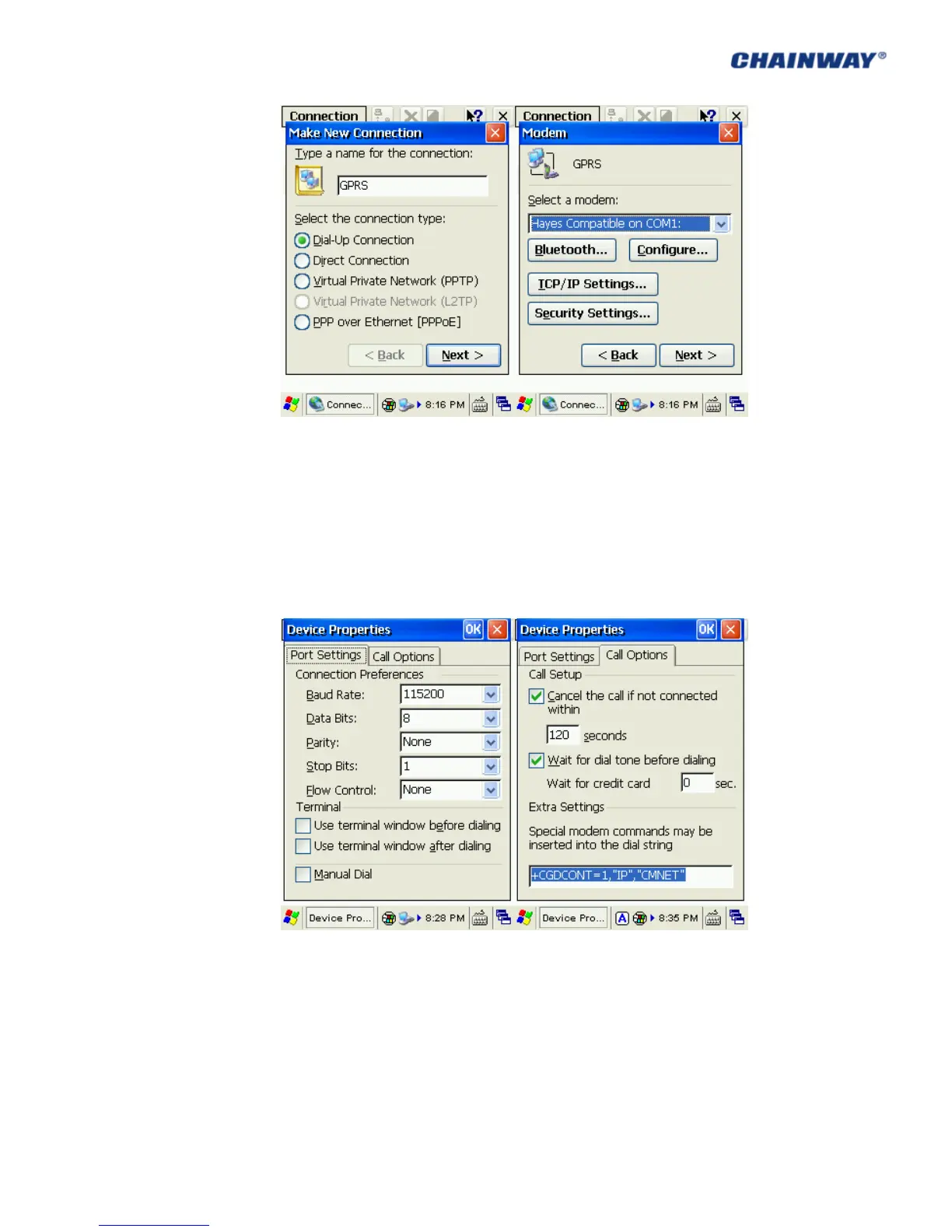
3) In ‘Port Settings’, set ‘Connection Preferences’ as below:
‘Baud Rate’: 115200; ‘Data Bits’: 8; ‘Parity’: None; ‘Stop Bits’: 1; ‘Flow Control’: None
Then click ‘Call Options’ to turn to another tab page;
4) Input ‘+CGDCONT=1,”IP”,”CMNET”’ (input all blue characters including the commas
and quotation marks) into ‘Extra Settings’, the ‘CMNET’ (which is short for China
Mobile Network) should be replaced by your local ‘GPRS APN’ (Access Point Name);
left other default, then click ‘OK’; Pic 5.2-5 and Pic 5.2-6
Pic 5.2-5 Pic 5.2-6
5) Click Next to Phone Number page, input the country/region code, area code and
Phone number (*99***1#), then click Finish; now you can see the GPRS connection
icon; Pic 5.2-7 and Pic 5.2-8



 To Next Page