19
Identify Door Profile
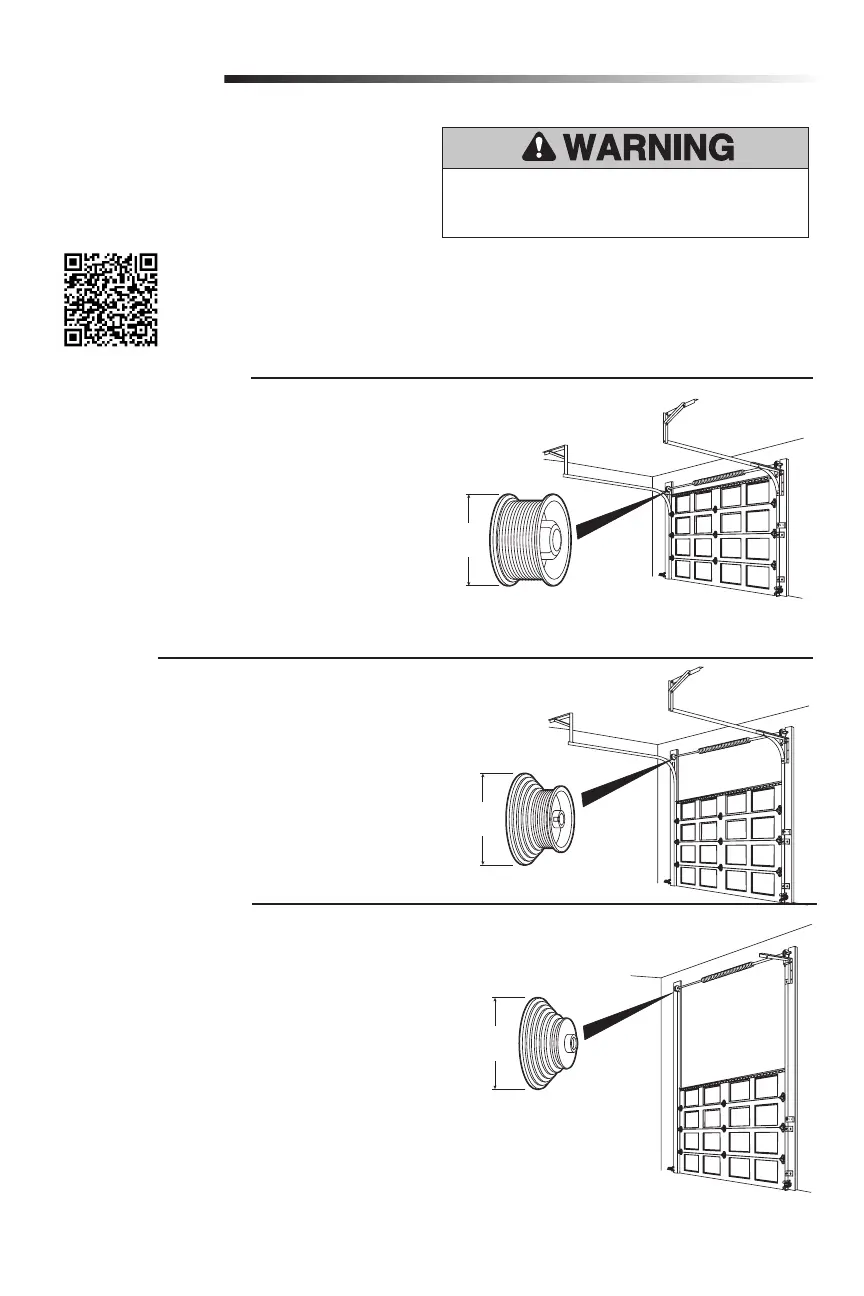
To identify the door profile number, measure the full drum
diameter based on the images below.
NOTE: This step is important to ensure the proper operation of
the unit.
To view a video demonstration of how to identify and set the door
profile, scan the QR code.
1
Standard Lift Sectional Door
• Door Profile 1 = Standard to Heavy Weight Door* with a 4" drum (Recommended).
• Door Profile 2 = Light Weight Door with a 4" drum.
• Door Profile 3 = Heavy Weight Door* with a 6" drum.
• Door Profile 4 = Light Weight Door with a 6" drum.
*NOTE: Drum sizes may vary by manufacturer.
For Standard Lift Sectional Doors:
•Drums less than or equal to 5", use 4" drum.
•Drums more than 5", use 6" drum.
Standard to Heavy Weight doors are those with solid wood
interiors, wood veneer exteriors, glass windows, insulation,
and/or decorations.
High Lift Door
• Door Profile 5 = Tapered drum with rails that raise to a higher elevation
Vertical Lift Sectional Door
• Door Profile 5 = Tapered Drum with rails raising vertically above the opening.
Adjustment
To prevent possible SERIOUS INJURY or DEATH, follow
instructions to select and set door profile for safe and proper
operation.
4-6 inch
diameter
8 inch
diameter
8 inch
diameter
8 inch
diameter
4-6 inch
diameter
8 inch
diameter
8 inch
diameter






 To Next Page