24
Remote Controls (Not Provided)
A total of 50 Security+ 2.0
®
remote controls or KPW250 keypads and 2
keyless entries (1 PIN for each keyless entry) can be programmed to the
operator. When programming a third keyless entry to the operator, the
first keyless entry will be erased to allow the third keyless entry to be
programmed. When the operator’s memory is full it will exit the
programming mode and the remote control will not be programmed. The
memory will need to be erased before programming any additional
remote controls. NOTE: If installing an 86LM to extend the range of the
remote controls DO NOT straighten the antenna.
The operator can learn remote controls on a single frequency of either
315 MHz, 390.0 MHz, or 433.92 MHz (where available). The default
frequency will be 315 MHz. This can be changed prior to learning remote
controls. Any remote controls learned will need to be erased before the
frequency can be changed.
Change Frequency
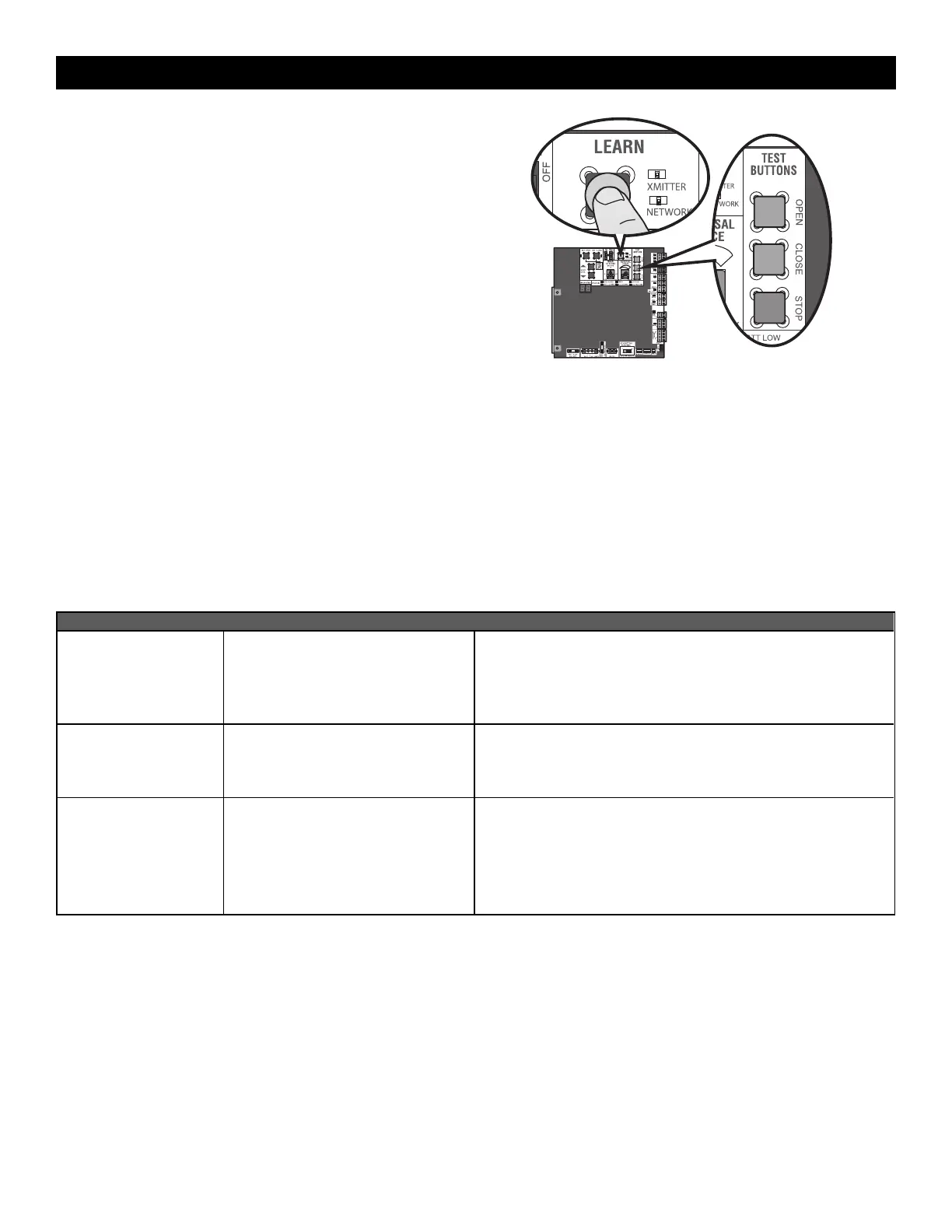
1. Press and release the LEARN button (operator will beep and green
XMITTER LED will light). NOTE: The display will show what
frequency is currently selected.
2. Use the MOVE GATE buttons to select the desired frequency.
F1 = 315 MHZ (default)
F2 = 390 MHz
F3 = 433.92 MHz (where available)
3. Follow the steps below to learn a remote control to lock in the
selected frequency.
There are 3 different options for programming the remote control depending on how you would like the remote control to function. Choose a
programming option:
OPTION DESCRIPTION PROGRAMMING STEPS
Single button as OPEN
only
Program a single button on the remote
control for open only. The Timer-to-Close
can be set to close the gate.
1. Press and release the LEARN button (operator will beep and green
XMITTER LED will light). NOTE: The operator will time out of
programming mode after 30 seconds.
2. Press the OPEN button.
3. Press the remote control button that you would like to program.
Single button (SBC) as
OPEN, CLOSE, and STOP
Program one remote control button as an
open, close, and stop.
1. Press and release the LEARN button (operator will beep and green
XMITTER LED will light). NOTE: The operator will time out of
programming mode after 30 seconds.
2. Press the remote control button that you would like to program.
Three separate buttons as
OPEN, CLOSE, and STOP
Program each remote control button as
an open, close, and stop.
1. Press and release the LEARN button (operator will beep and green
XMITTER LED will light). NOTE: The operator will time out of
programming mode after 30 seconds.
2. Press the OPEN, CLOSE, or STOP button, depending on the desired
function.
3. Press the remote control button that you would like to program.
PROGRAMMING







 To Next Page