33
To protect against fire and electrocution:
•
DISCONNECT power (AC or solar and battery) BEFORE installing or
servicing operator.
For continued protection against fire:
•
Replace ONLY with fuse of same type and rating.
Diagnostic Codes
NOTE: When cycling or disconnecting power (ac/dc) to the control board, it is recommended that you unplug the J15 plug.
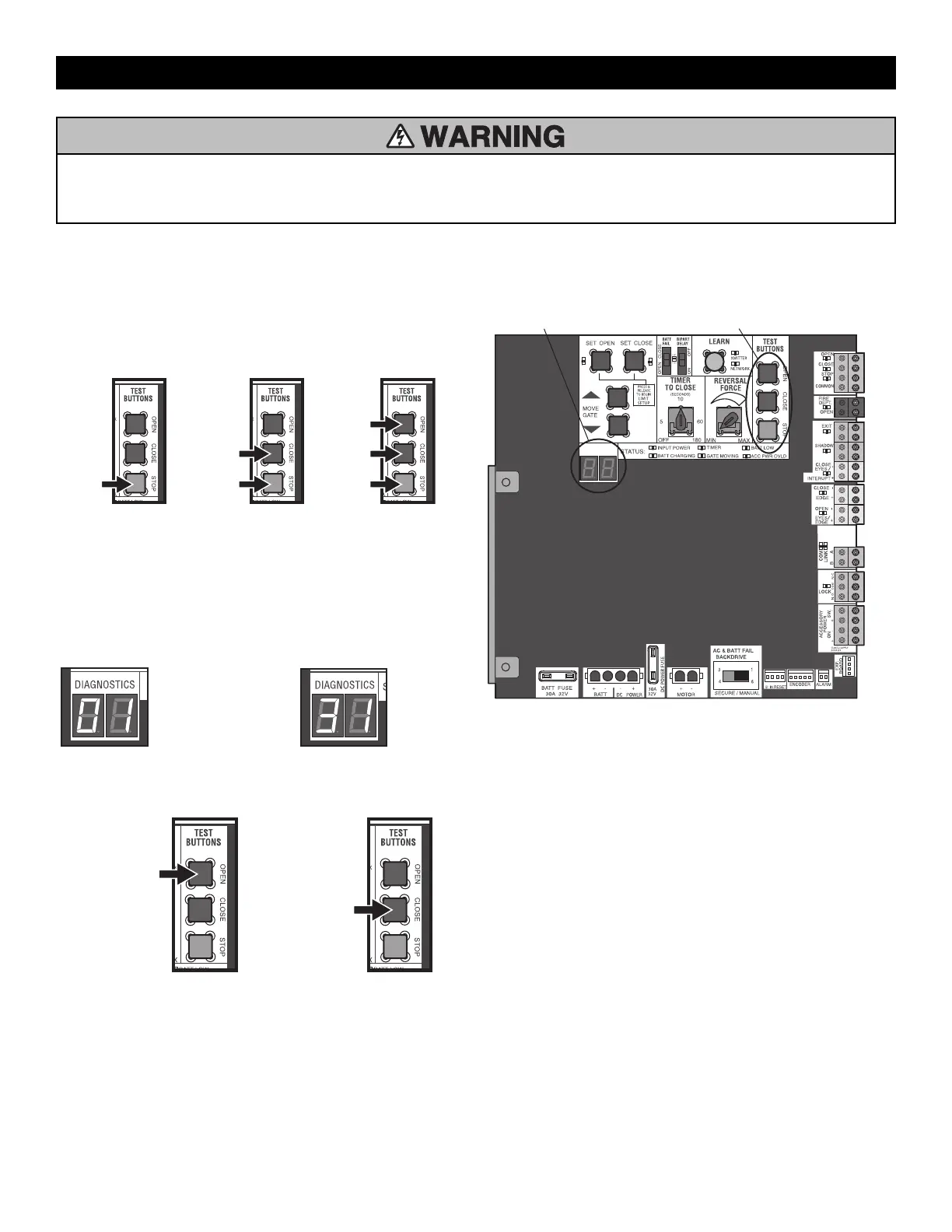
To View the Codes
The codes will show on the diagnostic display.
Press and
hold the
STOP
button...
...then press
and hold the
CLOSE button...
...then press
and hold the
OPEN button
until "Er"
shows on
the display.
The operator will show the code sequence number followed by the code
number:
A SECOND
LATER....
CODE SEQUENCE NUMBER
The first number shown is the
most recent code (example:
"01"). The display will show the
sequence of codes that
occurred starting with "01" and
going up to code "20".
CODE NUMBER
The second number shown after
the code sequence number is
the code itself (31-99, example"
"31"). Refer to the chart on the
following page for an
explanation of each code.
To Scroll Through the Saved Codes
Press the OPEN button
to cycle to the most
recent code ("01").
Press the CLOSE button
to cycle to the oldest
code (up to "20").
The operator will only keep track of up to 20 codes, then will start saving
over the oldest codes as new codes occur.
DIAGNOSTICS
DIAGNOSTICS DISPLAY
OPEN, CLOSE, & STOP BUTTONS
To Exit
Press and release the STOP button to exit. The display will also time out
after two minutes of inactivity.
To Reset the Code History
1. Press and hold the STOP button for six seconds. The display will show
"Er" then "CL" alternately for six seconds.
2. Release the STOP button. The code history has now been reset and
the display will show "- -" until a new code occurs.
3. Press and release the STOP button to exit.
TROUBLESHOOTING







 To Next Page