chargepoint.com 3
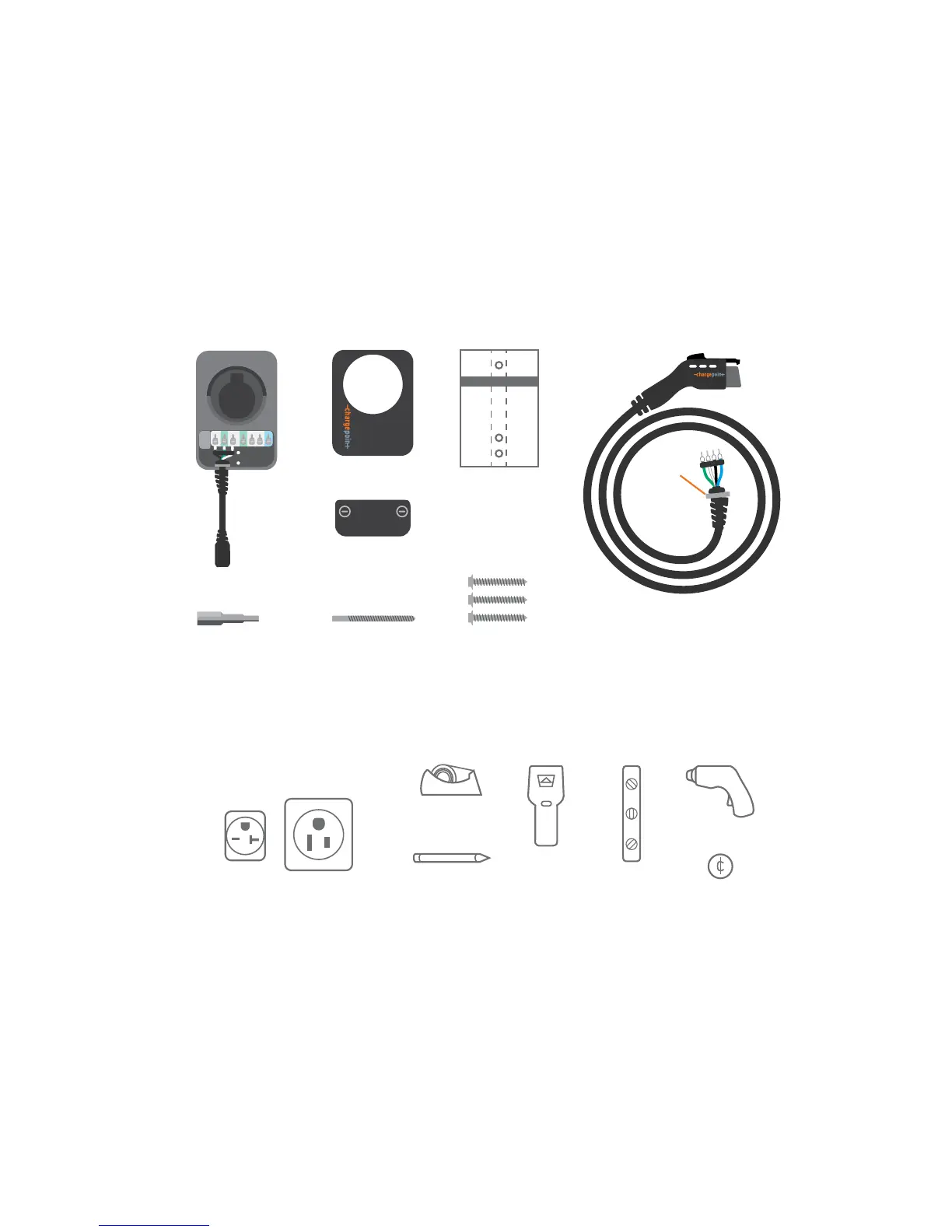
Inside the boxes you'll find...
➜ For information on Hardwire and outlet installation
by professional electricians, refer to pages 9-10.
Requirements to activate the Home station:
+ WiFi and Bluetooth
+ iOS or Android Phone
+ ChargePoint mobile app (free)
+ ChargePoint account (free)
Station Cover
Wire Cover
Power Cable
(comes with Plug
version only)
Installation Template
For Plug version:
NEMA 6-20 or 6-50 240V outlet,
installed ground facing up
Tape Stud Finder Level Drill
Coin
Pencil
Charging Cord
Cable
Clip
/ Driver Bit / Drill Bit
(3) 2 X / Lag Screws
Charging Cord Box:
If you’re missing any of these parts, please call 1.888.758.4389
Meet ChargePoint Home
Activation of Home will allow you to schedule
charging, start sessions remotely and set reminders
so you never forget to charge. You’ll be able to view
and track all your residential, public and workplace
charging in one place including energy usage and
how many miles you’ve added during a charging
session depending on your car model. You’ll also be
able to update your station remotely with any
software upgrades. Plus, Home works with Nest to
help you save on energy costs.










 To Next Page