4 chargepoint.com
✔
✘
!
1
Setup and Installation
Watch the Installation Video
Download the ChargePoint app from the Apple App
Store™ or Google Play™, select Home Charger from the
main menu and watch the Home Installation Video.
2
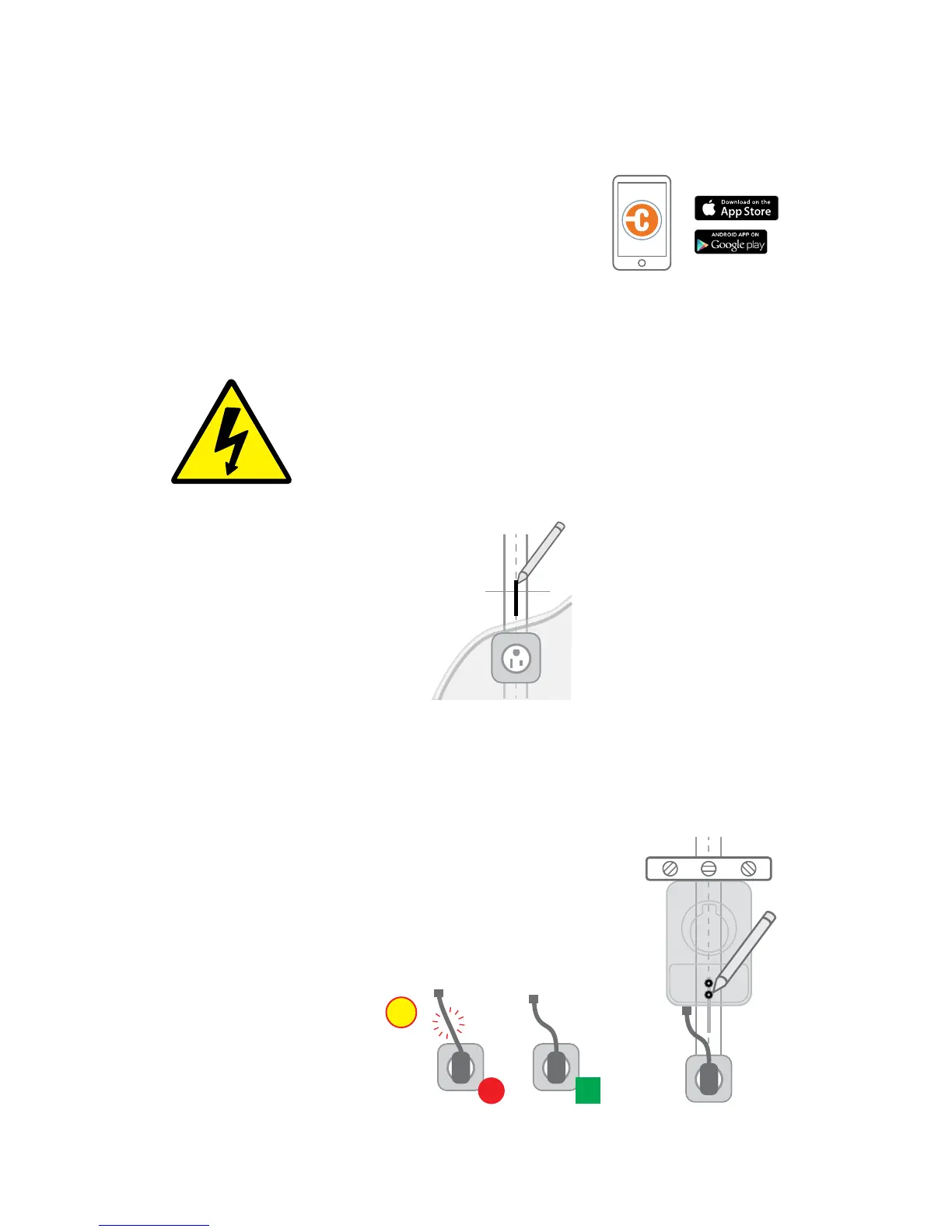
Find a wall stud
+ Find the center of the nearest
stud to the installed outlet using
a stud finder
+ Mark the center of the stud
with a line
3
Choose station installation location (Plug version only)
+ If you haven’t already, turn o your circuit breaker
+ Plug the station in. WARNING: If the front status light turns on
when the station is plugged in, your circuit is not o.
STOP IMMEDIATELY. Unplug the station and turn
o the power to the outlet at the circuit breaker.
+ Place the station against the wall, line up the station’s
two mounting holes with the line you marked earlier
+ Mark the two lower mounting holes
+ Unplug the station
Tip (Plug version only): To find
the station’s ideal mounting
height, plug the station's power
cord into the outlet.
Tip: Be sure the power cord has a gentle
curve but is not stretched.
➜ For Plug version, start at Step 2. For Hardwire and outlet installation, refer
to the steps for professional electricians on pages 9-10.
DANGER: RISK OF SHOCK
Turn o circuit breaker to 240V outlet. Do not restore
power to the outlet until installation is complete.
Failure to follow these instructions could result in
shock or electrocution.











 To Next Page