SET UP
34
Intelect® Advanced Therapy System
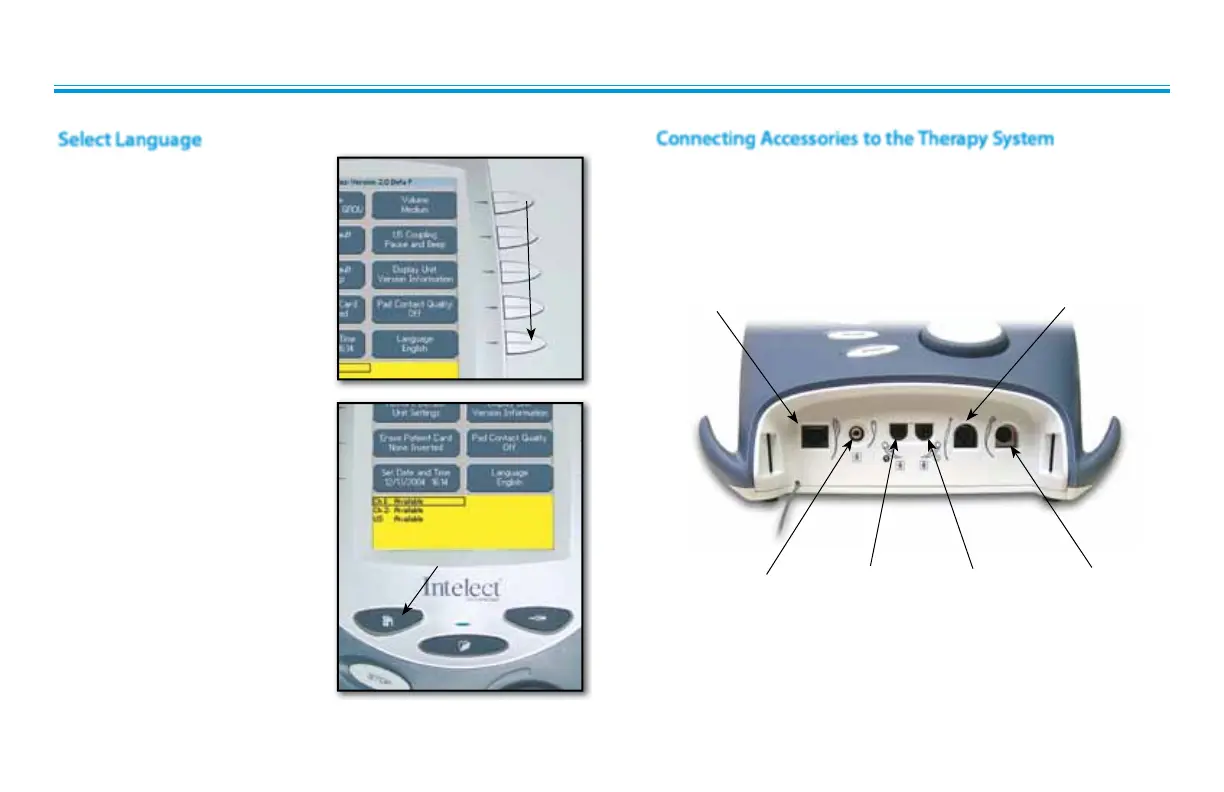
To change the language
displayed on the system, press
the Language button until the
desired language is displayed.
Press Home button to set the
language and return to Home
screen.
If Unit Default Settings are
restored, the language will revert
back to English.
LANGUAGE
BUTTON
PRESS HOME BUTTON
TO SET LANGUAGE
THERAPY SYSTEM SET UP (continued)
Select Language
Install Lead Wires, Ultrasound Applicator, Patient Interrupt Switch,
and any other accessories according to the Front Access Panel as
illustrated below. Refer to page 13 for Symbol Definitions.
Connecting Accessories to the Therapy System
OPERATOR REMOTE
(OPTIONAL)
CHANNEL 1/2
PATIENT INTERRUPT SWITCH
CHANNEL 1
LEAD WIRE
(BLACK)
CHANNEL 2
LEAD WIRE
(GREY)
MICROCURRENT PROBE
(OPTIONAL)
ULTRASOUND APPLICATOR
(COMBO SYSTEMS ONLY)











 To Next Page