Intelect® Advanced Therapy System
73
OPERATION
CLINICAL RESOURCES LIBRARY- CLINICAL PROTOCOLS™
Clinical Protocols™
The Intelect Advanced Clinical Resources Library contains Clinical Protocols™, User Protocols, Sequencing functions and access to the
Multimedia Card (MMC) which contains the Anatomical and Pathological Libraries.
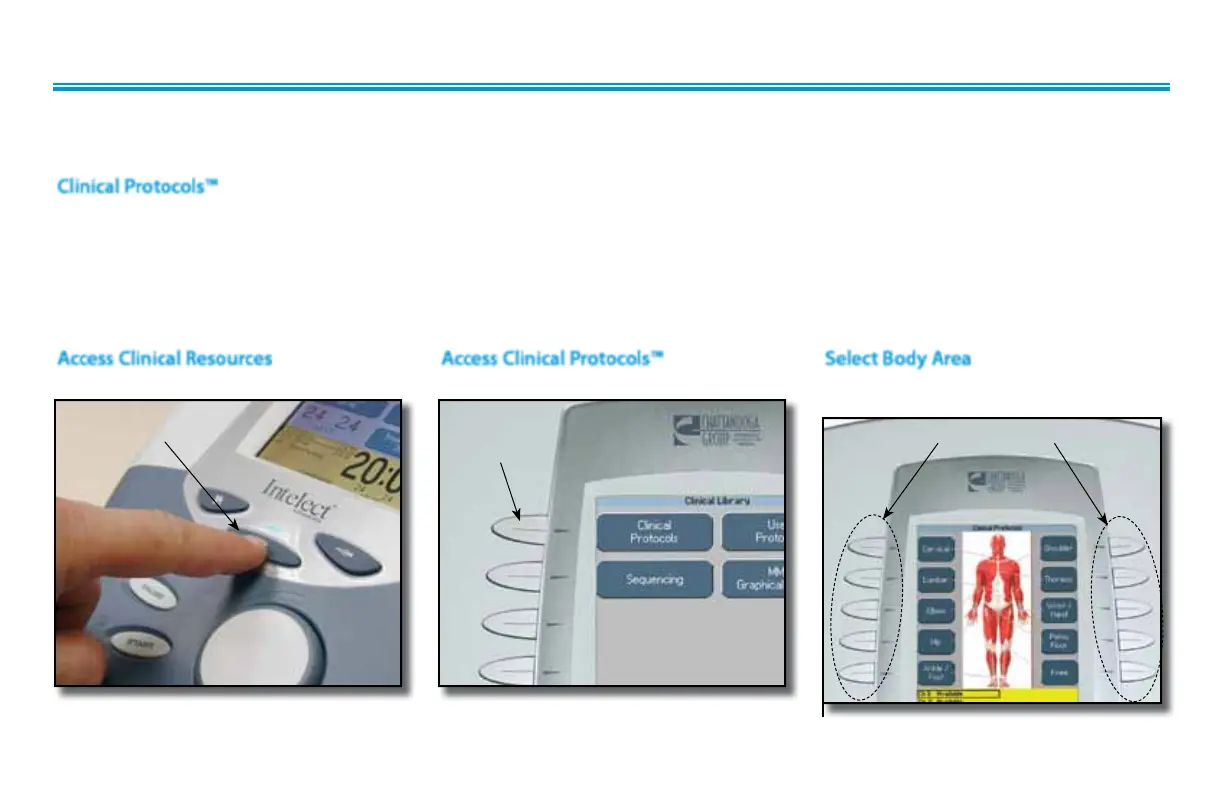
Press the Clinical Resources Library button. Press the Clinical Protocols button. Press the button corresponding to the
body area desired.
This library is a series of protocol presets where the Body Area, Clinical Indication, Pathological Condition, and Pathological Severity are
selected by the user,
and the Clinical Protocols algorithm will select the parameter
settings. These Clinical Protocols are to be used only as
guidelines. Each patient should be individually assessed to determine the appropriateness of the protocol parameters prior to use. All
Clinical Protocols can be edited to suit appropriate patient treatment prescription and patient comfort.
The following information gives general instructions to access, selection and setup of Clinical Protocols. Each Clinical Protocol is set up and
edited in the same basic manner.
Access Clinical Resources Access Clinical Protocols™
CLINICAL
PROTOCOLS
BUTTON
Select Body Area
BODY AREA BUTTONS
CLINICAL RESOURCES
LIBRARY BUTTON











 To Next Page