Product Using
CHCNAV ALPHAAIR-450 USER MANUAL | 2021-10 P a g e | 13
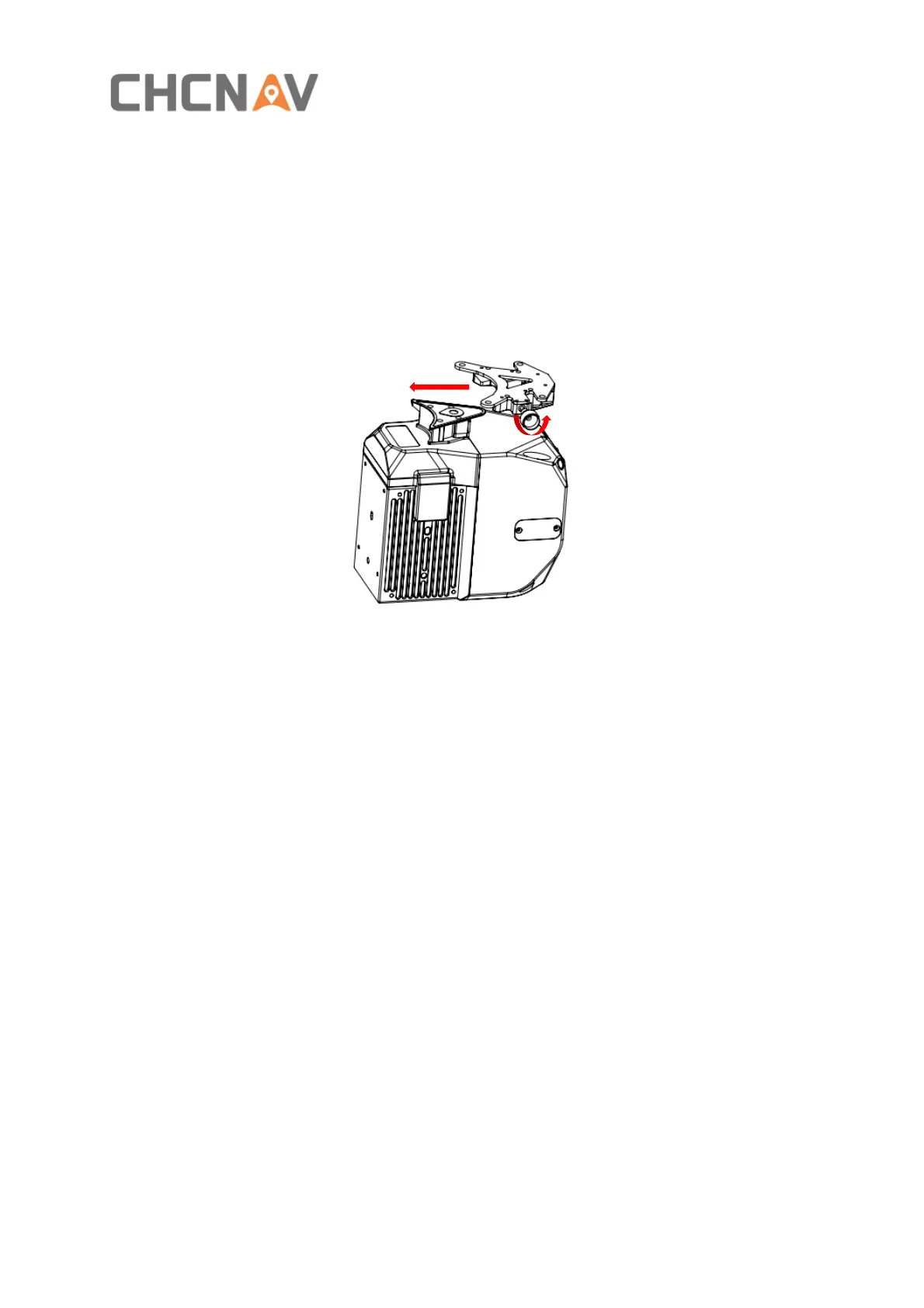
3.8.2 Airborne disassemble steps
▪ Hold the bottom of scanner with left hand and turn the handle bolt on the side of the
quick release fixture counterclockwise with right hand until the threaded part of the
handle bolt disengages.
▪ Pull the handle bolt back to the maximum position with the right hand and keep it. The
left hand can translate the scanner to the head direction to complete the separation of
the scanner and quick-release.
4 Product Using
4.1 Advance Preparation
▪ Take out the equipment from the container before using. Install it on the corresponding
platform and connect all cables. Meanwhile, set up the base station at an open sky area.
Turn on the equipment after the base station start recording static.
▪ Before data collection, it is necessary to check the remaining capacity of Alpha_LAS and
Alpha_CAM memory cards. If the remaining capacity is less than 10% or does not meet
the demand of current collection capacity, the data in card should be deleted in advance.
4.2 Equipment Installation
▪ First, install the equipment on the platform and lock it with screws. Remember to remove
the camera protective cover.
▪ Connect both power supply cable and GPS feeder cable of equipment and start power on.
▪ Put the equipment at an open sky area and turn on LiDAR.


 To Next Page