Data Acquisition
CHCNAV ALPHAAIR-450 USER MANUAL | 2021-10 P a g e | 15
DJI M300 Remote Control Flow
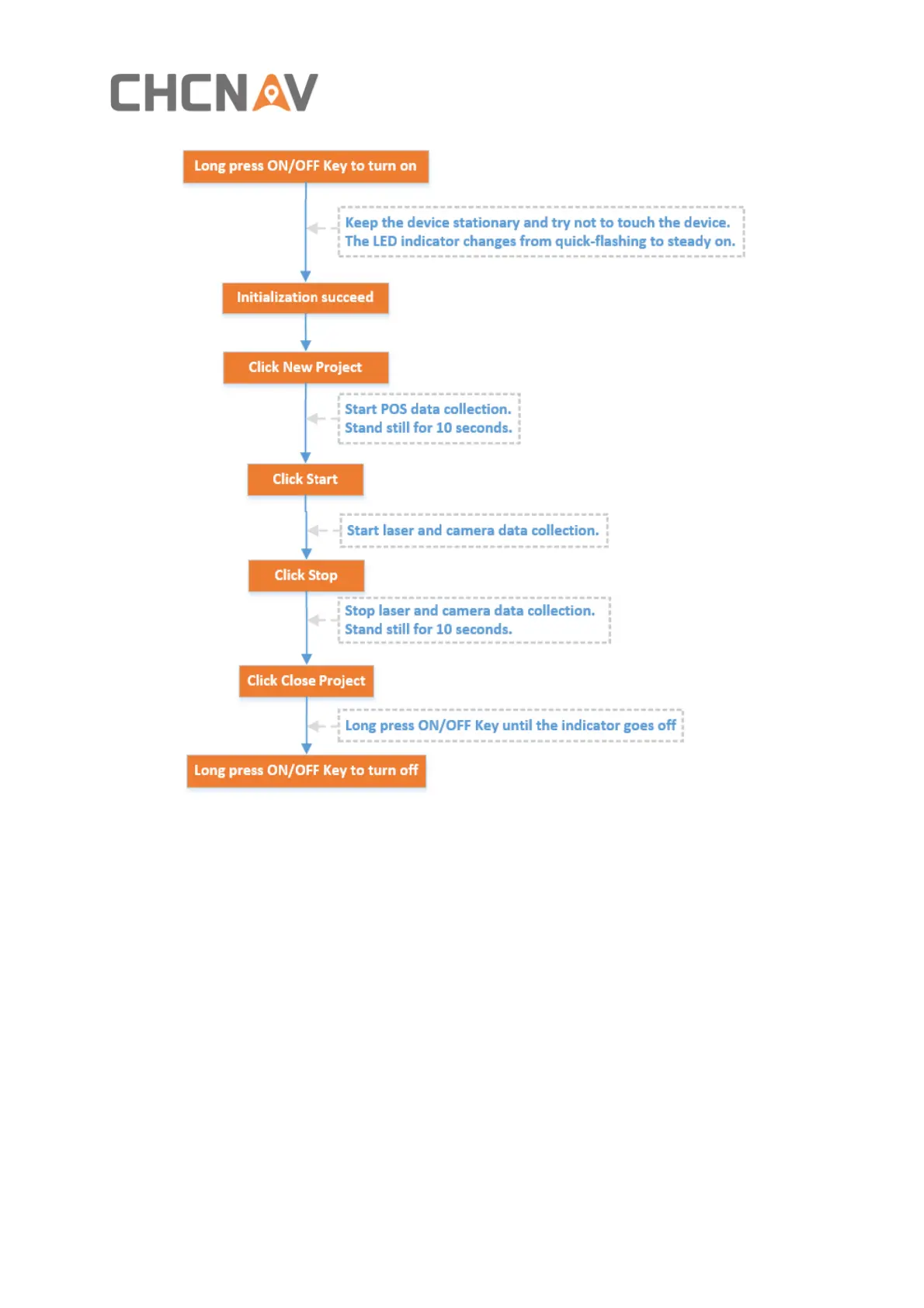
5.1 One-Key Control Flow
The AA450 is embedded with one-key acquisition software, equipped with one button
(including a buzzer and LED indicator) and two auxiliary LED indicators, the AA450 can be
controlled by a single key to complete data collection.
▪ Before power on, check all cables are connect correctly and power supply is normal.
▪ M300 Power On: Short press the power button, then long press it within 3 seconds to
power on the M300.Indicator light is always on after power on.
▪ LiDAR Power On: Long press the device’s “ON/OFF key”,the indicator lights up and the
buzzer sounds , the indicator light flashes which means the lidar is powered on
successfully. Keep the device stationary and try not to touch the device.
▪ Device initialization: About one minute after lidar is powered on, the indicator light is
normal on which means device initialization successfully completed!


 To Next Page