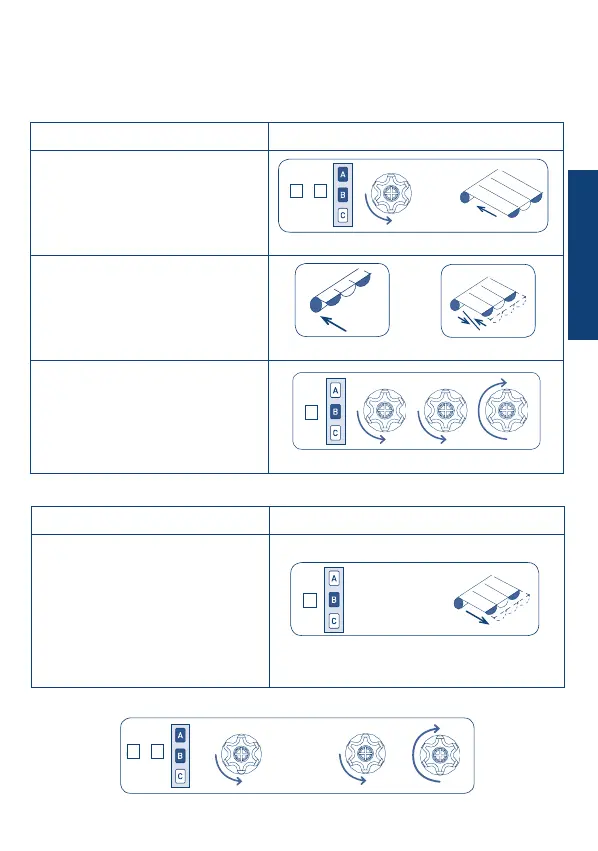
Procedure Command sequence
1) Press the A+B buttons for at
least 2 s.
The motor will immediately perform a
brief conrmation movement and after
2 s will start again in ascent.
2) Wait for the awning to ascend
completely.
The motor is now running in dead man
mode, enabling the ne adjustment of
the rst middle position.
3) Conrm the position by
pressing B for 2 s.
The motor will perform three (3)
conrmation movements.
Procedure Command sequence
1) Give a long (>2 s) stop impulse
with the motor stopped.
After 2 seconds, the motor will perform
the movement into position.
Note: in motors with electronic limit
switches the proper positioning is
ensured only if the awning starts from
the upper limit position.
31
FIRST MIDDLE POSITIONS
This optional function enables the awning to be moved to a rst preferred middle position.
The rst middle position is memorized as descent time starting from the upper limit switch.
SETTING FIRST MIDDLE POSITION
Positioning2 sec
MOVEMENT TO THE FIRST MIDDLE POSITION
DELETING THE FIRST MIDDLE POSITION
.....
4 sec
B
2 sec
2 sec
.....
+
A
B
.....
Adjustment
+
A B
B
B
+
A B
ENGLISH


 To Next Page