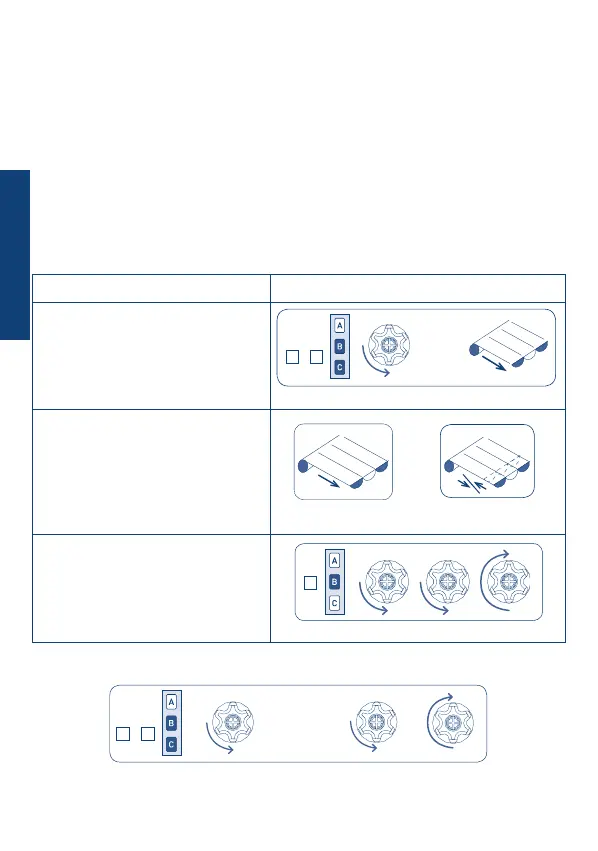
Procedure Command sequence
1) Press the B+C buttons for at
least 2 s.
The motor will immediately perform a
brief conrmation movement and after
2 s will start again in descent.
2) Wait for the awnings to
descend completely.
The motor is now running in dead man
mode, enabling the ne adjustment of
the second middle position.
3) Conrm the position pressing
B for 2 s.
The motor will perform three (3)
conrmation movements.
32
SECOND MIDDLE POSITIONS
SETTING SECOND MIDDLE POSITION
2 sec
Adjustment
.....
DELETING THE SECOND MIDDLE POSITION
+ CB
4 sec
.....
B
2 sec
This optional function is useful to open the awning automatically using the WindTec Lux
sensor when ambient light exceeds the set threshold.
This position is intended only for use in combination with the “Light” automatic
movement given by the WindTec Lux light sensor.
There are no manual controls to bring the awning into this position.
If the second middle position is not programmed, the “Light” automatic movement given
by the WindTec Lux light sensor (if enabled) opens the awning completely.
The second middle position is memorized as ascent time starting from the bottom limit
switch.
B
+
B C
+
B C
ENGLISH


 To Next Page