38
ENGLISH
REMOTE CONTROL MEMORY CLEARING
It is possible to delete singly all the memorized remote controls. When the last one
is deleted the control unit initial condition is restored. The same applies to the single
channels of a multichannel remote control: just select the channel to cancel.
Tn: Remote control to be cleared
TnTn Tn (2 sec)
+
A B
B
A
SETTING THE A530058 REMOTE CONTROL
WITH 4 INDEPENDENT CHANNELS
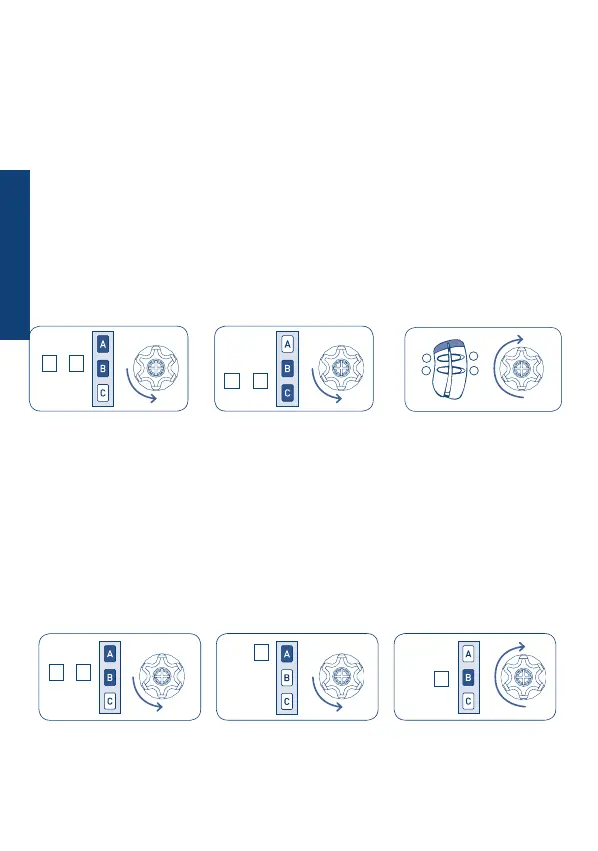
The A530058 remote control must be set from another Skipper or Giro Series remote
control that has already been programmed.
• Press the A and B buttons at the same time.
• The motor makes a short movement.
• Then press the B and C buttons at the same time.
• The motor makes a short movement again.
• Then, press the desired button on the A530058 remote control for at least 2 seconds.
• The motor makes a long movement.
Tn: Already programmed remote control
Tx: Additional remote control
1
3 4
2
Tx (2 sec) Tn Tn
+
A B
+
B C


 To Next Page