15
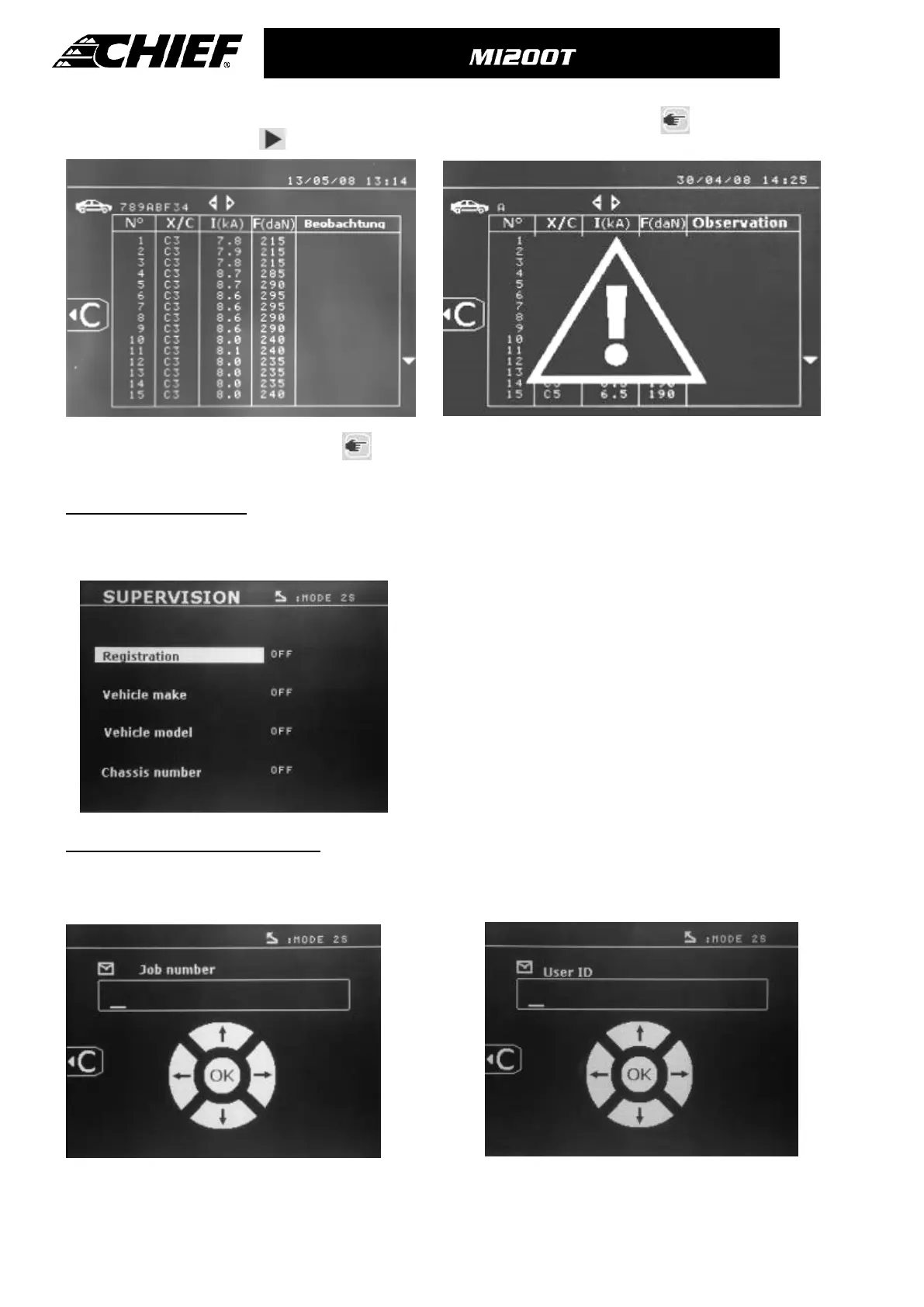
When the warning image is displayed, press again and the report content will be erased. The warning image will
disappear after 3 seconds.
User Identification mode
Entry of repair order (screen guide):
To modify or erase a repair order that has already been created, you will need to use the SPOT software on a PC (you are
unable to do this on the machine). You can create maximum 100 repair orders.
Screen: « Job number » Screen: “User identification”
The « left » and « right » arrow keys move the cursor within the field.
The up and down arrow keys scroll through letters or figures.
Press Esc to erase the field.
To erase the content of a report , it has to be
on screen by pressing "view" .
To erase the report shown, press and the
following message will be on the screen:
If the identification mode setting is « ON », all the fields of the repair order must be completed or the machine will display «
identification defect ». To activate or deactivate the identification mode, an "Identification" SD card must be inserted in the BP
drive instead of the "Program" SD card. The setting screen below is activated by pressing the mode button for 2 seconds.
When the "Identification" SD card is inserted and the identification
mode is « ON », the following screen is displayed.
This screen allows the selection of default fields « registration
number, car brand, car model, chassis number »
To exit the screen, press and hold the mode button for 2 seconds.
Then, re-insert the '"Program" SD card into the BP drive.



 To Next Page