Installation
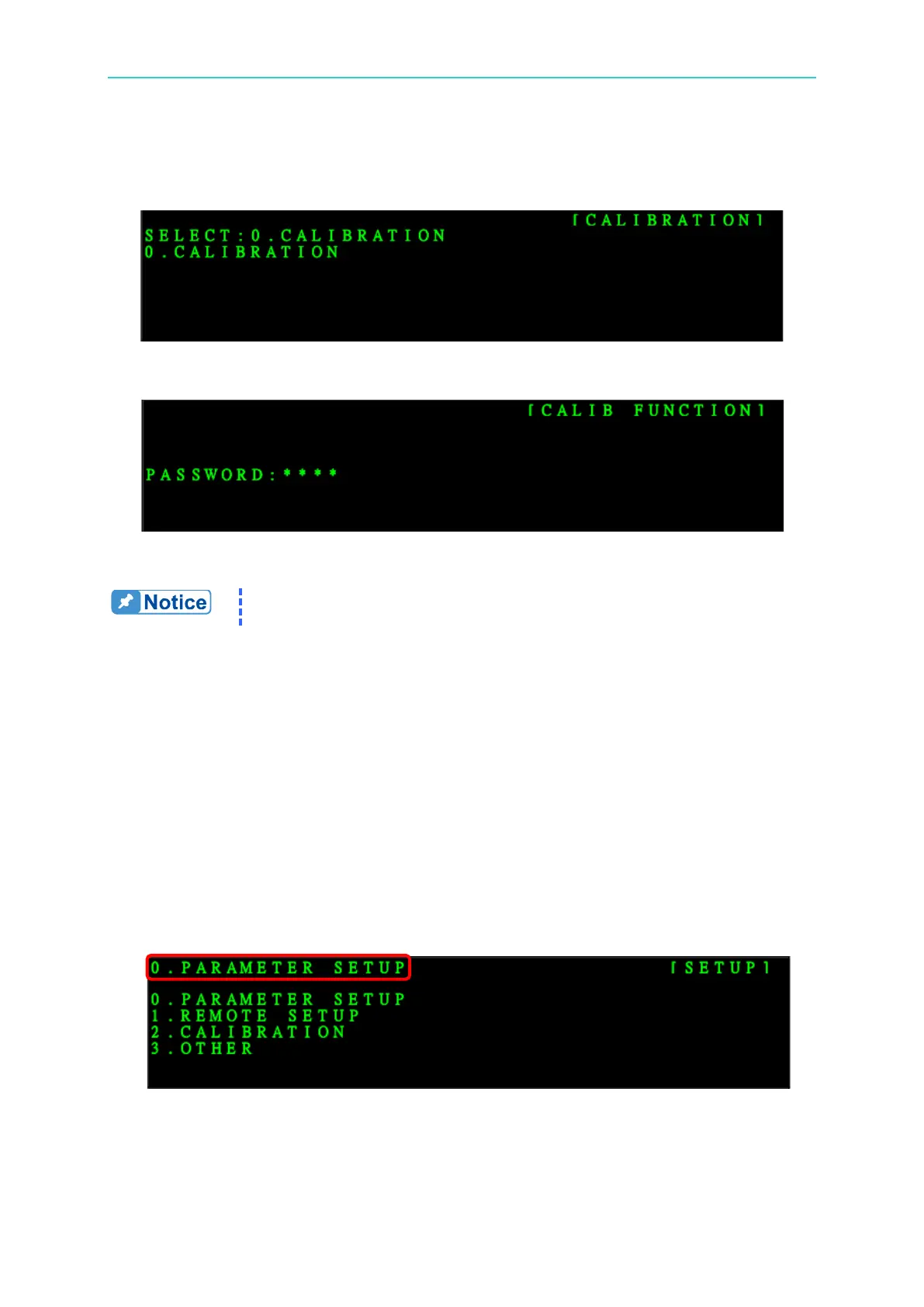
1. Press SETUP and select 2. CALIBRATION.
2. Press ENTER to go to 0. CALIBRATION as the figure shown below:
3. Press ENTER and input PASSWORD:6200 as the figure shown below:
4. To quit the CALIBRATION, just press EXIT.
It is necessary to enter PASSWORD when running CALIBRATION. The
PASSWORD is 6200.
3.3.8 Setting SCPI Communication Method
1. Select SCPI communication for setting.
Step1. Press SETUP to enter into SETUP screen.
Step2. Press 0 or turn the rotary knob to select 0.
Step3. Press ENTER to confirm entering PARAMETER SETUP menu.
Step4. Press arrow key to select COMMUNICATION MODE for setting.
Step5. Press 1 or turn the rotary knob to select 1.
Step6. Press ENTER to confirm.
Step7. Press EXIT to quit.
2. Select PARAMETER SETUP in SETUP screen.
3. Set COMMUNICATION MODE in PARAMETER SETUP screen.


 To Next Page