The Uconnect Phone feature enables you to place and receive hands-free mobile phone calls.
Drivers can also place mobile phone calls using their voice or by using the buttons on the
touchscreen (see Voice Command section).
The hands-free calling feature is made possible through Bluetooth technology — the global
standard that enables different electronic devices to connect to each other wirelessly.
If the Uconnect Phone Button
exists on your steering wheel, you then have the Uconnect
Phone features.
Refer to the “Understanding The Features Of Your Vehicle” section of your vehicle's Owner's
Manual on the DVD for further details.
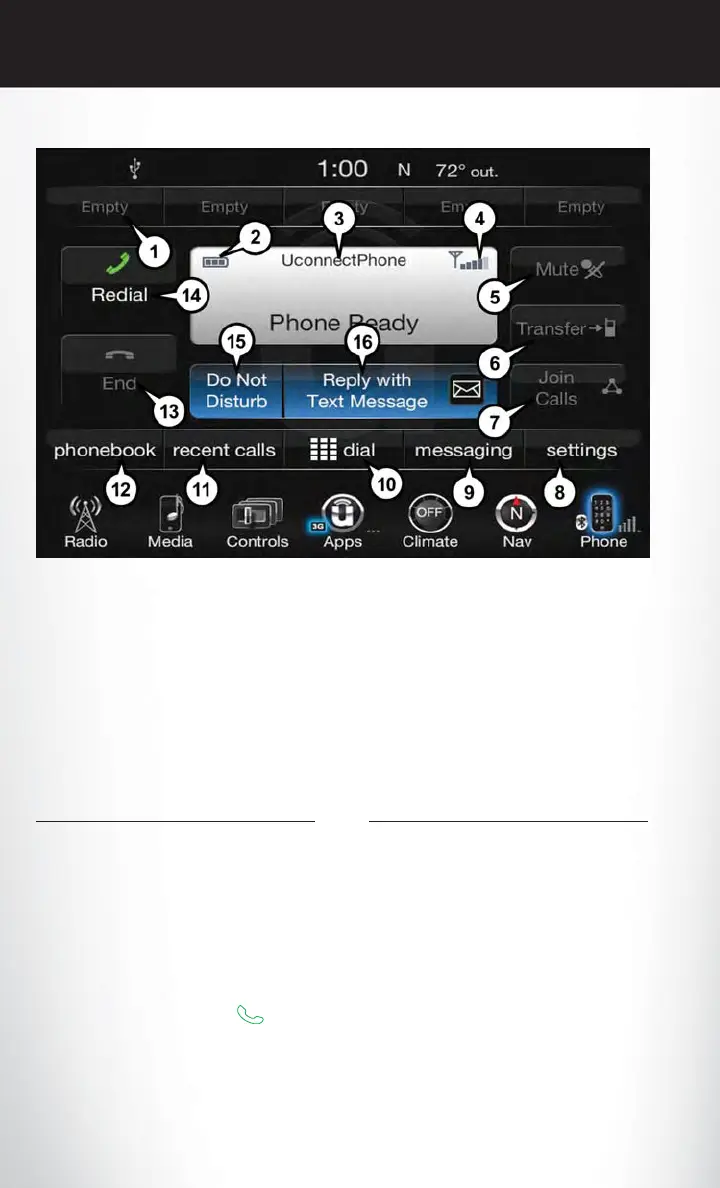
Uconnect 8.4A/8.4AN Phone Menu
1 — Favorite Contacts
2 — Mobile Phone Battery Life
3 — Currently Paired Mobile Phone
4 — Mobile Phone Signal Strength
5 — Mute Microphone
6 — Transfer To/From Uconnect System
7 — Conference Call*
8 — Manage Paired Mobile Phones
9 — Text Messaging**
10 — Direct Dial Pad
11 — Recent Call Log
12 — Browse Phone Book Entries
(Contains 9-1-1)
13 — End Call
14 — Call/Redial/Hold
15 — Do Not Disturb
16 — Reply with Text Message
* — Conference call feature only available
on GSM mobile devices
** — Text messaging feature not available
on all mobile phones (requires Bluetooth
MAP profile)
ELECTRONICS
128













 To Next Page