ELECTRONIC VEHICLE INFORMATION
CENTER (EVIC ) AND DRIVER INFORMATION
DISPLAY (DID)
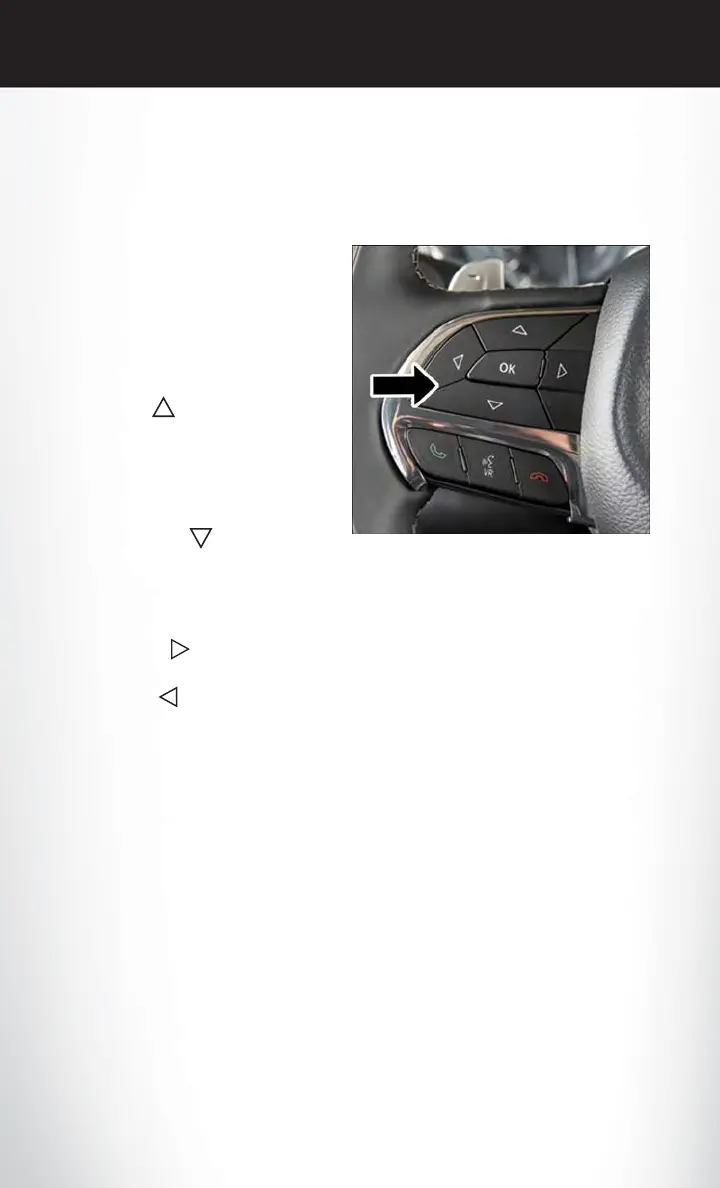
The EVIC/DID features a driver interactive
display that is located in the instrument cluster.
Pushing the controls on the left side of the
steering wheel allows the driver to select ve-
hicle information and Personal Settings. Refer
to “Programmable Features” located in “Elec-
tronics” in this guide for additional information.
• Push the UP
arrow button to scroll
upward through the main menus (Main
Gauge, Speedometer, Vehicle Info, Driver
Assist (DID Only), Fuel Economy, Trip Info,
Start/Stop Info, Audio, Messages, Screen
Set Up, Settings (EVIC Only).
• Push the DOWN
arrow button to
scroll downward through the main menu and
submenus (Main Gauge, Speedometer, Ve-
hicle Info, Driver Assist (DID Only), Fuel Economy, Trip Info, Start/Stop Info, Audio, Mes-
sages, Screen Set Up, Settings (EVIC Only).
• Push the RIGHT
arrow button to access the information screens or submenu screens of
a main menu item.
• Push the LEFT
arrow button to access the information screens or submenu screens of a
main menu item.
• Push the OK button to access/select the information screens or submenu screens of a main
menu item. Push and hold the OK button for two seconds to reset displayed/selected features
that can be reset.
NOTE:
Identify the Electronic Vehicle Information Center (EVIC) and Driver Information Display (DID)
as described:
• Electronic Vehicle Information Center (EVIC) — 3.5” Instrument Cluster
• Driver Information Display (DID) — 7” Instrument Cluster
EVIC/DID Controls
ELECTRONICS
138












 To Next Page