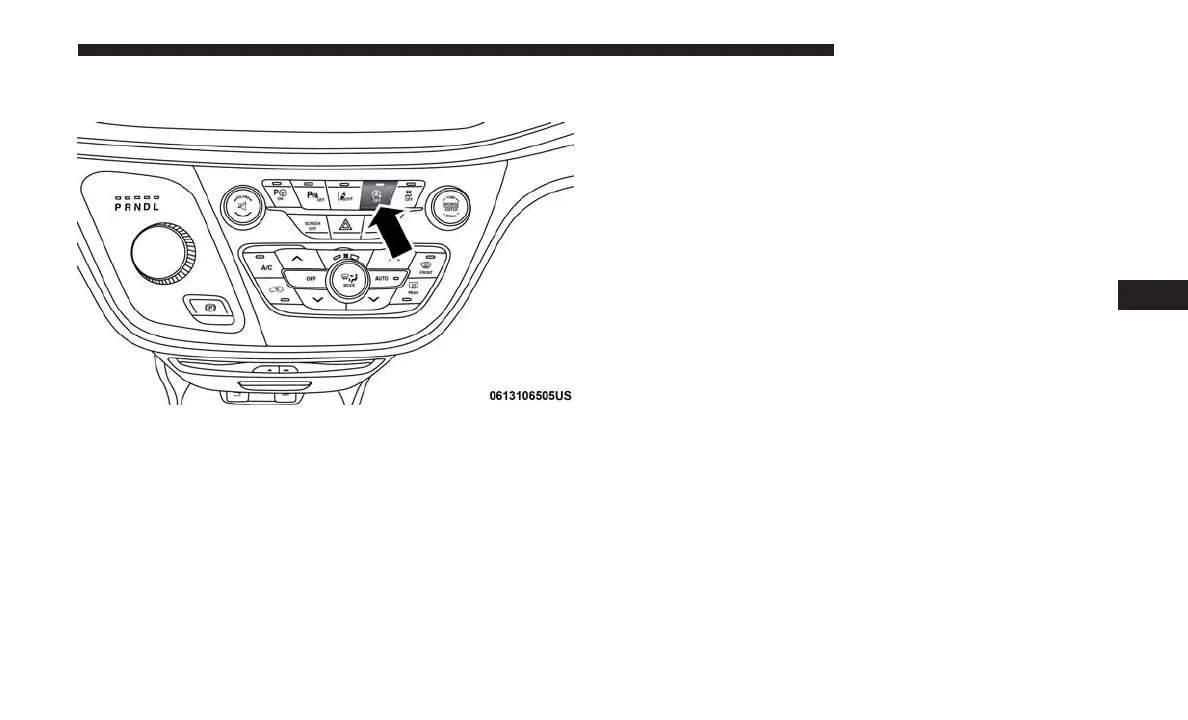
To Manually Turn Off The Stop/Start System
1. Push the STOP/START OFF switch (located on the
instrument panel). The light on the switch will illumi-
nate.
2. The “STOP/START OFF” message will appear in the
instrument cluster display. Refer to “Instrument Cluster
Display” in “Getting To Know Your Instrument Panel”
for further information.
3. At the next vehicle stop (after turning off the STOP/
START system) the engine will not be stopped.
4. The STOP/START system will reset itself back to an ON
condition every time the ignition is turned off and back
on.
Automatic Shutdown
This vehicle is equipped with an automatic shutdown
feature. If the vehicle is left in READY mode (vehicle
running) with the gear selector in PARK for one hour after
the driver exits, this feature will automatically turn the
vehicle off. Notifications have been added into this feature
to raise awareness of the timed event:
• In the interior of the vehicle, the instrument cluster will
display “Ready To Drive”, and will be accompanied by
three audible chimes while exiting. These interior warn-
ings will occur regardless of whether the key fob re-
mains in the vehicle or is removed.
• For the exterior of the vehicle, the horn will sound three
times if the fob is removed from the vehicle and the
vehicle is in the “READY” mode.
Please consider this feature when intentionally running the
vehicle for extended periods of time over one hour. To
restart the vehicle, follow the normal vehicle starting
process.
Stop/Start Button
6
STARTING AND OPERATING 339















 To Next Page