The system will also continuously perform the dynamic
vehicle calibration to account for differences such as
over or under inflated tires and new tires.
Enabling And Disabling The ParkSense Active Park
Assist System
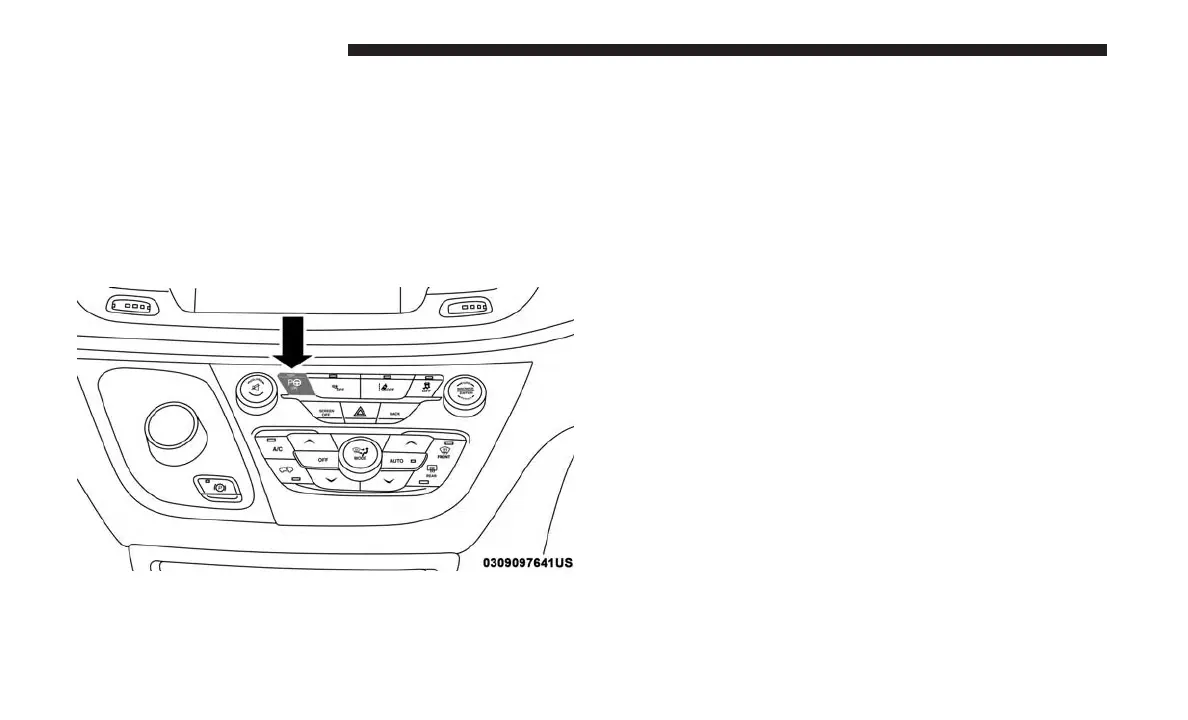
The ParkSense Active Park Assist system can be enabled
and disabled with the ParkSense Active Park Assist switch,
located on the switch panel below the Uconnect display.
To enable the ParkSense Active Park Assist system, push
the ParkSense Active Park Assist switch once (LED turns
on).
To disable the ParkSense Active Park Assist system, push
the ParkSense Active Park Assist switch again (LED turns
off).
The ParkSense Active Park Assist system will turn off
automatically for any of the following conditions:
• The parking maneuver is completed.
• Vehicle speed greater than 18 mph (30 km/h) when
searching for a parking space.
• Vehicle speed greater than 5 mph (7 km/h) during active
steering guidance into the parking space.
• Touching the steering wheel during active steering guid-
ance into the parking space.
• Pushing the ParkSense Front and Rear Park Assist
switch.
• The Driver’s door is opened.
• The liftgate is opened.
• Electronic Stability Control/Anti-lock Braking System
intervention.
•
The ParkSense Active Park Assist system will allow a
maximum of six shifts between DRIVE and REVERSE. If
the maneuver cannot be completed within six shifts, the
ParkSense Active Park Assist Switch
388 STARTING AND OPERATING















 To Next Page