5. You can interrupt the help message or system prompts
by pushing the VR or Phone button and saying a Voice
Command from current category.
Basic Voice Commands
The basic Voice Commands below can be given at any
point while using your Uconnect system.
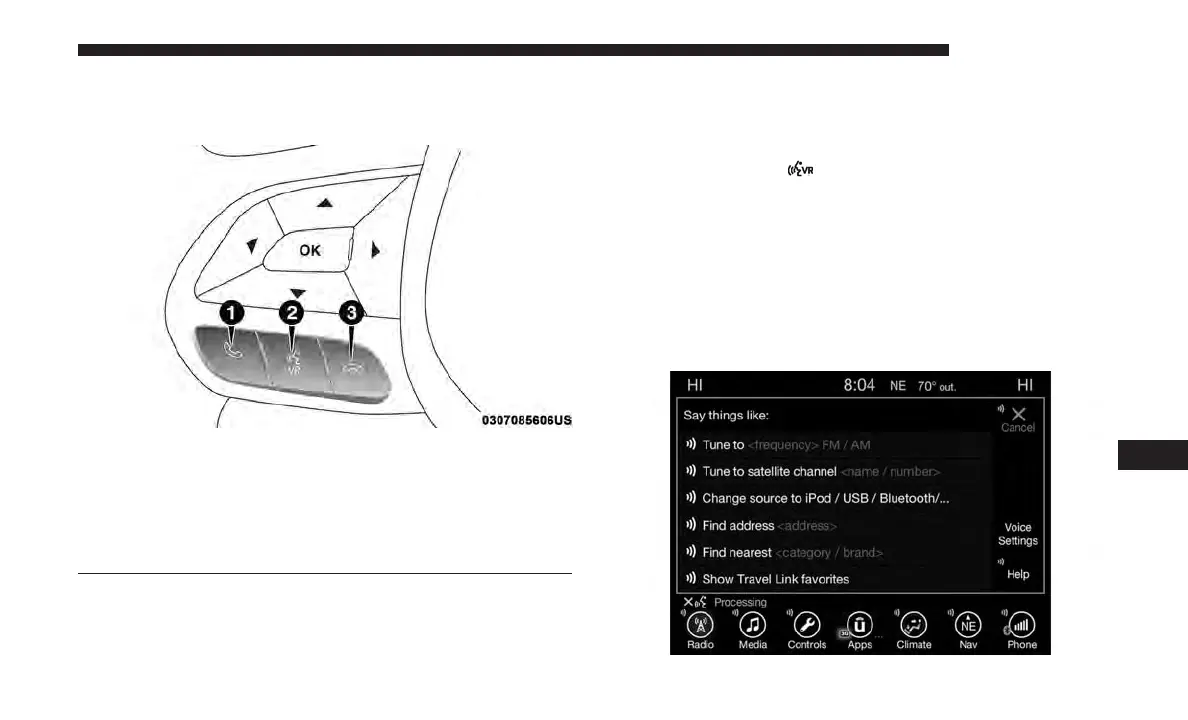
Push the VR button
. After the beep, sayѧ
• Cancel to stop a current voice session
• Help to hear a list of suggested Voice Commands
• Repeat to listen to the system prompts again
Notice the visual cues that inform you of your voice
recognition system’s status. Cues appear on the touch-
screen.
Uconnect Voice Command Buttons
1 — Push To Initiate Or To Answer A Phone Call, Send Or Receive
A Text
2 — For All Radios: Push To Begin Radio Or Media Functions. For
8.4 Only: Push To Begin Navigation, Apps And Climate Functions.
3 — Push To End Call
Uconnect 8.4
10
MULTIMEDIA 661















 To Next Page