1-6
Cisco Aironet 1130AG Series Access Point Hardware Installation Guide
OL-8369-05
Chapter 1 Overview
Hardware Features
Anti-Theft Features
There are three methods of securing the access point:
• Security cable keyhole—You can use the security cable slot to secure the access point using a
standard security cable, like those used on laptop computers (refer to the “Using a Security Cable”
section on page 2-18).
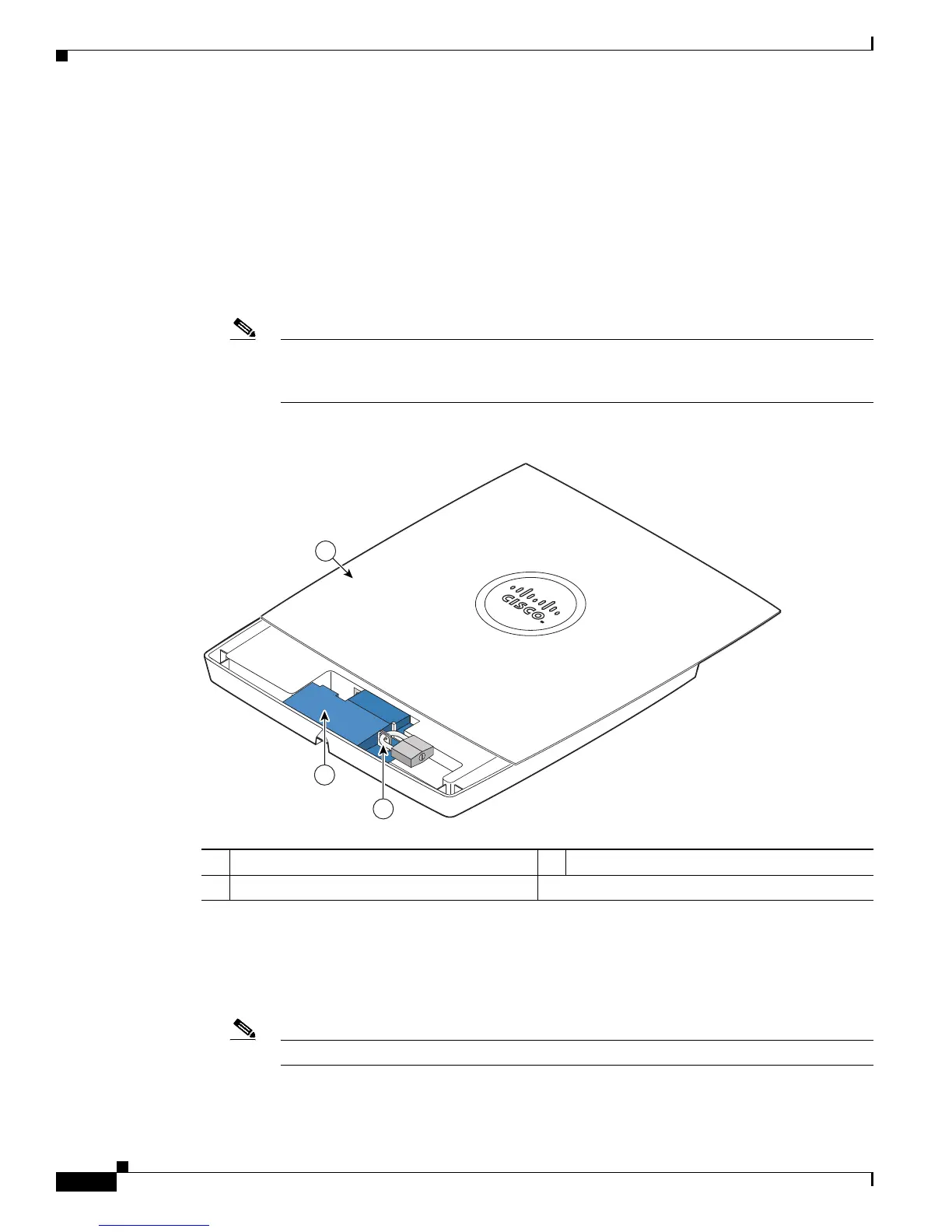
• Security hasp adapter—When you mount the access point on a wall or ceiling using the mounting
plate and the security hasp adapter, you can lock the access point to the plate with a padlock (see
Figure 1-2). Compatible padlocks are Master Lock models 120T and 121T or equivalent.
Note The security hasp adapter covers the cable bay area ( including the power port, Ethernet port,
console port, and the mode button) to prevent the installation or removal of the cables or the
activation of the mode button.
Figure 1-2 Access Point with Security Hasp Adapter
\
• Security screw—The access point contains a security screw hole (see Figure 1-3) that can be used
to secure the access point to the mounting plate.
–
When the supplied #8 Philips head screw is used, the access point is prevented from accidently
detaching from the mounting plate in vertical and over-head mounting positions.
Note The supplied #8 Philips head screw provides minimal anti-theft protection.
1 Access point cover in open position 3 Security padlock
2 Security hasp adapter


 To Next Page
 Loading...