2-6
Cisco Aironet 1130AG Series Access Point Hardware Installation Guide
OL-8369-05
Chapter 2 Installing the Access Point
Deploying the Access Points on the Wireless Network
Step 4 For lightweight access points, after your access points are deployed, ensure that your controller is not
configured as a master controller. A master controller should only be used for configuring access points
and not in a working network.
Access Point Layout and Connectors
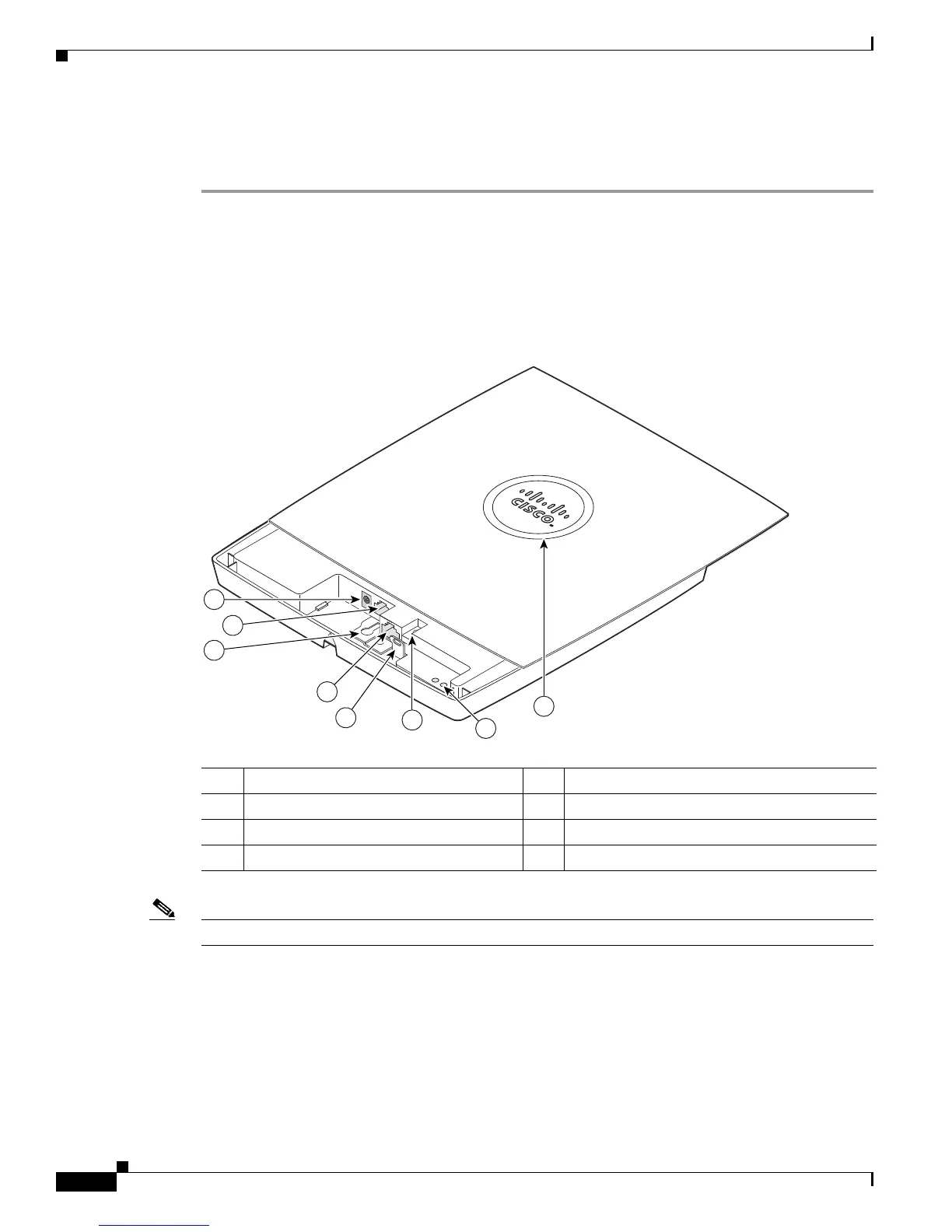
Figure 2-1 identifies the main access point hardware features.
Figure 2-1 Access Point Hardware Features
Note There is a second keyhole slot located on the bottom of the unit near the security slot.
1 48-VDC power port 5 Padlock post
2 Ethernet port (RJ-45) 6 Mode button
3 Keyhole slot 7 Ethernet (E) and radio (R) LEDs
4 Console port (RJ-45) 8 Status LED


 To Next Page
 Loading...