1-11
Cisco Aironet 1130AG Series Access Point Hardware Installation Guide
OL-8369-05
Chapter 1 Overview
Network Example with Lightweight Access Points
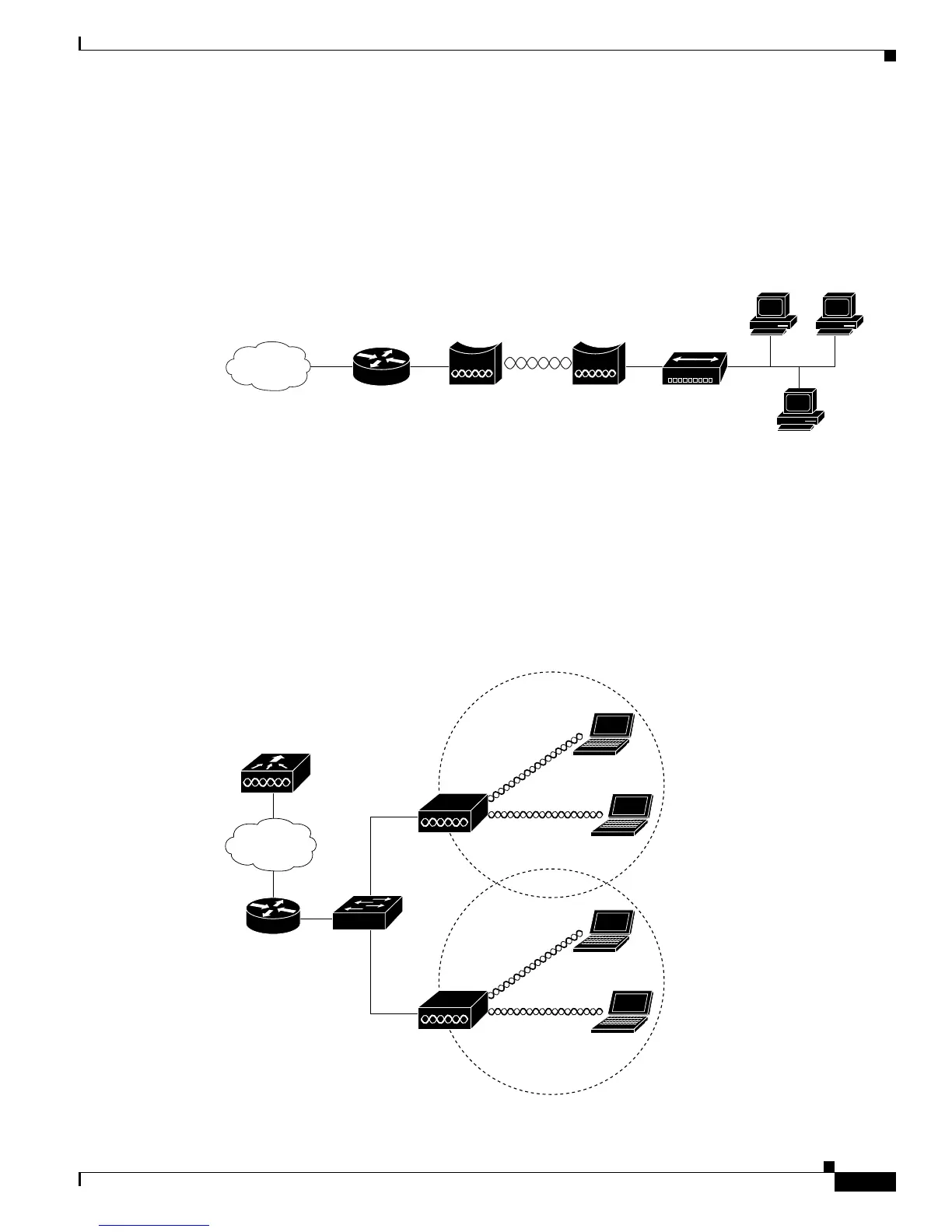
In Figure 1-8, the autonomous unit is configured in workgroup bridge mode and is associated to a Cisco
Aironet root bridge as a wireless bridge device. This configuration allows the Ethernet-enabled devices
pass Ethernet traffic to and from the main LAN using the workgroup bridge. The main advantage of this
configuration is that the wireless communication link can be over a longer distance than an access point
supports. Typically, an access point can communicate over approximately a 1-mile range; however, the
bridge-to-bridge wireless link can communicate over approximately a 21-mile range.
Figure 1-8 Workgroup Bridge Configuration 2
Network Example with Lightweight Access Points
The lightweight access points support Layer 3 network operation. Lightweight access points and
controllers in Layer 3 configurations use IP addresses and UDP packets, which can be routed through
large networks. Layer 3 operation is scalable and recommended by Cisco. Figure 1-9 illustrates a typical
network configuration containing lightweight access points.
Figure 1-9 Typical Lightweight Access Point Network Configuration Example
Bridge Workgroup
bridge
135499


 To Next Page
 Loading...