22
Chapter 4: Setting up and Connecting the USB Network Adapter
Setting Up the Adapter
Wireless-G USB Network Adapter
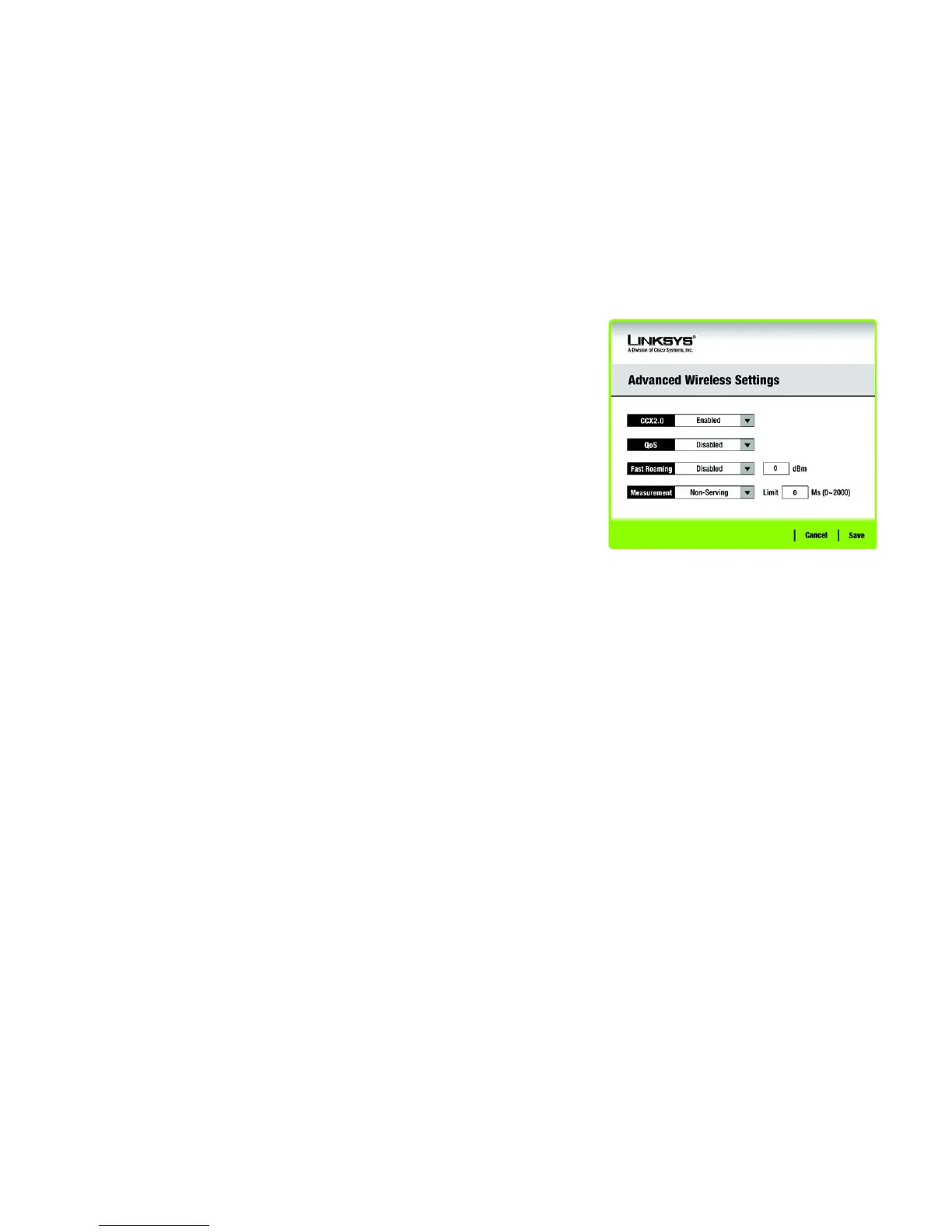
Advanced Wireless Settings
This screen is for advanced users to enable CCX2.0.
CCX2.0 - Cisco Compatible Extensions, a Cisco wireless network protocol. Select Enabled from the drop-
down menu to use the function. Select Disabled to disable to function.
QoS - Quality of Service. QoS mechanisms ensure better service to high-priority types of network traffic,
which may involve demanding, real-time applications, such as videoconferencing. To use this function, select
Enabled from the drop-down menu. Select Disabled to disable to function.
Fast Roaming - To use fast roaming, select Enabled from the drop-down menu. Select Disabled to disable
the function. Enter the rate in the field. The default is -70 dBm.
Measurement- To use measurement, select Non-Serving or Serving from the drop-down menu. Select
Disabled to disable the function. Enter the limit from 0-2000 Ms in the field. The default limit is 250 Ms.
Figure 4-30: Advanced Wireless Settings


 To Next Page
 Loading...