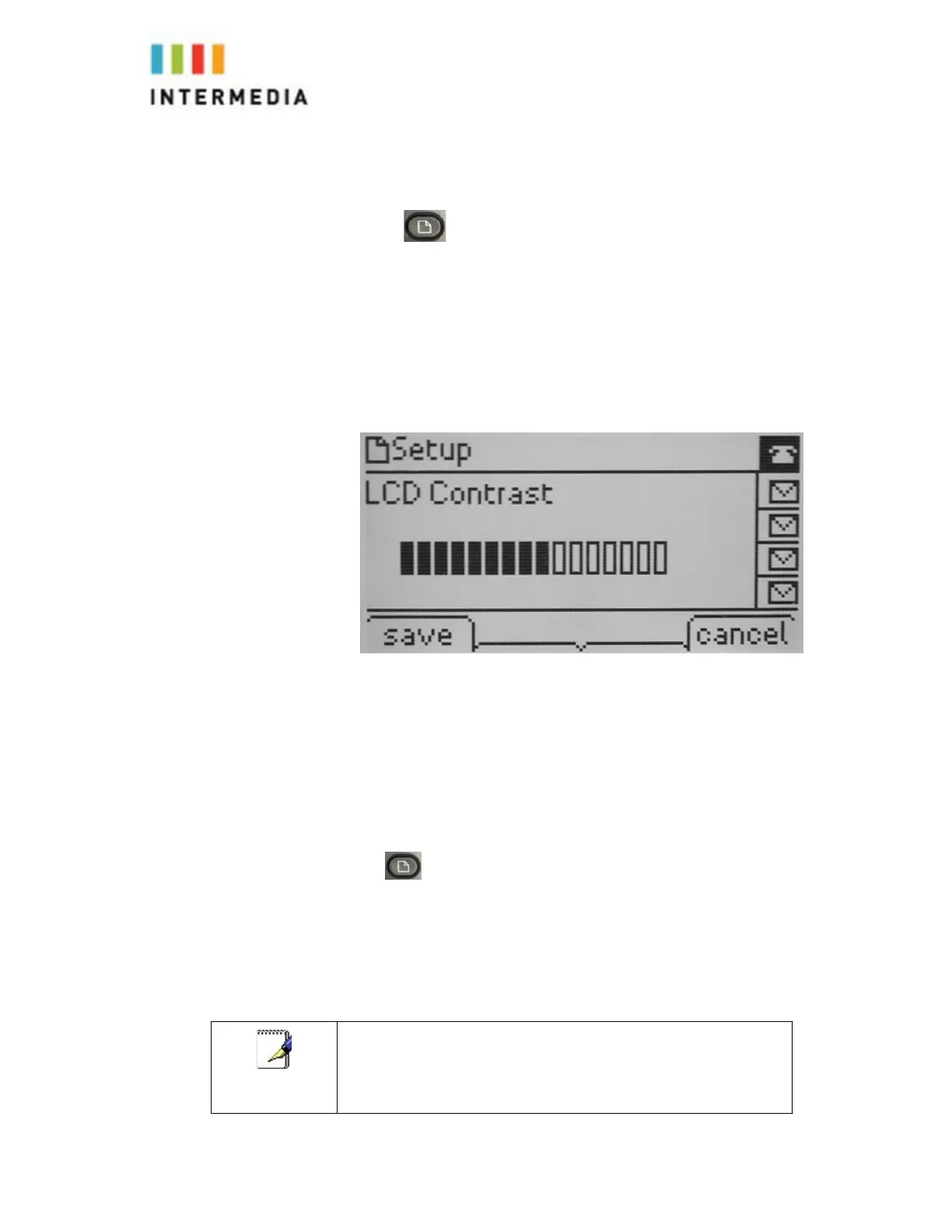
To Adjust the Display contrast:
1.
Press
2.
Select #16 LCD Contrast using the Arrow Pad and select soft key
3.
Use the Arrow Pad to adjust the contrast to the desired level
4.
Press the save soft key
5.
The cancel soft key will return you to the idle screen
The following figure shows the Clock Ti
me
Selecting the Ring Type
You can select different ring types to distinguish your phone from your
neighbor’s phone.
To change the incoming ring type:
1.
Press
2.
Select # 4, Ring Tone using the select soft key
3.
Select the ext you want to change using the arrow pad and the change soft key
4.
Using the Arrow key scroll through and press the play soft key to hear the ringtone
5.
Once you find the desired tone, press the select soft key
If
you
configure
your
Desk
Phone
with
a
silent
ring,
press
the
flashing
line
Key
or
the
answer
soft
key
to
answer
the
call.
If
your
handset
is
off
hook,
the
call
is
routed
to
the
handset.
If
your
handset
is
on
hook,
the
call
is
routed
to
the
speaker.
41



 To Next Page