a.
If you selected Always, enter a number, or extension number, to
forward all future incoming calls t
o.
b.
If you selected No Answer, you will see that your phone number is
entered in the Contact field by default. By entering your own phone
number in this field, the phone will send callers to your v
oicemail
box if you do not answer. You may enter a number to forward al
l
unanswered incoming calls to and how m
any rings to wait before
forwarding (one ring is approximately four seconds). A value of
20sec is
recommended.
c.
If you selected Busy, you will see that your phone number is entered
in the Contact field by default. By entering your own phone num
ber
in this f
ield, the phone will send callers to your voicemail box if your
phone is busy. You may enter a number to forward all f
uture
incoming calls to when all of your incoming lines are bus
y.
3.
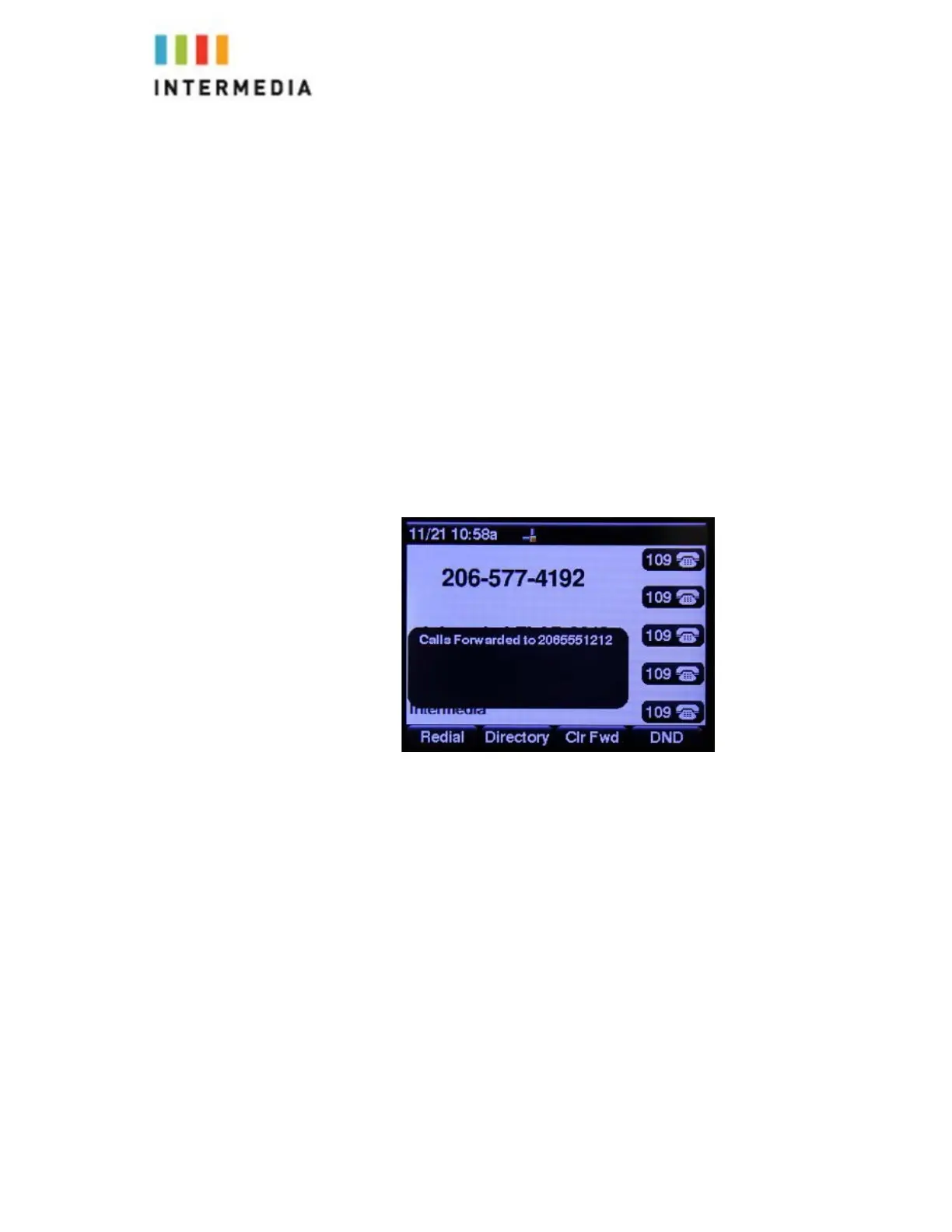
After you press Forward soft key and enter the desired number you will see
the below idle s
creen.
“Calls Forwarded” Appears on the display and confirms call forwarding is
enabled.
To Disable Call Forwarding:
From the idle display, press the Clr Fwd soft key on the display.
The idle display returns, and the date and time are displayed.
Dynamic Forwarding
This Feature is not supported by the Cisco SPA525G2
Enabling Do Not Disturb
Do Not Disturb prevents the phone from ringing and sends callers directly to
your voicemail box.
18








 To Next Page