<SM-13024-A>
8
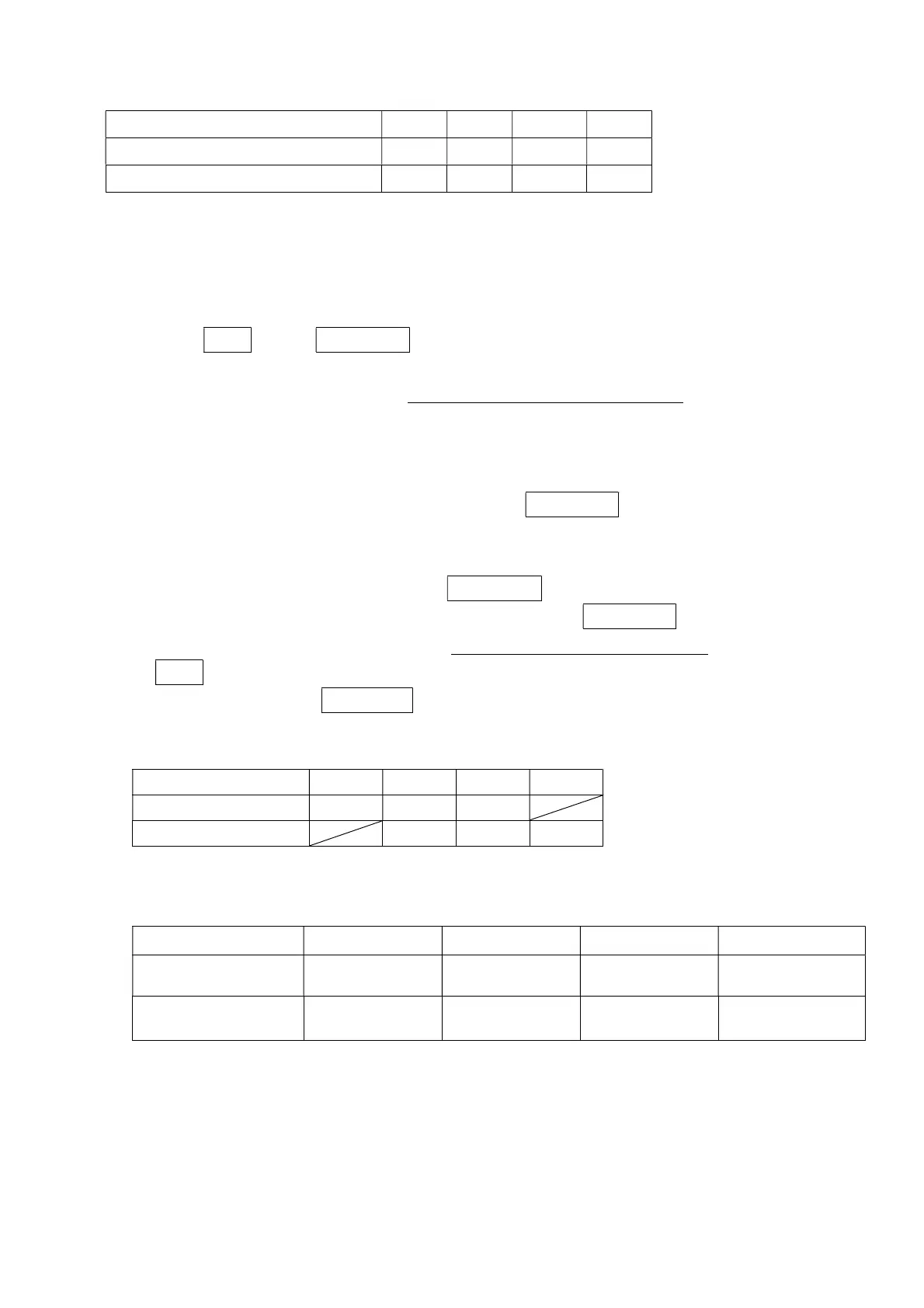
Pressuredewpoint(℃)
(NOTE)
-20 -30 -40 -60
(reference)
Atmosphericdewpoint
(℃) -40 -48 -57 -74
Time(h) 6 12 24 72
NOTE:Pressuredewpointis0.7MPa.
14) Sinceithassetupbeforehand,donottouchtheneedlevalve(referto6-3clause)attachedtothe
dewpointsensorlowerpart.
5-2Operationstop
1)
Closetheinletandoutletvalves.
2)
PresstheSTOPbutton.DEWPOINTisstilldisplayedevenatthistime.
3)
TurnOFFthemainpowersupply.
4) Sincedryerpassesairalsoduringastop,besuretocloseinletandoutletvalve.
5-3Energysavingunit
Thisproductisequippedwithanenergysavingunitasastandardaccessory. Thefollowing
showstheoutlineoftheenergysavingunit.
1)
TurnONor OFFtheenergysaving unitusingthe ECOMODE button. Whentheenergy
savingunitispoweredON,theindicationlampislit.Additionally,thelampislittoshowthe
dewpointvalue,whichissetatthistime.
2)
To change the set dew point, keepthe ECO MODE button pressed for 2 sec. with the
energysavingunitturnedOFF([ECO]lampisoff.).SinceECOMODEblinksinthatcase
anditdisplaysthatachangeispossible,pleasebesuretocheckblinking.Whenpressing
theSTOPbuttoninthisstate,thenumericvaluecanbechanged.Whenadesirednumeric
valueisshown,presstheECOMODEbuttontosetthisvalue.(Blinkingchangestolighting.)
3)
ThedewpointsetfortheG-type(standardtype)isdifferentfromthatsetfortheM-type
(high-gradetype).
Pressuredewpoint
-10℃ -20℃ -40℃ -60℃
G-type
○ ○ ○
M
-type
○ ○ ○
4)
Thedewpoint,atwhichtheoperationisactuallychangedtotheenergysavingoperation,is
set at a level slightly lower than the set dew point level. Therefore, the energy saving
operationisnotstartedatthesetdewpoint.
-10℃setting -20℃setting -40℃setting -60℃setting
Dewpointchangedto
energysaving
Lessthan-14℃ Lessthan-24℃ Lessthan-44℃ Lessthan-64℃
Dewpointwhich
Over-12℃ Over-22℃ Over-42℃ Over-62℃
5) Ifthe flowconsumptionissmall,the dewpoint does notbecomeworse with theenergy
saving operation started. At this time, the operation is forcibly returned to the normal
operationafter1hourhaselapsed.



 To Next Page