6 VTM1
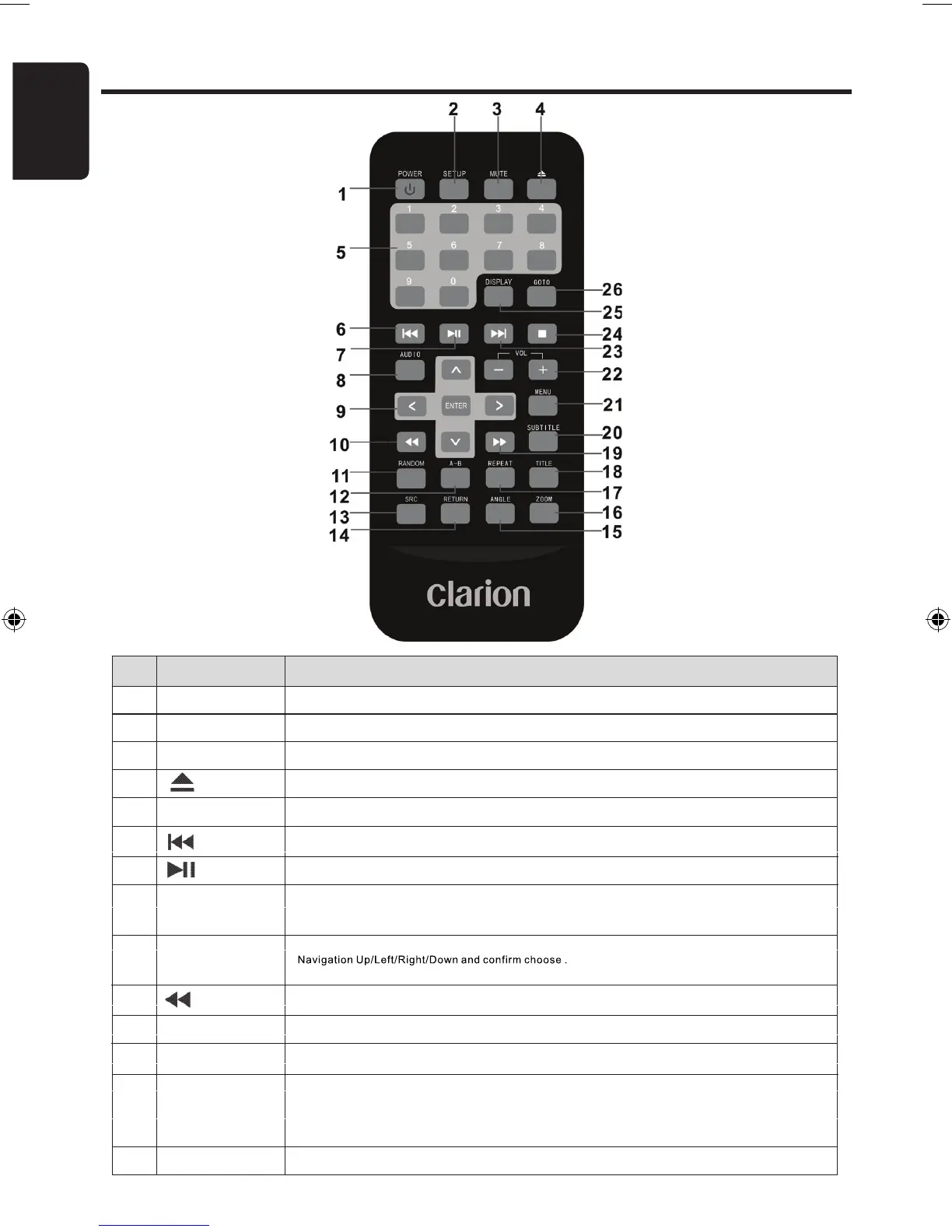
Controls and Functions : Remote Unit
Item
Name
Function or control
1 Power Press to turn the VTM1 On or Off.
2 Setup Press to access the setup menu and modify the player settings.
3 Mute Press to switch the sound On or Off.
4
Eject Press to Eject an inserted CD or DVD.
5 0 - 9 Numeric Keys Press to directly enter Track Numbers or to change some settings.
6
Previous Press to go back to a previous Chapter / Track on CD, DVD, USB or SD.
7
Play or Pause Press to Play or Pause playback from CD, DVD, USB or SD.
8 Audio
DVD: Press to change the Audio Language during playback.
VCD/CD: Press to change the Audio Channel (Left, Right, Stereo) during playback.
9 Up/Down/Left/Right Press to navigate in a DVD Menu, MP3/AVI Menu and change settings/values in the
Arrows and ENTER Display Menu.
10
Reverse Press to Fast Reverse playback at 2x, 4x, 8x, 16x and 32x speeds.
11 Random Press to play chapters or tracks in random order.
12 A - B Press to repeat playback from point A to point B.
13 SRC Press to select the desired Video Input Source: DVD, AV1 or AV2.
To select USB or SD first select DVD mode, then press and hold once again >2 sec.
To switch between USB and SD modes press and hold once again until it changes.
14 Return Press to return to the Main Menu. Press again to return the last position of playback.
15
Angle
Press to select a different filming Angle.
Please note that this feature only works if the DVD is recorded with multiple angles.
16
Zoom
Press to set the Zoom for movie viewing.
17
Repeat
DVD Repeat: Press 1x Chapter, 2x Title, 3x All.
CD Repeat: Press 1x Track, 2x All.
18
Title
Press to view the DVD disc’s Title Menu.
19
Skip forward
Press to Fast Forward playback at 2x, 4x, 8x,16x and 32x speeds.
20
Subtitle
Press to select and turn on DVD Subtitles during playback.
21
Menu
Press to view the DVD Main Menu.
Press and hold it to display the Display Menu.
22
VOL - / VOL+
Press to Decrease / Increase the volume.
23
Next
Press to go to the next Chapter on DVD or Track on CD.
24
Stop
Press to stop playback, press [PLAY] or [ENTER] button to start playing at the last position;
Press [STOP] button twice to fully stop playback, Press [PLAY] or [ENTER] button to start
playing at the beginning of DVD.
25
Display
Press to Display the Playback Information-
(Title, Chapter, Track and Time).
REMOTE CONTROL FUNCTIONS
VTM1 6
01-12-2010


 To Next Page