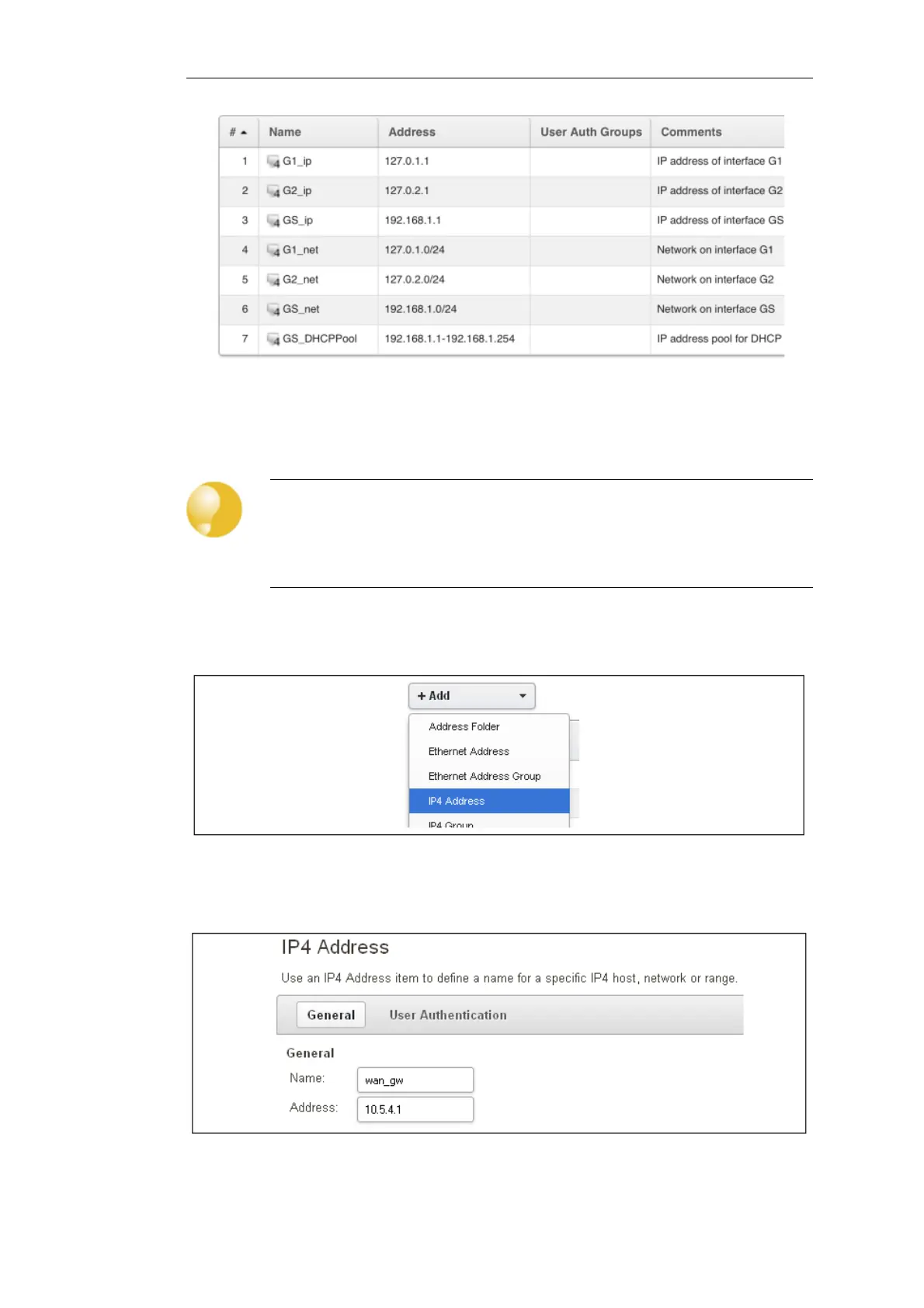
On initial startup, two IPv4 address objects are created automatically for each interface detected
by cOS Core. One IPv4 address object is named by combining the physical interface name with
the suffix "_ip" and this is used for the IPv4 address assigned to that interface. The other address
object is named by combining the interface name with the suffix "_net" and this is the network to
which the interface belongs.
Tip: Creating address book folders
New folders can be created when needed and provide a convenient way to group
together related IP address objects. The folder name can be chosen to indicate the
folder's contents.
Now click the Add button at the top left of the list and choose the IP4 Address option to add a
new address to the folder.
Enter the details of the object into the properties fields for the IP4 Address object. Below, the IPv4
address 10.5.4.1 has been entered for the address object called wan_gw. This is the IP of the ISP's
router which acts as the gateway to the public Internet.
Click the OK button to save the values entered.
Chapter 4: cOS Core Configuration
41


 To Next Page