28 PL12EN-1001 2011-04 en03d441.fm, 07.04.2011
Programming
3
application. When using Copy function from the Basic Application Builder, all stages of the selected applica-
tion are copied. Multiple target applications may be specified by separating the application numbers with a
comma. Ranges could specified with minus, e.g. 2,10–15, 99…
3.3 Standard
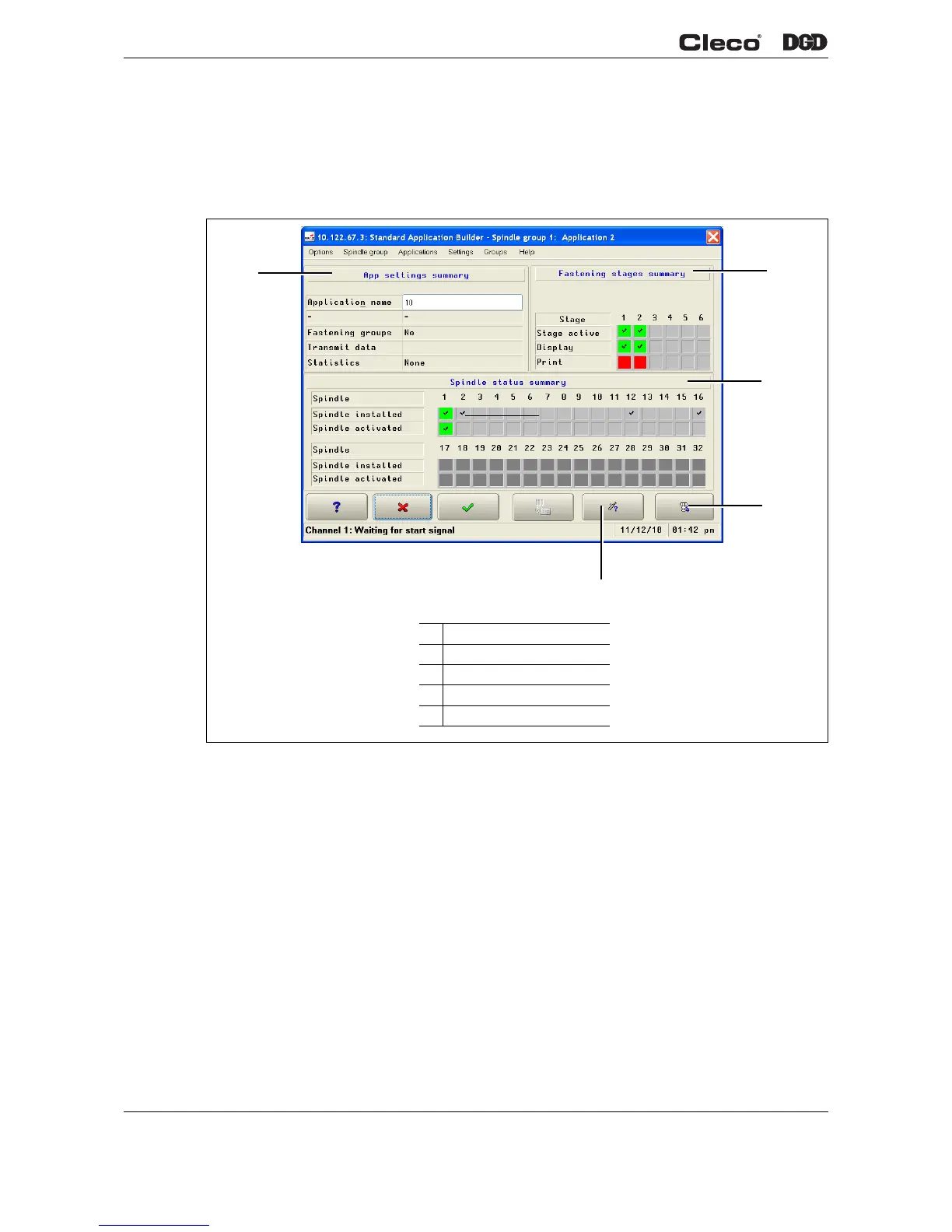
Fig. 3-2 Application 1
Standard Application Builder
The parameters for the rundowns are entered.
Settings > Channel activation
Activation of channels for the selected application.
Settings > Fastening stages
Activation and setup of fastening stages for the selected application.
Groups > Fastening groups
Setup of fastening groups (= time delay of channels) for more channel applications.
c01229en.png
1
2
3
5
4
1 Fastening stage summary
2 Spindle status summary
3 Fastening stages
4 Activate spindle
5 PS settings summary


 To Next Page