Clickfree C2N Home Backup Drive User Guide Browsing, Searching & Viewing My Files (HD)
4. In the
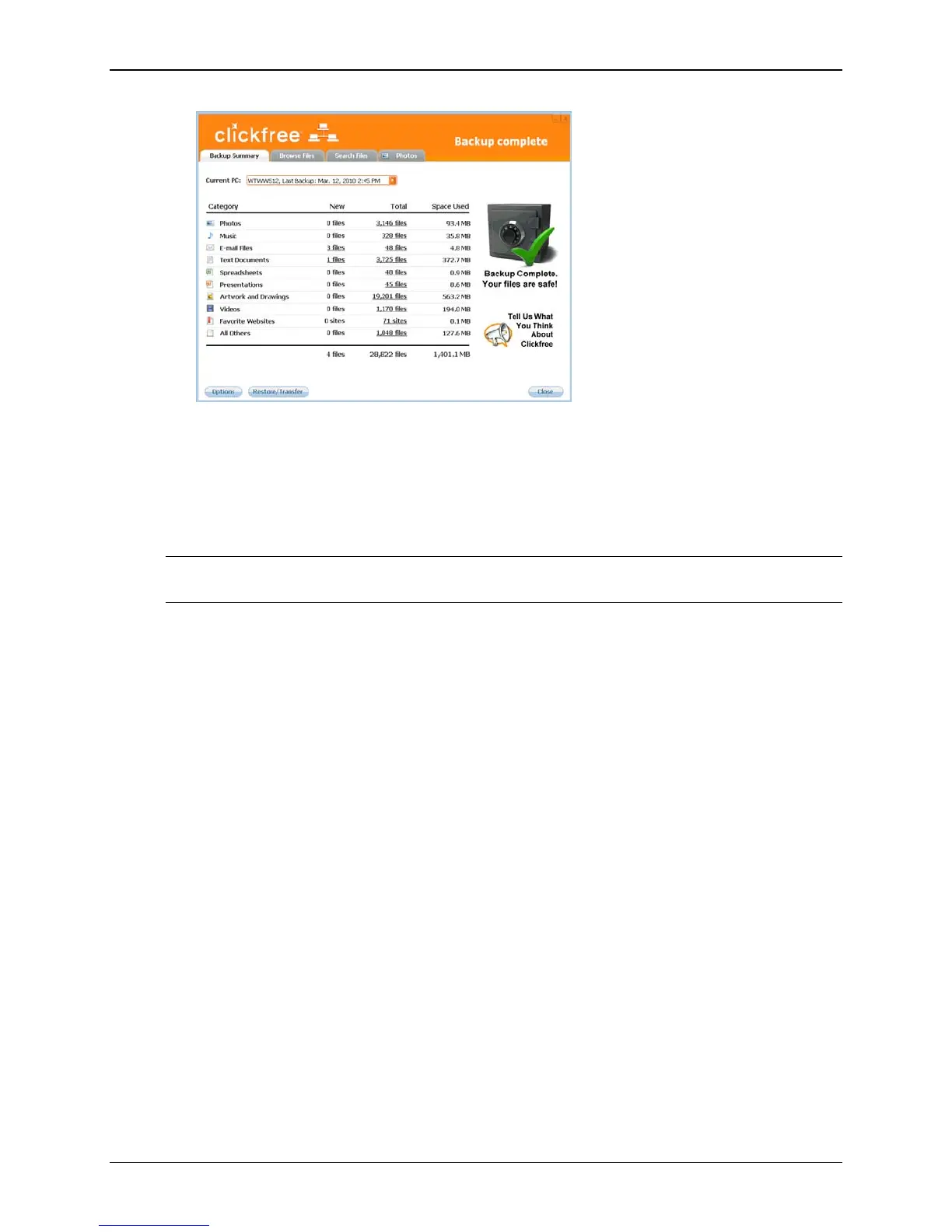
Current PC box select the name of the computer whose files you want to
search for/browse for/view.
5. Do one of the following:
• Click the name of a category , and follow ”How do I search for my backed-up
files” on page 49
Note: If the Category you click is Photos, follow “How do I view and use photos” on
page 44
• Click the Photos tab, and follow “How do I view and use photos” on page 44
• Click the
Browse Files tab, and follow “How do I browse my backed-up files” on
page 48
• Click the
Search Files tab, and follow ”How do I search for my backed-up files”
on page 49
HOW DO I VIEW AND USE PHOTOS?
1. On the Backup Summary screen, in the Current PC box, select the name of the
computer whose files you want to search for/browse for/view.
2. Click the
Photos tab
The photo viewer shows “thumbnails”, or miniature views of your photos and
videos.
Copyright © 2010 Storage Appliance Corporation. 44



 To Next Page