Clickfree C2N Home Backup Drive User Guide Advanced Topics (DVD)
HOW IS BACKUP DIFFERENT WHEN I HAVE MORE THAN ONE COMPUTER?
It makes no difference at all - just plug the C2N Home Backup Drive in to each computer
to back it up.
Each time you back up a computer for the first time, its name is added to the drop down
list of computers that you see on the
Backup Summary, Restore Summary, and Options
screens.
♦ To find the name of a computer:
1. Follow steps 1 to 2 of “How do I start using my Clickfree C2N Home Backup Drive
(DVD)?” on page 85.
2. When you see the countdown, click
Options.
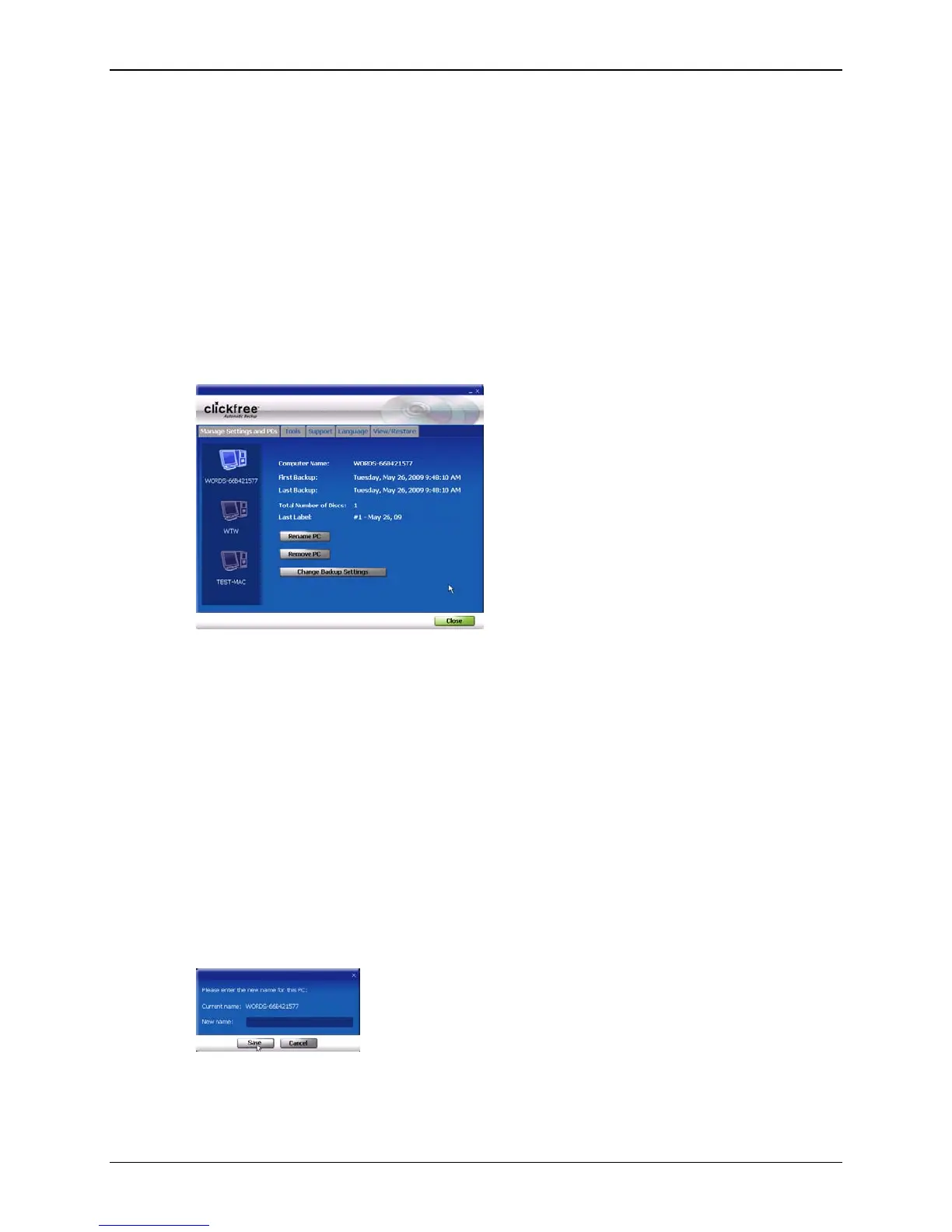
All of the computers that Clickfree has backed up to CD/DVD using your C2N
Home Backup Drive are shown at the left side of the screen, with the computer name
underneath.
When you click one of the computers, Clickfree shows:
• the computer name
• the date and time of first and last backup
• the number of disks used for the last backup
• the label you were asked to write on the last disk used
♦ To rename a computer:
On the Options screen:
1. Click the computer whose name you want to change.
2. Click
Rename PC.
3. Type the new name for the computer and click
Save.
Use only letters, numbers and hyphens for the computer name.
Copyright © 2010 Storage Appliance Corporation. 121



 To Next Page