Chapter 4: Setup and verification
System app 29
44444
Setup and verification
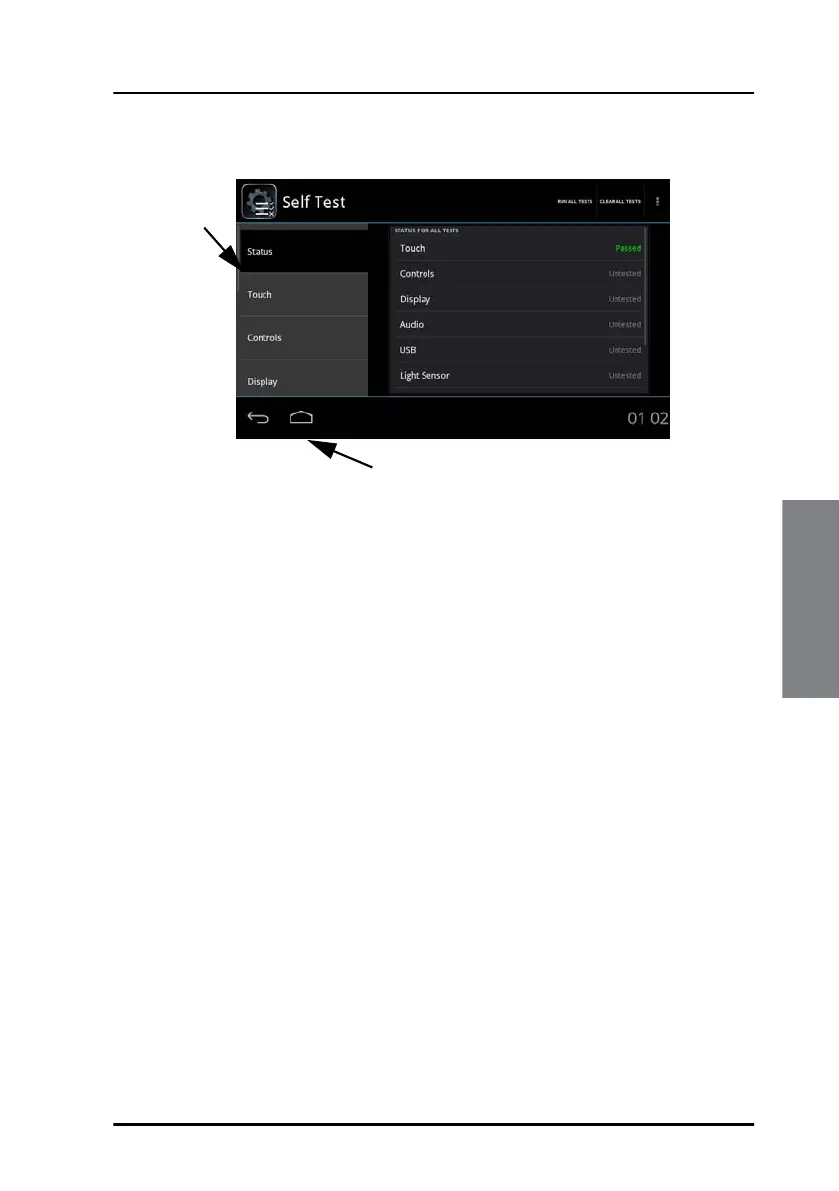
2. The self test status page is displayed.
You can test the following parts and functions:
• Touch - the touch screen
• Controls - power button and dim/volume knob
• Display - pixel and colour check
• Audio - test of microphone and loudspeaker
• USB - test of USB connection
• Light sensor
• Alarm output - test of connection to connected alarm systems
• NMEA (can be used to display received NMEA)
• LAN (can be used to display received LWE)
Further details for each test are shown on the screen for the individual
test.
3. To run all tests, tap Run all tests, located in the upper right corner.
To run one of the tests, tap the test and follow the instructions on the
screen.
4. To leave the self test tap the home icon.
Tap an
item to
start the
test.
Slide the
list to
display
further
items.
Tap to go to the home screen.
Test result
of
individual
tests


 To Next Page